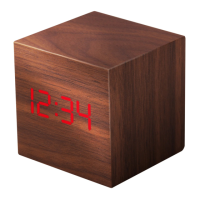
This document describes the Liquid Ears LEGACR Night Light Alarm Clock.
Function Description
The LEGACR is a night light and alarm clock designed for indoor use. It features a digital clock display, an integrated night light with dimming capabilities, and an alarm function with snooze. The device can display time in either 12-hour or 24-hour format and includes a date display (year-month-day). It also incorporates a light sensor to automatically adjust display brightness and a power-saving mode to conserve battery.
Important Technical Specifications
- Rated working voltage: DC5V
- Rated working current: 700mA
- Product rated power: 3.5W
- Power supply mode: Built-in rechargeable lithium battery or external DC 5V power
- LED colour temperature: 4000K
Usage Features
Charging:
To charge the product, connect the supplied USB cable to a power source. The indicator light will turn red during charging and turn off when fully charged. If the product's power is low, "Lo" will flash on the display, indicating it needs to be charged to prevent the clock from resetting due to low battery.
Toggle Switch Functions (located on the bottom):
- "OFF": The night light is off, and the clock enters standby mode.
- "ON": The display screen is on, and all functions are operable.
- "PS" (Power Saving Mode): The display screen is off and enters power-saving mode.
Night Light Operation (using the
button):
- Touch: Turns the night light ON/OFF.
- Touch and Hold: Activates stepless dimming for the night light.
- In Power Saving Mode:
- A single touch wakes the display, which automatically turns off after 30 seconds.
- Touch twice to illuminate the night light.
- Touch once more to turn off the night light.
- The clock remembers the last brightness setting when turned on.
Mode Button (M):
- Press: Cycles through the "year-month day-time" display.
- Press and Hold: Enters sleep mode. The light flashes twice, and the night light slowly dims until it is off (takes approximately 30 minutes).
Setting Button (S):
- Press: Enters alarm setting.
- Press and Hold for 2 seconds: Enters date/time setting.
Up Button (▲):
- When setting time, date, or alarm: Press to add value step by step. Press and hold to add value quickly.
- Press and Hold for 2 seconds: Switches between 12/24 hours display. Press and hold again for 2 seconds to confirm the selection.
- In time display state (for Hours system setting): Press and hold to enter the hours system setting.
Down Button (V):
- When setting time, date, or alarm: Press to decrease value step by step. Press and hold to decrease value quickly.
- In hours system setting: Press to switch between 12h / 24h hours system.
Date / Time Setting:
- Press and hold the "S" button for 2 seconds until you hear a "tick" sound and "Year" flashes.
- Adjust the year using the "▲" and "V" buttons.
- Press the "S" button to enter "month" setting, then repeat for "day-hour-minute".
- After setting the minute, press the "S" button to exit.
- If no operation occurs for 10 seconds during setting, the system will exit.
Alarm Setting:
- Press the "S" button once to display "oFR1" (continue pressing to select "oFR2", "oFR3"). "R1", "R2", "R3" represent the 3 alarms, and "oF" indicates the alarm clock is off.
- Press the "▲" button to turn on the alarm; "onR1" will be displayed.
- Press and hold the "S" button for 2 seconds until you hear a "tick" sound to enter alarm clock setting.
- Set the "Hour" using the "▲" and "V" buttons.
- Press the "S" button again to switch to the "minute" setting.
- Press the "S" button to exit after the time is set.
Alarm Ringing:
- When the alarm rings, touch any button to turn it off.
- If no action is taken, the alarm lasts for 1 minute and automatically enters snooze mode for 9 minutes.
- Press any button to turn off snooze.
- After 9 minutes, the alarm will sound again. This cycle repeats 3 times, after which the alarm turns off automatically.
Hours System Setting (12h/24h):
- The default is a 24-hour system.
- In the time display state, press and hold the "▲" button to enter the hours system setting.
- Press the "V" button to switch between the 12h / 24h hours system.
Maintenance Features
- Indoor Use Only: This product is designed exclusively for indoor environments.
- Power Switch: If the device will not be used for an extended period, switch the power switch to the "OFF" position to conserve battery and prevent potential issues.

 Need help?
 General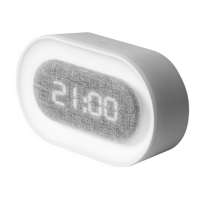

 To Next Page