page 7
It is recommended that you test fan before finalizing
installation. Restore power from circuit box and light
switch (if applicable). Test fan speeds with the pull
chain labeled FAN. Start at the OFF position (no blade
movement). First pull will set the fan to HI. Second
pull will set the fan to MEDIUM. Third pull will set the
fan to LOW. Fourth pull will again set the fan to the
OFF setting. Test light with the pull chain labeled
LIGHT. If fan and/or light do (does) not function,
please refer to "Troubleshooting" section to solve any
issues before contacting Customer Service.
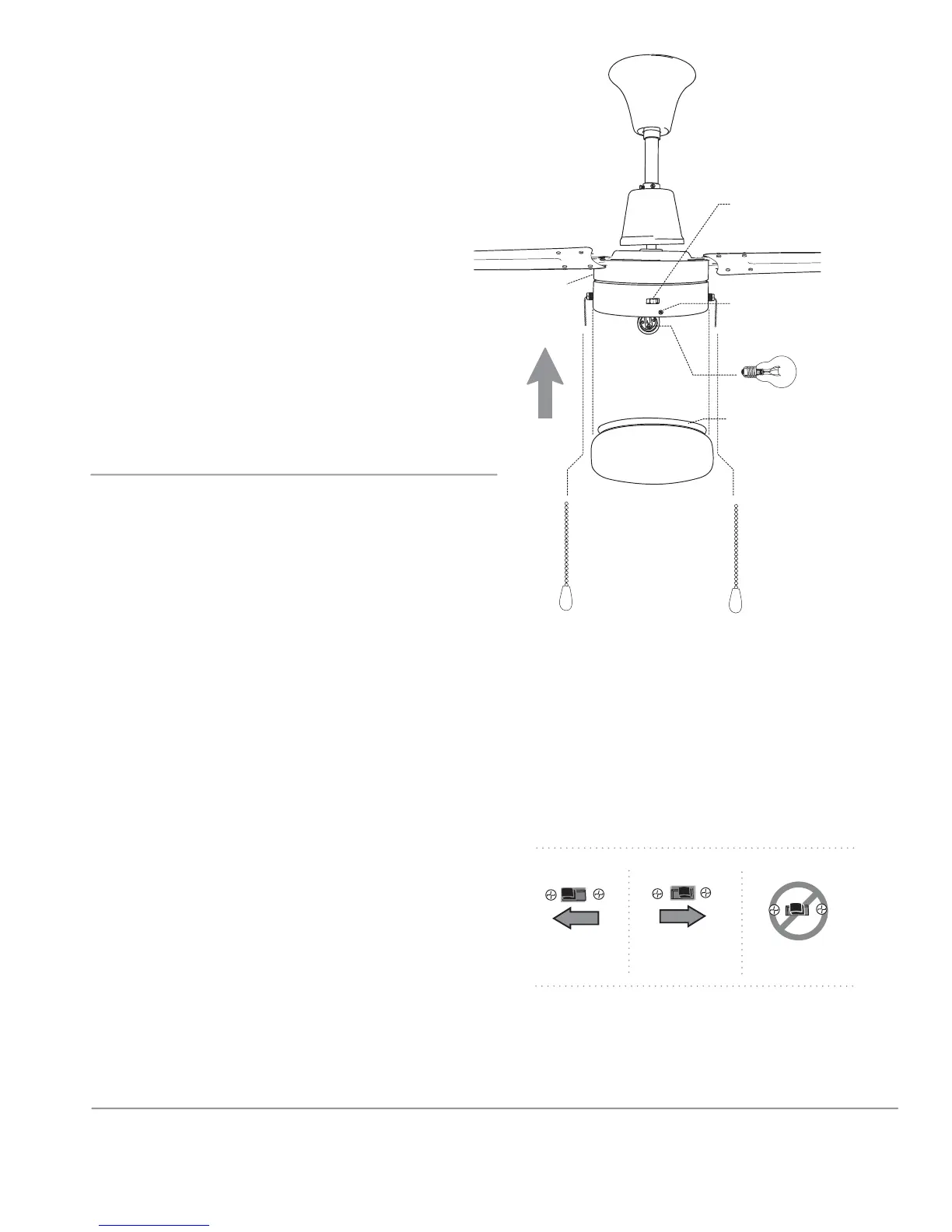
Turn fan completely off before moving the reverse
switch. Set reverse switch to recirculate air
depending on the season:
- LEFT position in summer (diagram 1)
- RIGHT position in winter (diagram 2)
A ceiling fan will allow you to raise your thermostat
setting in summer and lower your thermostat setting
in winter without feeling a difference in your
comfort.
Important: Reverse switch must be set either
completely to the LEFT or completely to the RIGHT for
fan to function. If the reverse switch is set in the
middle position (diagram 3), fan will not operate.
10. Testing Your Fan.
glass shade
pull chain
extensions
rubber ring
thumbscrew
9. Light Kit Assembly.
Install 1 candelabra base 60 watt max. bulb
(included).
Important: When replacing bulb, please
allow bulb and glass shade to cool before
touching.
Partially loosen 3 thumbscrews at bottom of
motor housing and raise glass shade to
motor housing. Secure glass shade with
thumbscrews. Be sure thumbscrews make
contact with rubber ring on glass shade, but
do not overtighten thumbscrews as glass may
crack or break.
Attach pull chain extensions supplied or
custom pull chain extensions (sold
separately) to the end of the pull chains.
reverse switch
bulb
motor
housing
diagram 1 diagram 2 diagram 3


 To Next Page