EN
Step2 Power on the camera, and make sure your mobile phone is already
connected to WiFi (only 2.4Ghz WiFi is supported)
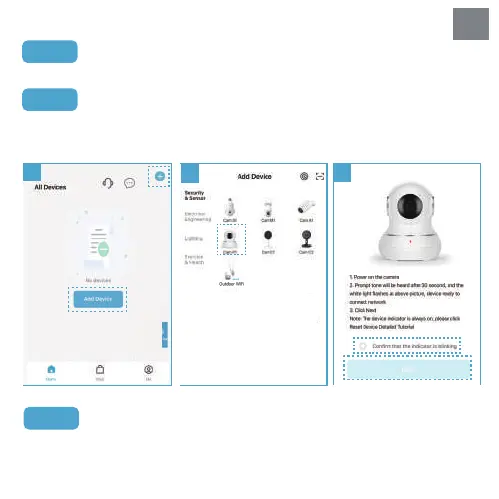
Step3 Open the "Littlelf Smart" APP, click "+" or "Add Device" button on the home
page (Picture 1); Then click "Cam P1" (Picture 2) , please check and confirm the
camera status then click " Next" (Picture 3).
Step4 Align the QR code on the phone screen with the camera lens (at a
distance of 15-20cm), and upon hearing the “Scan QR code successfully”, click
"Hear the beep" (refer to Picture 4).
1
2
3
2


 To Next Page