EasyManua.ls Logo

Little Tikes YouDrive Flex Tracks - User Manual

Little Tikes YouDrive Flex Tracks
2 pages
Print Icon
To Next Page IconTo Next Page
Loading...
SKUs: 649301, 649318
AGES 3+ YEARS
ADULT BATTERY INSTALLATION REQUIRED
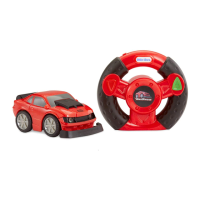
A. 1 Vehicle
B. 1 Remote Control
C. 50 Track Pieces
CONTENTS
TM
EACH SOLD SEPARATELY
A.
A.
B. B.
1
Before beginning, an adult must install fresh alkaline batteries in the vehicle and remote control. Here’s how:
1. Using a Phillips screwdriver (not included), remove the screws and battery compartment covers located
under the vehicle and on the back of the remote control.
2. Install two (2) fresh 1.5V AAA (LR03) alkaline batteries (not included) in the vehicle and remote control,
making sure the (+) and (-) ends face the proper direction as indicated inside the battery compartment.
3. Replace the compartment covers and tighten the screws.
BATTERY INSTALLATION
VEHICLE
REMOTE CONTROL
1.5V AAA/LR03
1.5V AAA/LR03
2 x AAA Batteries
Illustrations are for reference only. Styles may vary from actual contents.
649301 649318
C. C.
4
‘Let’s care for the environment!’
The wheelie bin symbol indicates that the product must not be disposed of with other household waste. Please use designated
collection points or recycling facilities when disposing of the item. Do not treat old batteries as household waste. Take them to a
designated recycling facility.
• Use only size AAA (LR03) alkaline batteries (4 required).
• Charging of rechargeable batteries should only be done under adult supervision.
• Remove rechargeable batteries from the product before recharging.
• Do not mix old and new batteries.
• Do not mix alkaline, standard (carbon-zinc), or rechargeable batteries.
• Be sure to insert the batteries correctly and follow the toy and battery manufacturer’s instruction.
• Always remove exhausted or dead batteries from the product.
• Dispose of dead batteries properly: do not burn or bury them.
• Do not attempt to recharge non-rechargeable batteries.
• Avoid short-circuiting battery terminals.
• Remove batteries before placing the unit into storage for a prolonged period of time.
BATTERY SAFETY INFORMATION
FCC COMPLIANCE
NOTE: This equipment has been tested and found to comply with the limits for a Class B digital device, pursuant to Part 15 of the
FCC Rules. These limits are designed to provide reasonable protection against harmful interference in a residential installation. This
equipment generates, uses and can radiate radio frequency energy and, if not installed and used in accordance with the
instructions, may cause harmful interference to radio communications. However, there is no guarantee that interference will not
occur in a particular installation. If this equipment does cause harmful interference to radio or television reception, which can be
determined by turning the equipment o and on, the user is encouraged to try to correct the interference by one or more of the
following measures:
• Reorient or relocate the receiving antenna.
• Increase the separation between the equipment and receiver.
• Connect the equipment into an outlet on a circuit dierent from that to which the receiver is connected.
• Consult the dealer or an experienced radio/TV technician for help.
This device complies with Part 15 of the FCC Rules. Operation is subject to the following two conditions: (1) This device may not
cause harmful interference, and (2) this device must accept any interference received, including interference that may cause
undesired operation.
Caution: Modications not authorized by the manufacturer may void users authority to operate this device.
This device contains licence-exempt transmitter(s)/receiver(s) that comply with Innovation, Science and Economic
Development Canadas licence-exempt RSS(s). Operation is subject to the following two conditions: (1) This device may not cause
interference. (2) This device must accept any interference, including interference that may cause undesired operation of the device.
CAN ICES-3 (B)/NMB-3(B).
Please keep this manual as it contains important information.
MGA Entertainment (Netherlands) B.V.
Klipperaak 201, 2411 ND Bodergraven, NL
Tel: +31 (0) 172-758 038
E-mail: klantenservice@mgae.com
© The Little Tikes Company, an MGA Entertainment company.
LITTLE TIKES® is a trademark of Little Tikes in the U.S. and
other countries. All logos, names, characters, likenesses,
images, slogan, and packaging appearance are the property
of Little Tikes.
MGA Entertainment UK Ltd
50 Presley Way
Crownhill
Milton Keynes
MK8 0ES
Bucks, UK
0800 521 558
Printed in China
1118-1-E/INT
Little Tikes Consumer Service
2180 Barlow Road
Hudson, Ohio 44236 U.S.A.
1-800-321-0183
www.littletikes.com
www.littletikes.co.uk
Visit our website at
www.littletikes.com
to register your product and
to enter our sweepstakes.
(No purchase necessary)
OI
1.5V AAA/LR03
1.5V AAA/LR03
2 x AAA Batteries
Question and Answer IconNeed help?

Do you have a question about the Little Tikes YouDrive Flex Tracks and is the answer not in the manual?

Summary

Battery Safety Information

FCC Compliance

Battery Installation

Build It Your Way

Driving Lessons

Test Your Skills

Pairing Vehicle and Remote Control

Adjusting the Alignment

Important Information

Limited Warranty

Overview

This document describes the Little Tikes YouDrive toy, a remote-controlled vehicle system designed for children aged 3 years and older. The product is available in two SKUs, 649301 and 649318, each sold separately, and requires adult supervision for battery installation.

The YouDrive system consists of three main components: a vehicle, a remote control, and a set of track pieces. The core function of the toy is to allow children to build custom tracks and then drive a remote-controlled vehicle along them, enhancing their motor skills and problem-solving abilities.

Function Description

The primary function of the Little Tikes YouDrive is to provide an interactive driving experience. Users can assemble various track configurations and then control a small vehicle using a handheld remote.

  • Track Building: The toy includes 50 track pieces that can be connected to form different layouts. The pieces snap together by inserting a peg into an opening, and alternating colors can be used for a realistic track appearance. To disassemble, users firmly hold both pieces, push in on the peg with their thumb, and pull the pieces apart. A tip is provided for hard-to-remove pieces, suggesting pushing on the peg, turning one piece inward, and then pulling apart. The manual encourages users to practice building tracks following provided diagrams for "Beginner," "Intermediate," and "Expert" levels, which helps strengthen their skills.

  • Vehicle Control: The vehicle is controlled via a remote control. Before operation, the vehicle and remote control must be paired. This involves moving the switch under the vehicle from "OFF" (O) to "ON" (I), which causes the vehicle's front lights to blink. Then, the switch on top of the remote control is moved from "OFF" (O) to "ON" (I). Pairing is complete when the vehicle's lights stop blinking.

    Once paired, the vehicle can be driven using the remote control:

    • Pressing and holding the right button makes the vehicle go forward.
    • Pressing and holding the left button makes the vehicle go in reverse.
    • Tilting the wheel to the left while holding either the left or right button will make the vehicle go forward or reverse to the left.
    • Tilting the wheel to the right while holding either the left or right button will make the vehicle go forward or reverse to the right.
  • Alignment Adjustment: If the vehicle tends to move to one side, an alignment switch located under the vehicle can be adjusted to the left or right to correct its trajectory.

Usage Features

The YouDrive toy is designed for engaging play with several important usage considerations to ensure safety and optimal performance.

  • Play Environment: For best results, the track should be built on a hard, flat surface in a large, open area. It is recommended to drive the vehicle on hardwood flooring. Crucially, the toy should not be played with in the street or areas with vehicular traffic or heavy pedestrian activity. Users should avoid standing on, sitting on, or throwing the vehicle, remote control, or track pieces, as this can lead to injury or irreparable damage. The vehicle should not be run into furniture, walls, pets, or people, and driving through water or mud should be avoided.

  • Safety Precautions: Users should keep long hair and loose apparel, such as shoestrings, away from the rotating wheels of the vehicle. The remote control should be kept within range to operate the vehicle correctly. The toy produces flashes that may trigger epilepsy in sensitized individuals, so users should be aware of this.

  • Battery Management: To conserve battery power, both the vehicle and remote control should be turned off when not in use. If the vehicle stops working or does not operate as it should, users are advised to turn off both the remote and vehicle, pair them again, and if the problem persists, replace the batteries. The light on some vehicles may continue to flash even after pairing during play.

Maintenance Features

Proper maintenance ensures the longevity and safe operation of the YouDrive toy.

  • Battery Installation and Safety: The toy requires four "AAA" (LR03) alkaline batteries (two for the vehicle and two for the remote control), which must be installed by an adult. A Phillips screwdriver (not included) is needed to remove the battery compartment covers. Batteries should be inserted with the correct polarity, as indicated inside the compartment.

    • Only "AAA" (LR03) alkaline batteries should be used.
    • Rechargeable batteries should only be charged under adult supervision and removed from the product before recharging.
    • Do not mix old and new batteries, or alkaline, standard (carbon-zinc), or rechargeable batteries.
    • Batteries must be inserted correctly according to the manufacturer's instructions.
    • Exhausted or dead batteries should always be removed from the product and disposed of properly; they should not be burned or buried.
    • Non-rechargeable batteries should not be recharged.
    • Avoid short-circuiting battery terminals.
    • Batteries should be removed if the unit is to be stored for a prolonged period.
  • Cleaning: The unit can be cleaned with a damp cloth. It is important to keep moisture away from the battery compartment to prevent damage.

  • Disposal: The wheelie bin symbol on the product indicates that it should not be disposed of with other household waste. Users are encouraged to use designated collection points or recycling facilities for disposal. Old batteries should also be taken to a designated recycling facility.

This comprehensive guide ensures users can safely and effectively enjoy the Little Tikes YouDrive toy, promoting fun and skill development through interactive play.

Little Tikes YouDrive Flex Tracks Specifications

General IconGeneral
BrandLittle Tikes
Product NameYouDrive Flex Tracks
CategoryToy
MaterialPlastic
Manufacturer recommended age3 years and up
ManufacturerLittle Tikes
Recommended Age3+ years
ColorMulti-colored

Related product manuals