Choosing Emergency Contacts
6
Outgoing Call to Contact 1
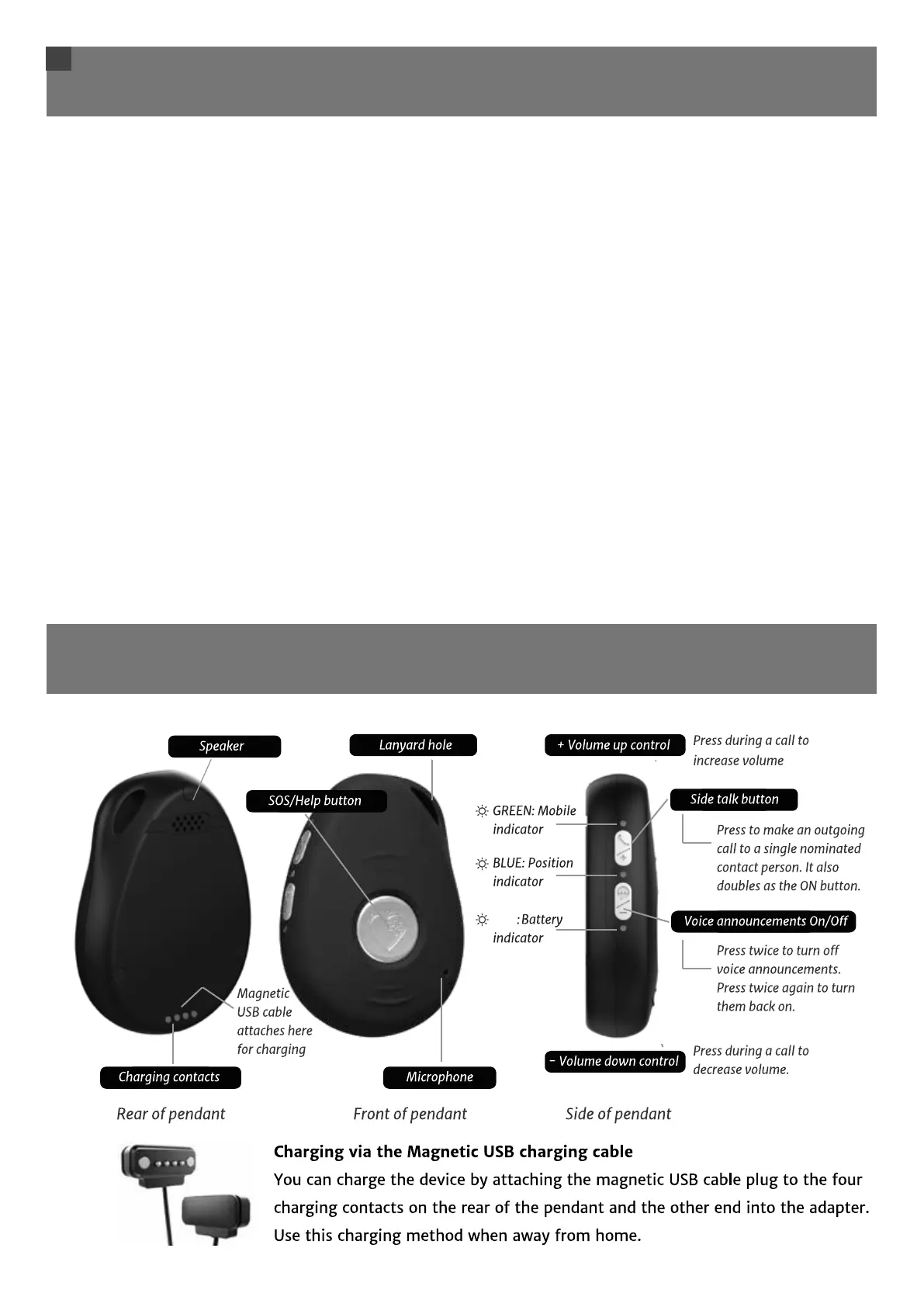
Side talk button feature (Speed Dial)
The device has a side talk button, also known as a speed dial. When pressed till it vibrates, it makes an
outgoing call to a single emergency contact (contact 1 by default). A voice will announce “Calling
contact number 1”. You will then be able to have a hands-free conversation with that nominated
contact person. Often, the side talk contact is someone well known to the wearer who lives close by
and is available to offer assistance at most times of the day. You may wish to consider this feature
when choosing your emergency contacts and the order you place them in the call sequence.
You can change or remove the order of your contact numbers at any time by sending simple text
commands from a mobile phone to your device. For more information see pg. 15 'Changing Your
Settings'.
Please note: Live Life Alarms does not take responsibility for the contact numbers you have
chosen. The choice of numbers is completely up to the user of the Live Life alarm.
Side talk button limit
Voice calls on this button are limited to three minutes in length. Family and friends can call you back
and talk to you as long as they want to.
Basic Operation of Alarm
RED



 To Next Page