EasyManua.ls Logo

LiveLife 4GX - User Manual

Default Icon
20 pages
Print Icon
To Next Page IconTo Next Page
Loading...
LiveLife
PERSONAL MOBILE ALARMS
www.livelifealarms.com.au
©2021. Live Life Alarms. All rights reserved.
R
User Manual
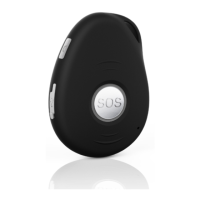
The 4GX Live Life Mobile Alarm with GPS & Fall Detection
2021
4G
X
5
Using the GPS feature
Using the fall detection feature
Monthly Alarm Health Check
Changing your settings
Change time zone
Mobile network setup & SIM card
Product use Terms & Conditions
Warranty, Returns/Refunds & Disclaimer
Other information
Quick Start Guide
Important Introduction
Emergency Services Contact Info
Choosing emergency contacts
Basic operation of alarm
Alarm: What do the lights mean?
Maintaining your device
Home charging station
Alarm battery & recharging
1-3
4
5
5-6
6-7
8
8
9-11
11-12
12-13
13-14
16
17
18
19
14
15
16

Other manuals for LiveLife 4GX

Question and Answer IconNeed help?

Do you have a question about the LiveLife 4GX and is the answer not in the manual?

Summary

Quick Start Guide

Charging your pendant

Instructions on how to charge the device using the home station or USB cable.

Turning on;off and finding your location

Guide to powering the device on/off and its location tracking methods.

How to make changes to emergency contacts

Instructions on modifying emergency contact details via text commands.

Important Introduction

Included in package

Lists all items included with the Live Life alarm package.

Telstra Mobile connection

Explains reliance on the Telstra network for alarm functions.

Emergency Services Contact Information

NSW

Contact details for NSW Ambulance Service administration offices.

VICTORIA

Contact number for Victoria Ambulance Service.

Choosing Emergency Contacts

How many emergency contacts to use

Guidance on the optimal number of contacts for quick help.

Side talk button feature (Speed Dial)

Explains the side talk button's function for speed dial calls.

Basic Operation of Alarm

Outgoing Call to Contact 1

How to use the side talk button for speed dial calls.

Charging via the Magnetic USB charging cable

Instructions for charging the device using the magnetic USB cable.

Alarm: What do the lights mean?

The Green LED

Explanation of the green LED indicator for network connection status.

The Red LED

Explanation of the red LED indicator for battery status and low battery warnings.

Maintaining your device

Dry device completely

Instructions for cleaning and drying the device before charging.

Showerproof

Information on the device's water resistance and usage in wet conditions.

Home Charging Station: Features

Introduction to your Home Charging Station

Overview of the charging station's functions and communication.

Home location beacon

How the station acts as a home beacon for location services.

Alarm Battery & Recharging

Charging your alarm

Instructions on how to charge the alarm unit.

Low battery warning

Details on low battery notifications and warnings.

Using the GPS feature

How the GPS works

Explanation of the GPS technology and its role in location tracking.

Getting a GPS fix

Steps to obtain an initial GPS fix and factors affecting it.

Using the fall detection feature

Designed for serious falls

Purpose and design of the fall detection feature for serious falls.

How it works

Algorithm used by the device to detect falls.

Monthly alarm health check

Check that the green light on your alarm is flashing

Verify green LED for mobile network connectivity.

Click or press down the SOS button

Test the SOS button functionality for emergency alerts.

Changing your settings

Using text commands

Overview of using text commands to modify device settings.

How to change emergency contacts

Instructions for adding, removing, or reordering emergency contacts.

Change time zone for relocation or daylight saving

Example 1

How to adjust the time zone for daylight savings in NSW.

Example 2

How to revert the time zone after daylight savings ends in NSW.

Mobile network setup & SIM card

Telstra network

Reliance on the Telstra network for device operation.

SIM card installation

Details on the pre-installed SIM card being ready to use.

Product use Terms & Conditions

Alerting people in an emergency situation

Explains the device's role in alerting contacts during emergencies.

Limitations of device: GPS Functions disclaimer

Disclaimer about the accuracy and limitations of GPS functions.

Warranty, Returns;Refunds & Disclaimer

Warranty

Details the 12-month warranty period and terms for defects.

How to claim against your warranty

Steps to follow for making a warranty claim.

Specifications

Operating temperature

Specifies the working and storage temperature ranges for the device.

Battery life

Information on the device's battery duration with normal use.

Other Information

Lifetime Support

Information on available lifetime support and contact details.

Technical Support videos

Links to helpful videos for common support issues.

Overview

The device is a 4GX Live Life Mobile Alarm with GPS & Fall Detection, designed to provide personal safety and emergency assistance. It operates on mobile networks (Telstra or Optus 4GX, 4G, 3G) and uses GPS, Wi-Fi, and Bluetooth 5 for location tracking.

Function Description:

The primary function of the device is to alert emergency contacts in situations of distress or a detected fall. When the SOS/Help button is pressed (or a fall is detected), the alarm sends help text messages with the wearer's location (on Google Maps) to pre-programmed emergency contacts and then initiates a sequence of voice calls to these contacts. The device is designed for emergency use, not as a general communication device. It has a "Fair Use Policy" for voice and text usage.

Important Technical Specifications:

  • Operating Temperature: 20°C to +80°C (working), 30°C to +70°C (storage).
  • Battery Life: 4 to 6 days with normal use.
  • Charging Voltage: 5V DC.
  • Home Charging Station Battery: 3.7V, 800mAH lithium backup battery (lasts up to 8 hours).
  • Bluetooth: BT5.0 LE.
  • Location Tracking: Indoor via Bluetooth/Wi-Fi/GPS/LBS; Outdoor via GPS/GLONASS/Wi-Fi.
  • GPS Technology: U-blox M8130, AGPS support, 2.5-meter accuracy.
  • GPS Fix Time: Cold start ~26 secs, warm ~2 secs, hot start ~1 sec.
  • Wi-Fi: 802.11 b/g/b, 2.4G.
  • SIM Card: Nano (Telstra SIM card pre-installed and activated for 1 year unlimited emergency use).
  • Sensors: 3D accelerometer, motion, and vibration sensor.
  • Waterproof Rating: IP67 (showerproof, not for submersion).
  • Dimensions: 61mm x 44mm.
  • Weight: 42g.
  • Network Bands:
    • Optus 4GX: B3 (1800MHz), B8 (900MHz), B28 (700MHz)
    • Optus 3G Rollback: B9 (900MHz), B1 (2100MHz)
    • Telstra 4GX: B3 (1800MHz), B8 (900MHz), B28 (700MHz)
    • Telstra 3G Rollback: B5 (850MHz)

Usage Features:

  • Activation: The device is typically pre-programmed and ready to use out of the box. A family test run is recommended.
  • Turning On/Off:
    • On: Press the grey, upper side button until it vibrates, or place it in the charging station/connect the magnetic USB cable.
    • Off: Press the SOS button and the upper grey side button together until it vibrates, or send the text command 'OFF'.
  • Emergency Activation:
    • SOS/Help Button: Press for 1 second until it vibrates. It announces "Your mobile alarm has been activated. Click the SOS button to cancel."
    • Cancellation: Click the SOS button within 10 seconds to cancel text messages and calls.
    • Help Text Messages: Sent to all emergency contacts (mobile numbers receive location on Google Maps).
    • Help Call Sequence: Calls contacts in chosen order for 10 seconds each, avoiding voicemail. The first person to answer can talk hands-free for up to 3 minutes. The sequence loops and tries each contact twice by default.
  • Fall Detection:
    • Functionality: Designed to detect serious falls (likely to result in unconsciousness) by measuring speed and angle of impact.
    • Alerts: If a fall is detected, it vibrates and announces "Fall has been detected, click the SOS/Heart button to cancel the fall alert." If not cancelled, it sends 'Fall down alert!' text messages with location and initiates voice calls.
    • Limitations: May not detect falls from less than 1 meter or if the device swings during a fall. False alerts can occur.
    • On/Off: Can be turned ON/OFF via text commands (FL1,5,1 for ON with sensitivity 5,1; FL0 for OFF).
  • Location Tracking:
    • GPS: Uses GPS for outdoor location, accurate to 2.5 meters. Requires line-of-sight to satellites.
    • Bluetooth/Wi-Fi: Used for indoor location or when GPS is unavailable. The Home Charging Station acts as a Bluetooth beacon for home location.
    • "Find Me" Function: Send text command 'FINDME' to make the device announce "I am your Live Life alarm. I am over here."
    • Location Request: Send text command 'LOC' to receive a text reply with the device's location on Google Maps.
  • Side Talk Button (Speed Dial):
    • Function: Press to make an outgoing call to a single emergency contact (Contact 1 by default).
    • Call Duration: Limited to 3 minutes.
    • Customization: Can be assigned to any of the six contacts via text command (e.g., 'X2' for contact 2).
  • Voice Announcements: Can be turned On/Off by pressing the voice announcements button twice on the side of the pendant or on the Home Charging Station.
  • Pendant Calls: Anyone knowing the pendant's mobile number can call it; it will answer automatically in hands-free speakerphone mode.
  • Emergency Contact Management:
    • Changing Numbers: Send text commands (e.g., 'A1,1,1,0400123456' for Contact 1 with text and voice calls).
    • Removing Contacts: Send text command 'REMOVEAX' (X=contact number).
    • Checking Contacts: Send text command 'A?'.
    • Including '000': Can be included as a contact, often last in the sequence.
  • Wearer's Name in Help Text: Can be changed via text command (e.g., 'PREFIX1,MUM').
  • Time Zone: Pre-programmed. Can be changed for daylight savings or relocation via text commands (e.g., 'TZ+11').
  • Power Saving Mode: GPS goes to sleep after 10 seconds of no movement to conserve battery. Wakes up with movement.
  • Low Battery Warning: Voice announcement "Battery is low. Please recharge your battery" at ~20% charge, red LED blinks. Text reminder to Contact 1 at ~10% charge. Can be turned On/Off via text commands (LOW0 for OFF, LOW1,20 for ON at 20% charge).

Maintenance Features:

  • Charging:
    • Home Charging Station: Place the pendant with the SOS button facing forward. It will vibrate and announce "Your alarm is charging."
    • Magnetic USB Cable: Attach to the four charging pins on the rear of the pendant.
    • Recharge Time: Approximately 45 minutes for a full charge from very low/flat.
    • Full Charge Indicator: Red light on the side of the alarm will be steady on.
  • Device Care:
    • Dust Proof: Can be used in dusty environments.
    • Drying: Ensure the device is completely dry before recharging. Wipe with the supplied microsuede cloth.
    • Cleaning: Do not use cleaners or harsh chemicals.
    • Water Exposure: Showerproof (IP67), but not for submersion in bath, swimming pool, spa, or ocean.
  • Home Charging Station Care:
    • Drying: Ensure completely dry before placing the device.
    • Cleaning: Wipe with the supplied microsuede cloth. Do not use cleaners or harsh chemicals.
    • Always On: Leave the charging station plugged in and turned on for optimal alarm battery life and fastest location in an emergency.
  • Monthly Health Check:
    • Check green light flashes quickly every 3 seconds (mobile network connection).
    • Ask a friend to call the alarm and answer hands-free.
    • Test SOS button (press for 1 second, then click again to cancel).
    • Check for obvious signs of damage and ensure brass charging discs are bright and shiny.
  • SIM Card: Pre-installed and activated. Do not remove screws or screw plugs to avoid voiding warranty for water ingress.
  • Moving Home: Contact Customer Support to update the programmed home address in the charging station.
  • Lifetime Support: Call 1800 936 774 for customer support.
  • Technical Support Videos: Available on www.livelifealarms.com.au/videos.
  • Downloadable Instructions: User manual available as PDF on www.livelifealarms.com.au/downloads.

LiveLife 4GX Specifications

General IconGeneral
BrandLiveLife
Model4GX
CategorySecurity System
LanguageEnglish

Related product manuals