Turning on/off and finding your location
TIP
The Home Charging Station has been programmed with the GPS location of your your home
address you supplied us with. Please leave the station at your home and plugged in at all times.
Quick Start Guide
2
MONITORING
4G
X
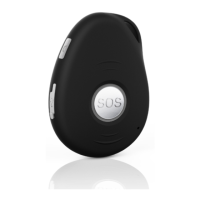
• To turn the device on, press the grey, upper side button till it vibrates. The LEDS will flash.
Alternatively you can turn it on automatically by placing it in the charging station or by connecting
the magnetic USB cable to the back.
• To turn the device off, click or press down the SOS button and the upper grey side button together
till the device vibrates and side LEDS go off. Or send the text command 'OFF' to the device from a
mobile phone.
• The device uses Bluetooth to find its location inside the home. Outside the home it uses GPS to find
its location.
How to make changes to emergency contacts
You can make changes to the emergency contacts and other settings by sending simple commands
to the mobile number of the pendant via text. To change any emergency contact number,
send these commands to it from a mobile phone:
Send
Person 1
Send
Person 2
Send
Person 3
Send
Person 4
Send
Person 5
Do not include spaces in any text command. Is not case sensitive. The pendant will respond to
each text command with a reply text to confirm the change. To check the list of contacts, send
this text command to the pendant: A?
A1,1,1,0400123456
A2,1,1,0400123456
A3,1,1,0400123456
A4,1,1,0400123456
A5,1,1,0400123456
A6,1,1,0400123456
Send
Person 6
Testing your device
We recommend you test your device when
you receive it to ensure it is operates
correctly. You can test it by pressing the
SOS button. Make sure your contacts know
in advance you are testing your device.
Your home location
We have programmed your Home
Charging Station with the home address you
supplied us with. If you have an issue with the
location shown in a text message, call Support
on 1800 936 774.



 To Next Page