Operation
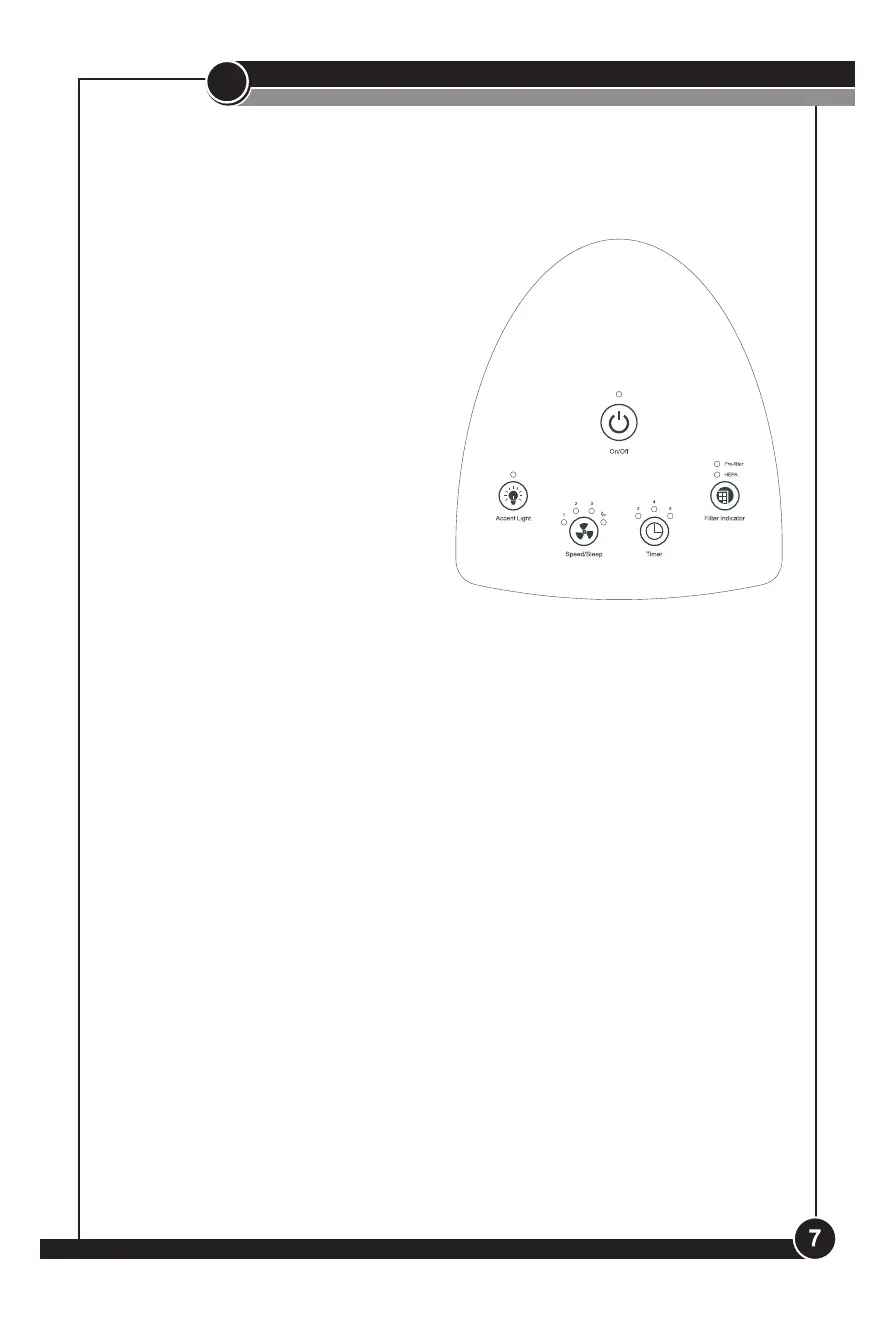
Control Panel Operation
Using the Controls:
1. Power: Press the On/O button
to turn air purier ON or OFF.
2. Accent Light: Press the Accent
Light button to turn the accent
light ON or OFF.
3. Speed/Sleep: Press the
Speed/Sleep button to select
Low, Medium, High or Sleep
Mode. Low provides the best
product sound. Medium oers
moderate cleaning. High provides
strong cleaning power. Sleep
Mode operates on Low until
mode is manually changed.
4. Timer: Press the Timer button to select from 2, 4, or 8 hour timer
settings.
5. Filter Indicator: Press the Filter Indicator button to reset once the
pre-lter and/or lter have been cleaned or replaced, depending on the
model purchased. See instructions on resetting the light below.
Resetting Filter Indicator:
Pre-Filter Indicator Light: After approximately 3 months of use (aver-
age of 12 hours daily use), the pre-lter indicator light will turn red and
icker. After pre-lter is cleaned or replaced, depending on the model
you purchased, press and hold the Filter Indicator button for 3 seconds.
The unit will beep 3 times to indicate reset.
HEPA Filter Indicator Light: After approximately 6 months of use
(average of 12 hours daily use), the HEPA lter indicator light will turn red
and icker. After lter is cleaned or replaced, depending on the model
you purchased, press and hold the Filter Indicator button for 3 seconds.
The unit will beep 3 times to indicate reset.
The air purier is operated by the digital controls located on the air
purier top. This manual covers several dierent models. The air purier
you have purchased may have some or all of the features listed.


 To Next Page