EasyManua.ls Logo

LMI Excel XR Series - User Manual

LMI Excel XR Series
22 pages
Print Icon
To Next Page IconTo Next Page
Loading...
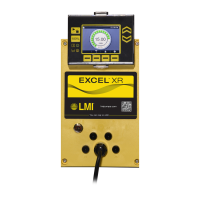
Excel
®
XR Series
Electronic Metering Pump
Modbus RTU
Manual
Manual No.: 55312
Revision
: 04
Rev. Date:
03/2020
Note:
For basic control features see manual 54630 and
enhanced
control features see manual
54772

Questions and Answers

  • B
    brownstephenAug 2, 2025
    What to do if LMI Water Pump slave not found?
    • R
      Robert SmithAug 2, 2025
      If the LMI Water Pump slave is not found, there might be several reasons. First, verify that the slave address on the pump's user interface matches the slave address on the master. Also, if the pump is the last slave on the bus, enable the internal line termination or use an external terminating resistor. Check that the wiring is correct according to Figure 4: Connector C Pin Diagram. Finally, ensure that the pump is powered on.
  • J
    James HamiltonAug 11, 2025
    Why LMI Water Pump does not start when commanded via Modbus?
    • J
      Jeffrey AlvaradoAug 12, 2025
      If the LMI Water Pump does not start when commanded via Modbus, it could be due to a couple of reasons. First, ensure that the homescreen is displayed on the pump. If not, check the pump display and press the X button to return to the homescreen. Alternatively, use Modbus Discrete Input 0x0017 to query whether the homescreen is displayed and set Modbus Coil 0x0005 to force the homescreen to be displayed. Secondly, the pump might not be in manual mode. If it's in an external mode, timed event, or timed cycle mode, it will only run if the external trigger is provided. Change the pump to manual mode using Modbus Coil 0x0006.
  • M
    Mr. Kevin LopezAug 22, 2025
    Why LMI Water Pump doesn't start when commanded via PROFIBUS?
    • E
      elliottdaltonAug 23, 2025
      If your LMI Water Pump doesn't start when commanded via PROFIBUS, here are a couple of things to investigate: 1. **Homescreen Display:** Check the pump display and press the X button to return to the homescreen. Alternatively, use Module 90 to query whether the homescreen is displayed and Module 0 to force the homescreen to be displayed. 2. **Pump Mode:** If the pump is in an external mode, a timed event, or a timed cycle mode, it will only run if the external trigger is provided (pulse, analog input, time of day). Change the pump to manual mode using Module 1.

Summary

Precautions

Protective Clothing

Essential protective gear, face shield, safety glasses, gloves for pump operation.

Electrical Safety and Connections

Proper grounding, GFCI use, and electrical connection safety.

System and Operational Safety

Covers flooding, pressure protection, and chemical concentration risks.

Local Operation

Modbus Communication Settings

Configuring slave address, bit rate, parity, stop bits, and line termination.

Modbus Software Definition

Supported Modbus RTU Functions

Lists Modbus function codes for reading and writing data.

Modbus Holding Register Addresses

Describes read/write holding registers for flow rate, time, RTC, and various modes.

Modbus Input Registers

Modbus Discrete Inputs

Modbus Alarm Discrete Inputs

Alarm Status Discrete Inputs

Reading discrete inputs for global, user, tank, system, motor, and signal alarms.

Troubleshooting

Slave Not Found Issues

Solutions for incorrect slave address, line termination, and wiring problems.

Pump Start-up Issues

Troubleshooting pump not starting via Modbus, including homescreen display and mode settings.

LMI Excel XR Series Specifications

General IconGeneral
BrandLMI
ModelExcel XR Series
CategoryWater Pump
LanguageEnglish

Related product manuals