The JM-C41 GPS Tracker (4G Version) is a versatile tracking device designed for various applications, including electric vehicles, motorcycles, and cars. It offers real-time location tracking, a range of alarm functions, and remote control capabilities, all managed through a dedicated mobile application and web platform.
Function Description:
The JM-C41 GPS Tracker provides comprehensive tracking and security features. Its core function is to provide accurate location data, utilizing GNSS (Global Navigation Satellite System) technology. The device supports 4G and 2G networks for communication, ensuring broad coverage.
Key functions include:
- Real-time Tracking: Continuously monitors and reports the device's location, accessible via the Lncoon tracking platform.
- Power Cut Off Alarm: Notifies the user if the device's power supply is interrupted. This alarm can be configured to send notifications via the platform, SMS, or calls.
- Overspeed Alarm: Triggers an alert if the vehicle exceeds a predefined speed limit. This feature helps in monitoring driving behavior and ensuring safety.
- Vibration Alarm: Detects vibrations and sends an alarm, useful for detecting unauthorized vehicle movement or tampering. The sensitivity of this alarm can be adjusted (ranges from 1 to 5).
- Remote Control (Fuel & Power Cut Off/Restore): Allows the user to remotely cut off or restore the fuel/power supply to the vehicle, providing an effective anti-theft measure.
- SOS Calling: Enables the device to make SOS calls to pre-configured numbers in emergencies, allowing up to three numbers to receive help information.
- ACC On/Off Alarm Setting: Monitors the vehicle's ignition status (ACC) and sends alerts when the ignition is turned on or off.
- Driving Behavior Alarm: Detects and reports various driving behaviors such as sharp acceleration, sharp turns, sudden braking, collisions, and rollovers. This feature is valuable for fleet management and driver safety analysis.
- SIM Card Installation: Supports standard, micro, and nano SIM cards for network connectivity.
- APN Setting: Automatically matches APN settings upon power-on, with options for manual configuration via SMS commands if needed.
- Server Configuration: Allows configuration of server information via SMS commands to ensure proper communication with the tracking platform.
Important Technical Specifications:
- Network: 4G & 2G
- Frequency: FDD: B1/B3/B5/B7/B8/B20; TDD: B34/B38/B39/B40/B41; GSM: 900/1800MHz
- Accuracy: < 10 meters CEP (Circular Error Probable)
- Relay: Optional (for remote fuel/power cut-off)
- TTFF (Time To First Fix) (open sky):
- Avg. hot start ≤ 1 sec
- Avg. cold start ≤ 32 sec
- Indicator: GPS (Blue), Cellular (Green), Power (Red)
- Battery: 60mAh, 3.7V Li-Polymer Battery
- Voltage: 9-90V
- Temperature: -20°C to +70°C
- Dimension: 9.0 (L) * 4.3 (W) * 1.0 (H) cm
- Weight: 53.8g
Interface Definition:
- V+ (Red): Anode (9-90V)
- V- (Black): Negative
- ACC (Orange): ACC Detection
- Relay (Yellow): Oil & Power Cut
LED Indication:
- Power Status (Red):
- On for 0.3s, Off for 0.3s: Low Power
- On for 1s, Off for 0.3s: Fully Charged
- On for 0.1s, Off for 0.3s: Working Normally
- Solid On: Charging (Higher priority than low power status)
- Off: Battery exhausted / Internal Failure
- GNNS Status (Blue):
- On for 0.3s, Off for 0.3s: Searching GNSS Signal
- Solid On: Positioned
- Off: GNSS module in sleep mode or not working
- Cellular Status (Green):
- On for 0.3s, Off for 0.3s: Network Initializing
- On for 1s, Off for 0.3s: Receiving signal normally
- On for 0.1s, Off for 0.3s: Network Connected
- Solid On: Calling
- Off: No signal received / No SIM card detected
Usage Features:
The JM-C41 is designed for ease of use with its accompanying "LNCOON" mobile application, available on Google Play and the App Store.
- Device Installation: The manual provides detailed instructions for installing the device in electric vehicles, motorcycles, and cars. It emphasizes finding suitable locations to ensure optimal satellite signal reception. For instance, in cars, it recommends installation under the front trim panel, around the dashboard, or near the rear windshield, with a note to avoid areas with metal thermal insulation that could hinder signal.
- SIM Card Installation: Users must prepare a SIM card of the correct size (standard, micro, or nano) and insert it into the device. It's crucial to ensure the SIM card is installed correctly and the device is switched off before installation.
- Wiring Diagram: Comprehensive wiring instructions are provided for power (V+ and V-), ACC detection, and relay connections for fuel/power cut-off. A multimeter is recommended to identify the correct battery positive, negative, and ACC lines.
- Platform Operation:
- App Download: The app can be downloaded by scanning a QR code or directly from app stores.
- Account Creation: Users create an account using their email.
- Device Addition: Devices are added to the app by inputting or scanning the IMEI number, which is found on the device or its packaging.
- Platform Service Activation: The device requires activation of a platform service plan, which can be done through the app by selecting a plan (e.g., 1 month, 6 months, 12 months, 24 months) and making a payment via PayPal or credit/debit card. The app automatically recognizes the ICCID number of the SIM card during activation.
Maintenance Features:
The manual includes a troubleshooting section to address common issues:
- Unable to connect to tracking platform:
- Check APN and server settings.
- Verify if the data service of the SIM card is enabled.
- Check the balance of the SIM card.
- Device is offline on the platform:
- Check if the external power is well connected.
- Check if the device is in an area without network.
- Check the balance of the SIM card.
- Unable to Locate:
- Check if there is a metallic layer above the device shielding the satellite signal.
- Check if the device is in an area without network.
- Location Drifts:
- May occur in areas with poor GNSS signal (e.g., urban canyons, basements).
- Check if the device is firmly fixed.
- No reply from device after sending a command:
- Ensure the format of the command is correct.
- Check if the device is in an area without network.
- Check if the SIM card is well inserted.
Support:
Users can get help through various channels:
- Chat on App: Login to the "LNCOON" App to chat with support online.
- Chat by WhatsApp or FB: Contact via WhatsApp or Facebook using the provided numbers (0086-13423860204).
- Email: Send an email to support@lncoon.com (Monday - Friday 11 am - 2 pm PST).

 Need help?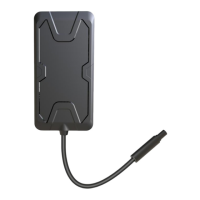

 To Next Page
 General