Page
Quick Key Guide 3
Setting Up Your Loc8tor 4
Locate Mode - Find a mislaid item 5
Alert Mode* - Helps prevent items getting lost 6
Alert Activated 7
Mini Homing & Panic Homing Tags 8
Icons and Abbreviations
Menu Functions 9
Batteries 10
General Care 10
Changes 11
Warranty 11
Please Note 12-13
CONTENTS
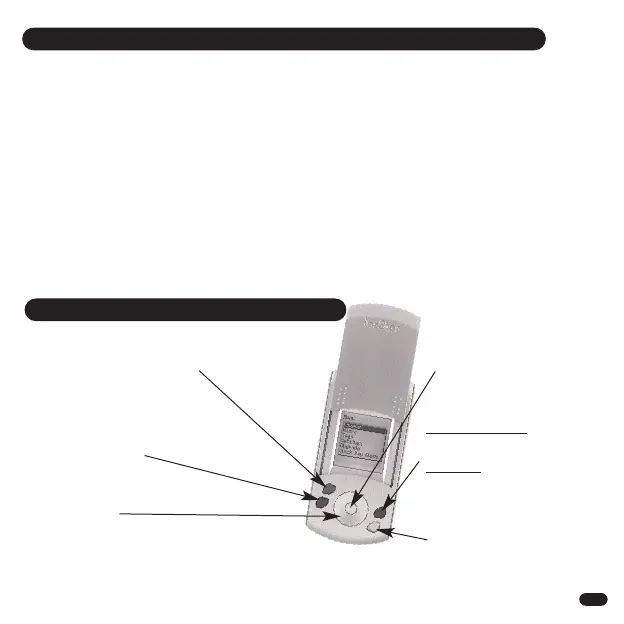
QUICK KEY GUIDE
3
Grey button
Shows list of registered Tags
that can be located
Red button
Turns ON or OFF all
Alert enabled Tags
(Loc8tor Plus only*)
Navigation ring
Moves cursor around
screen: left, right, up, down
White button
Selects item
highlighted on
screen
Blue button
Loc8tor & Loc8tor Plus
Shows Tag list and low
battery warnings
Loc8tor Plus
Alert mode Tag settings
Yellow button
To register a new Tag
8


 To Next Page