LOST
•
Slide up lid and press Grey button (top left) to see list of Tags that can be located
•
Scroll down and select item to be found with White button
•
Scan area slowly turning full 360° circle
•
Once circle completed go back to direction of strongest audio and visual
signal
•
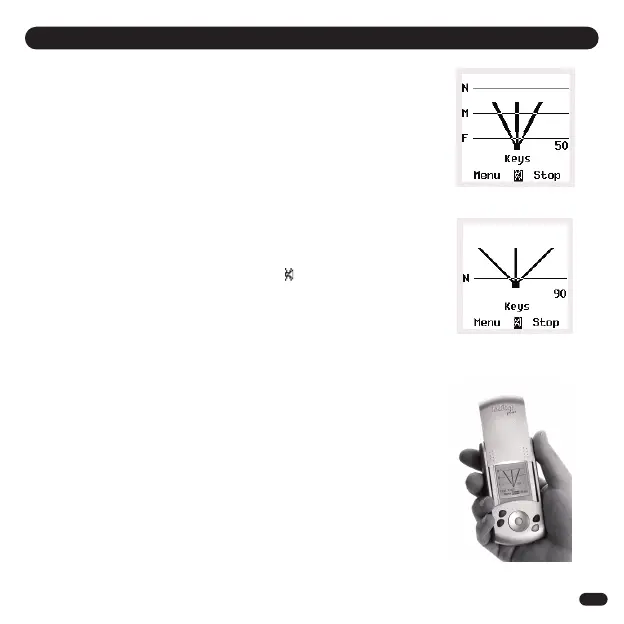
Walk in this direction - As you get nearer audio pitch and frequency of beeps
increase, lines on screen extend and signal strength numbers increase (1)
•
Whenever in doubt, repeat 360° circle
•
When signal strength lines get close to the top of the screen Tag is close by
•
Try pressing select button on Handheld to Mute (
When you are almost on top of Tag, screen changes to Zooming in mode to guide
you right in (2)
•
Select and press STOP when the item is found
FOUND
TIPS
•
Place the Tag on a surface and practice locating a few times to get a feel for how it
works
•
If you are ever unsure which direction to go in slowly repeat full 360° circle and
then go in direction with the strongest signal strength
•
Strongest signal is displayed when Handheld is pointing directly at Tag. Also try
moving Handheld up and down as Tag could be upstairs or downstairs
•
If you are close to a wall whilst getting a strong signal check the room next door
•
If no signal is displayed try moving position to a different area
LOCATE MODE - FIND A MISLAID ITEM
5
(1)
(2)
) and listen for the Tag
Beep


 To Next Page