Installing a C150 Cabinet Hookbolt Lock
Additional Notes
Overview
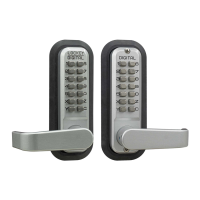
The C150 Cabinet Hookbolt Lock mounts on both sides of a door.
The striker plate mounts on the inside door frame.
Like a standard deadbolt lock, you can freely lock or unlock the
C150 from the inside, but you must have enter the code to open
the lock from the outside.
Unlike a standard deadbolt lock, the hookbolt does not retract
inside the door. Instead, it slides back and forth along the inside
surface, so that makes the C150 a surface mount lock.
Unlike a standard deadbolt lock, you can lock the C150 from
outside without knowing the combination.
The lock does not affect or replace any other mechanism you
may already have installed on your door.
What Type of Door Do You Have?
You can use the C150 Cabinet
Hookbolt Lock in any of the ten
situations shown in the
diagram. Decide which
situation most closely
represents your installation.
The door and door frame are
shown white with black outline, the
C150 lock and striker plate are
black, and door molding and
hinge are gray. Arrow shows
which way the door opens. The top
of each drawing is inside the
room, bottom is outside. Notice that
you can turn the knob
clockwise, but not counter-
clockwise.
The Keyless Locks Store Toll Free: (866) 586-0131
PO Box 4133 Fax: (630) 447-3635
Wheaton, IL 60189-4133 www.KeylessEntryLocks.com
We wish to thank Dan Connors for writing this document to help other customers. Email: lockorders@keylessentrylocks.com
C-150 viewed from
inside in locked position
C-150 viewed from inside in
unlocked position

 Need help?

 To Next Page
 General