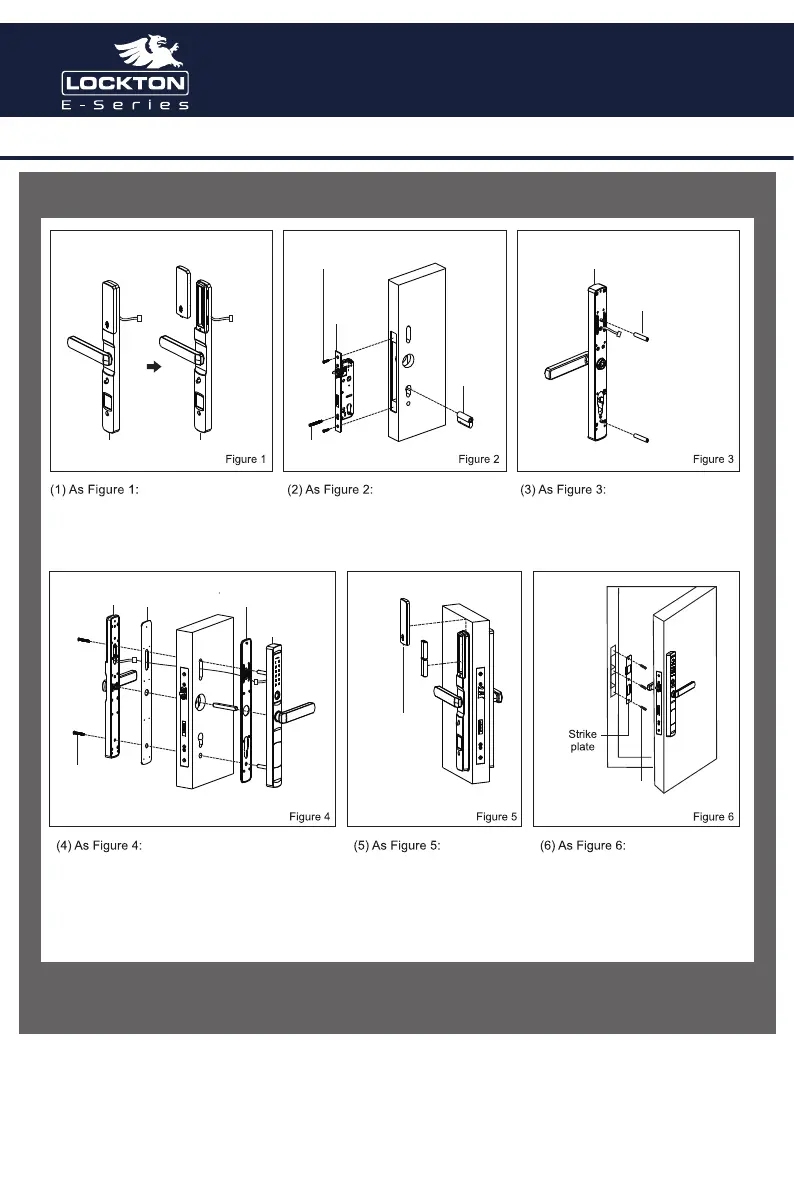
Remove the battery cover from the rear
handle.
Install the Mortice lock & Cylinder to the
door.
Install the 2 x appropriate connector pillars
to the front handle as per door size.
Install the appropriate size spindle as per the door size.
Run the wire from the front handle through the top cut
out in the door & connect to the rear handle.
Roll up any excess wire into the top cut out in the door
& install the 2x handle screws to fix the front handle to
the rear handle.
Install the Alkaline batteries &
battery cover.
Note: Do not use Lithium Batteries
Align & fix the strike to the door
frame.
use the 3x 4.2 x 20mm wood
screws for a timber jam
or 3x Metal self tapping screws for
a metal jam.
connector pillars
front handle
cylinder
cylinder screw
Mortice lock screws
Rear handle Rear handle
Battery cover
Rear handle screws
STEP 14. Follow the steps below as per Figure 1-6
STEP 15. Hardware installation is complete, please proceed to setup the software using the TTLock
application - see TTLock Quick start guide over page.
Art. ELEV36 Art. ELEV36



 To Next Page