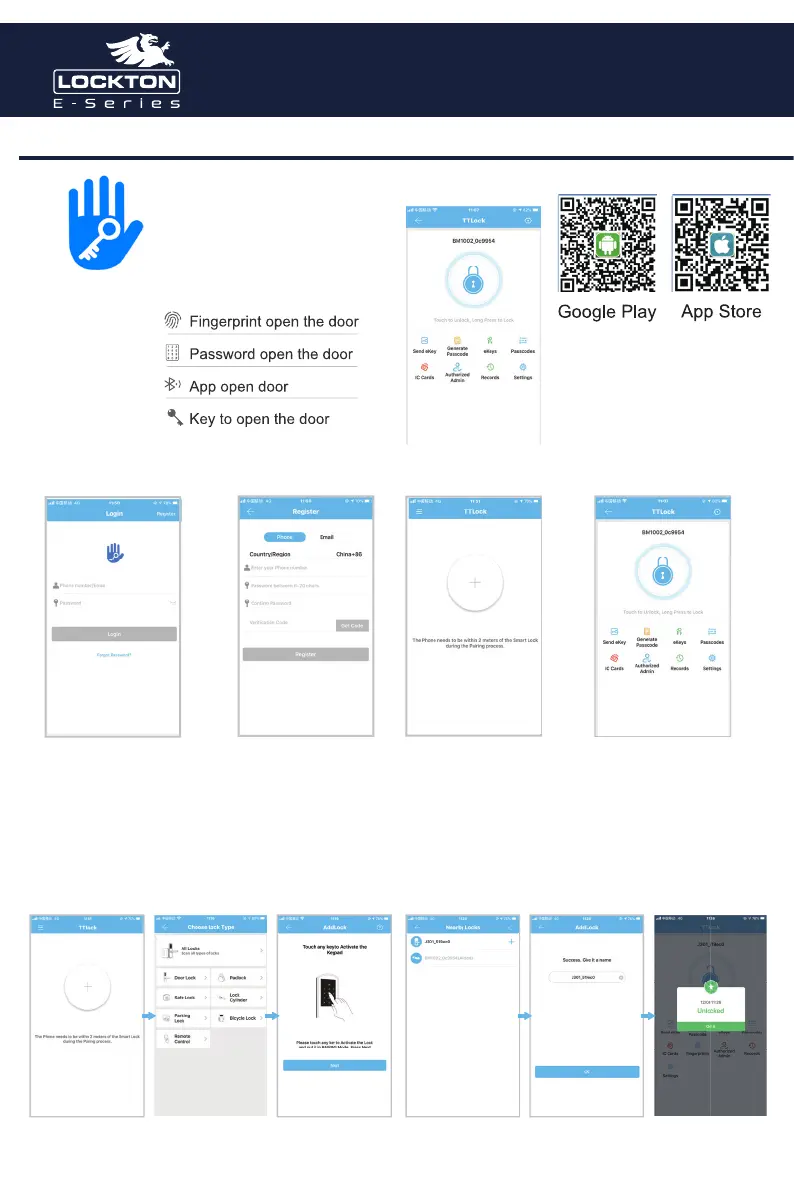
The software(iOS version) can be
downloaded from the app store,
and the Android version can be
downloaded from the application
store of Google play.
There is no lock or key data in the user’s account,
when TTLock App is used for the first time. The
user can add a lock in the front page. If a lock is
already added in the account, the lock information
will be displayed.
No lock bound with app Lock bound with app
Registration and Login By App Registration and Login By App
TTLock users can use their phone number and
email to register their account. Currently, when
users are registering their account, the verification
code will be sent to the mobile phone or the
email address. After the verification is passed, the
registration is successful. and then the page will
jump directly to the home page.
Add Lock By App
Add a lock Select
“Door Lock”
Light up
Touch Screen
Select Lock Input Lock
name
Operation
Successfull
Set up through mobile APP
TTLock
Quick Start Guide
Art. ELEV36
Art. ELEV36



 To Next Page