- 168
Svenska
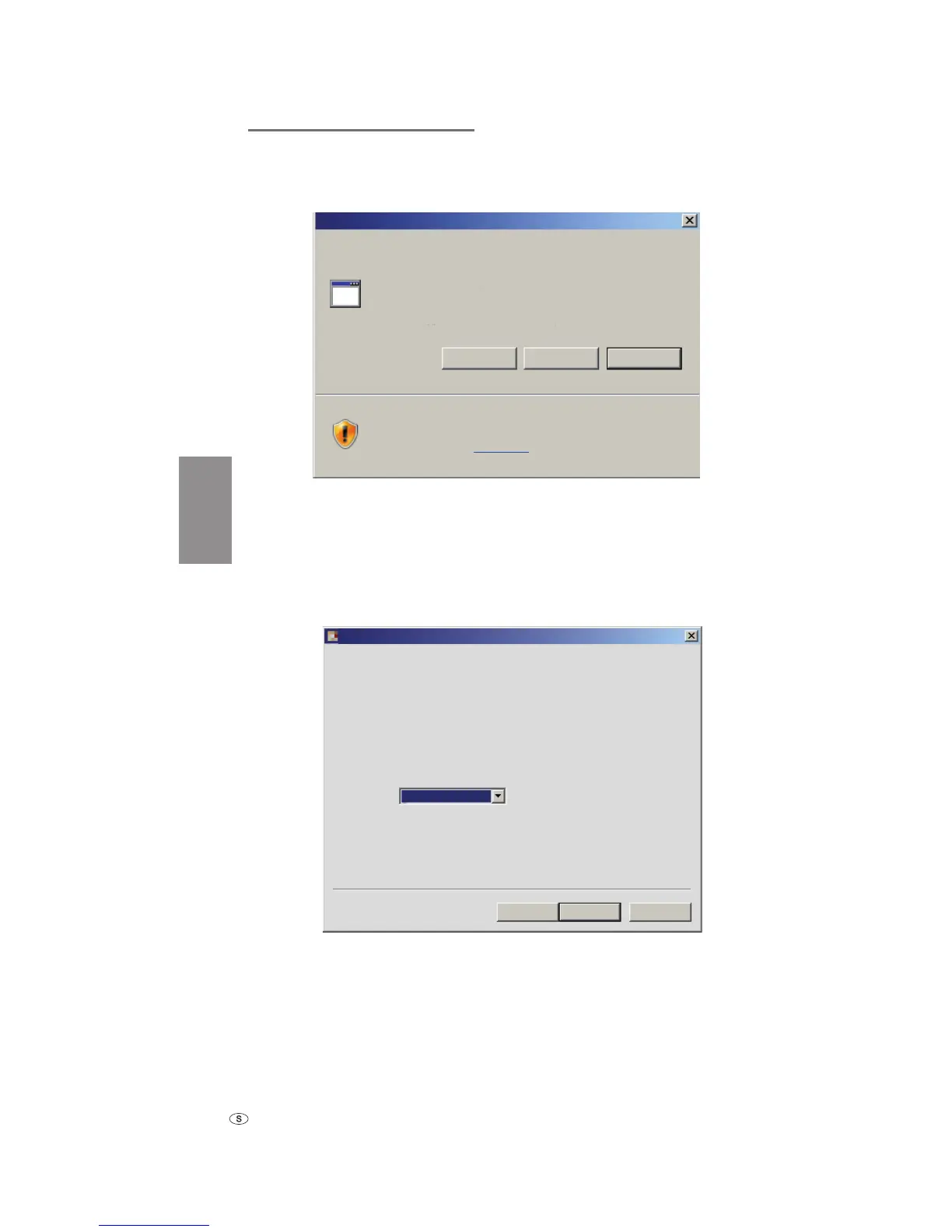
Klicka på Download och besvara ev. säkerhetsfrågor med ja.
Webbläsaren hämtar nu uppdateringsprogrammet (NAME_STB_XXXX_YYY.exe).
File download - Security Warning
Do you want to run or save this file?
While files from the Internet can be useful, this file type can
potentially harm your computer. If you do not trust the source, do not
run or save this software. What´s the risk?
Name: Loewe_STB_2243_345.exe
Type: Application, 1,20 MB
From: supportportal.ruwido.com
CancelSaveRun
Exempel: Internet Explorer 7 – klicka på Run (Kör).
➠ Allt efter vilken webbläsare, operativsystem och säkerhetsinställningar kan
det eventuellt förekomma säkerhetsfrågor vilka ska besvaras med ja.
Starta programmet på vanligt sätt.
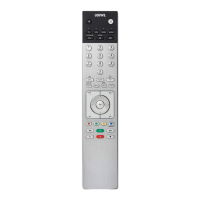
Fönstret Loewe Assist Update öppnas.
Loewe Assist remote control successfully detected!
Your Loewe Assist remote control is now ready for updating – please ensure that the
connector is NOT disconnected at any time during this process.
Multiple remote controls have been detected. Please select the required Loewe remote control
and click 'Next' again.
Click 'Next' to start the update.
Device key:
< Back Next > Cancel
STB
Loewe Assist Update
Klicka 2x på Next (Fortsätt). Om flera knappar har belagts med STB-funk-
tionen, ska du välja knapparna som ska ställas in i menyn.
➠ Försäkra dig om att USB-kabeln inte tas bort medan uppdateringen
genomförs.
Internet update
_33153_Assist_STB_Buch_DE-SE.ind168 168_33153_Assist_STB_Buch_DE-SE.ind168 168 23.01.2008 14:39:3223.01.2008 14:39:32


 To Next Page