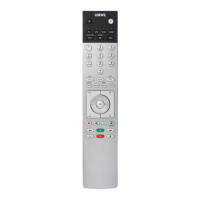
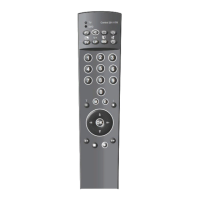
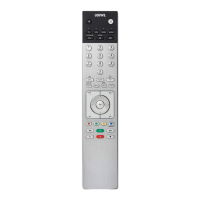
Remote control button mapping
1
Sound mute/on.
2
LED display for currently operated device.
3
Reassign remote control to SetTop-Box (presetting: Apple TV).
Pressing briefly
: Open the DR+ archive.
P
ressing longer
: Call timer list.
6
Pressing briefly
: Add current object to Home favourites.
P
ressing longer
: Call App Gallery.
EPG (Electronic Programme Guide) on/off.
8
Teletext/MediaText
on/off.
9
Pressing briefly
: Call function list for the active operating mode.
P
ressing longer
: Call System settings.
V+/V- increase/reduce volume.
Pressing briefly
:
Call station list.
Pressing longer
: Call
expanded station list.
In the menu: confirm/call up.
Green coloured key: screen on/off in Audio/Radio mode.
Red coloured key: call preferred value-added network service, if available.
Pressing briefly: skip backwards.
Pressing longer: winding backwards.
Pressing briefly: direct recording (with determination of recording duration).
Pressing longer: One Touch Recording.
Pause / Start/pause the timeshift television.
Stop / End timeshift (return to live image).
Pressing briefly: skip forwards.
Pressing longer: winding forwards.
Play / Start/continue timeshift television.
Blue coloured key: call station function list
(selection of language/sound, subtitles or channel/video track).
Pressing briefly: Yellow coloured key: call history.
Pressing longer: Yellow coloured key: call last station.
Navigation on the user interface, select objects.
In the menu / lists: select/set.
P+/P– next/previous station.
Pressing briefly: step / level back.
Pressing long: close all displays.
Press briefly during an on-screen display: info display.
Info text appropriate to the content that can assist you further, should you have any
questions about your TV set.
Press briefly, without on-screen display: access status display.
With status display open and repeatedly pressing the key call the detailed information
on the broadcast.
PIP (picture in picture) on/off.
. Select stations with numeric buttons directly.
In the menu: enter numbers or letters
Reassign remote control to video device
(presetting: BluTech Vision 3D).
Call radio mode (standard assignment)
.
Switches the TV set on (mains switch must be turned on) or switches to standby mode.
Press briefly while TV set is switched on: TV set and all CEC-enabled devices con-
nected to the HDMI ports will be switched off to standby (System Standby).


 To Next Page