22
Operating additional equipment
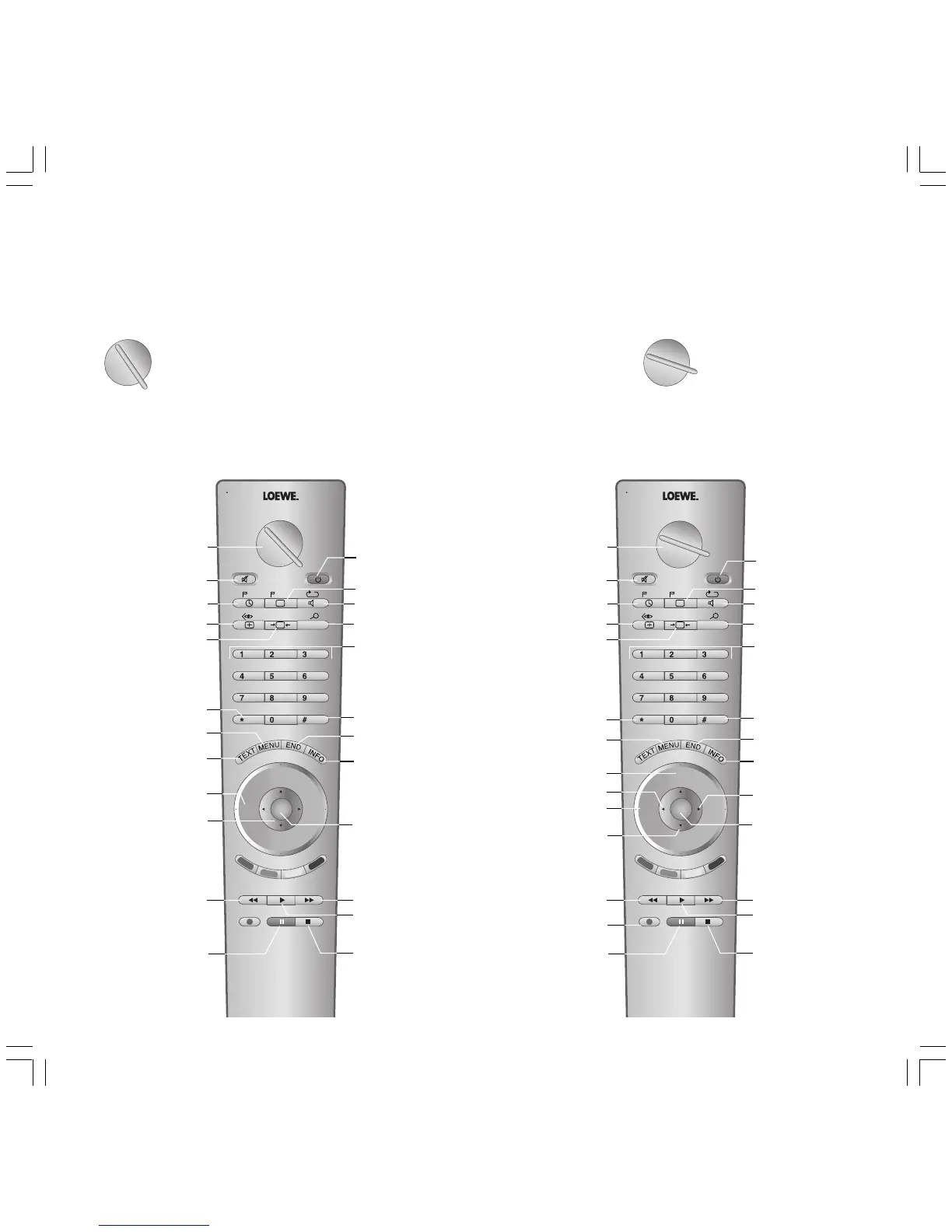
Switching over the remote control for
operating a DVD recorder/player
Turn the rotary switch to ”DVD”.
At the factory the infrared code and the func-
tionality is preset for the Loewe DVD recorder,
see previous page for how to switch over to the
DVD player.
Functions for the Loewe DVD player
abc def
RADIO
-Set
TV
DVD STB
VCR
REC-MENU
ghi jkl
mno
pqrs
tuv
wxyz
EPG
AV
DISC-M
DVD-AV
CARD
SV
TITLE
C-SET
PIP
P+
OK
P—
V— V+
-List
Sound off/on (mute)
Set marker
Switch DVD player
on/off – in standby
Next chapter
/search forward
Playback
Stop
V–/V+ volume quieter/louder
Menu bar on, previous
function active;
in menu: info on/off
Status display on;
in menu: close menu
Set picture format (TV)
Menu bar on,
select chapter active
Menu bar on,
Repeat active
Menu bar on,
Zoom active
Select Chapter;
in menu: enter digits
Pause
/single frame, slow motion
Beginning of chapter or
previous chapter
/search back
in menu: select
Title/Chapter Table;
in menu: cofirm the menu
selection
User interface of
loaded DVD on
DVD menu on;
in menu: close menu
Call AV selection (TV)
User interface of
loaded DVD on
Menu bar on,
select camera position active
Change-over switch
for operation of TV, VCR,
DVD or Set Top Box
TV
DVD STB
VCR
Switching over the remote control for
operating a video recorder
Turn the rotary switch to ”VCR”.
At the factory the infrared code and the func-
tionality is preset for the Loewe video recorder.
TV
DVD STB
VCR
Functions for the Loewe video recorder
abc def
RADIO
-Set
TV
DVD STB
VCR
REC-MENU
ghi jkl
mno
pqrs
tuv
wxyz
EPG
AV
DISC-M
CARD
SV
TITLE
C-SET
PIP
P+
OK
P—
V— V+
-List
Sound off/on (mute)
Switch recorder
on/off – in standby
Fast forward
/search forwards
Start playback
Stop tape
V–/V+ volume quieter/louder
Status display
Status display
/in menu: close menu
Set picture format (TV)
Select picture and
sound source
Select sound
/station language selection
Counter reset
Select station directly
/in menu: enter digits
Pause (still frame)
/frame-by-frame
advance
Rewind
/search backwards
Call up station list
/in menu: call up/confirm
P+/P– select program up/down
Call up VCR Menu
Call AV selection (TV)
Switch to Long Play
/Standard Play
Display/close
ShowView timer Menu
Display/close Timer list
Change-over switch
for operation of TV, VCR,
DVD or Set Top Box
Start recording
DVD-AV
/manual tracking
/in menu: select position
Reverse play
/in menu: select/set
Slow motion forwards
/in menu: select/set
BAQ2550H_31310_021_4_GB 22.07.2004, 10:15 Uhr22




 To Next Page