Simplex Elite Mat Cutter
Instruction Manual Model 750-1 760-1
8
Logan Graphic Products Inc., 1100 Brown Street, Wauconda, IL 60084 847-526-5515 LoganGraphic.com
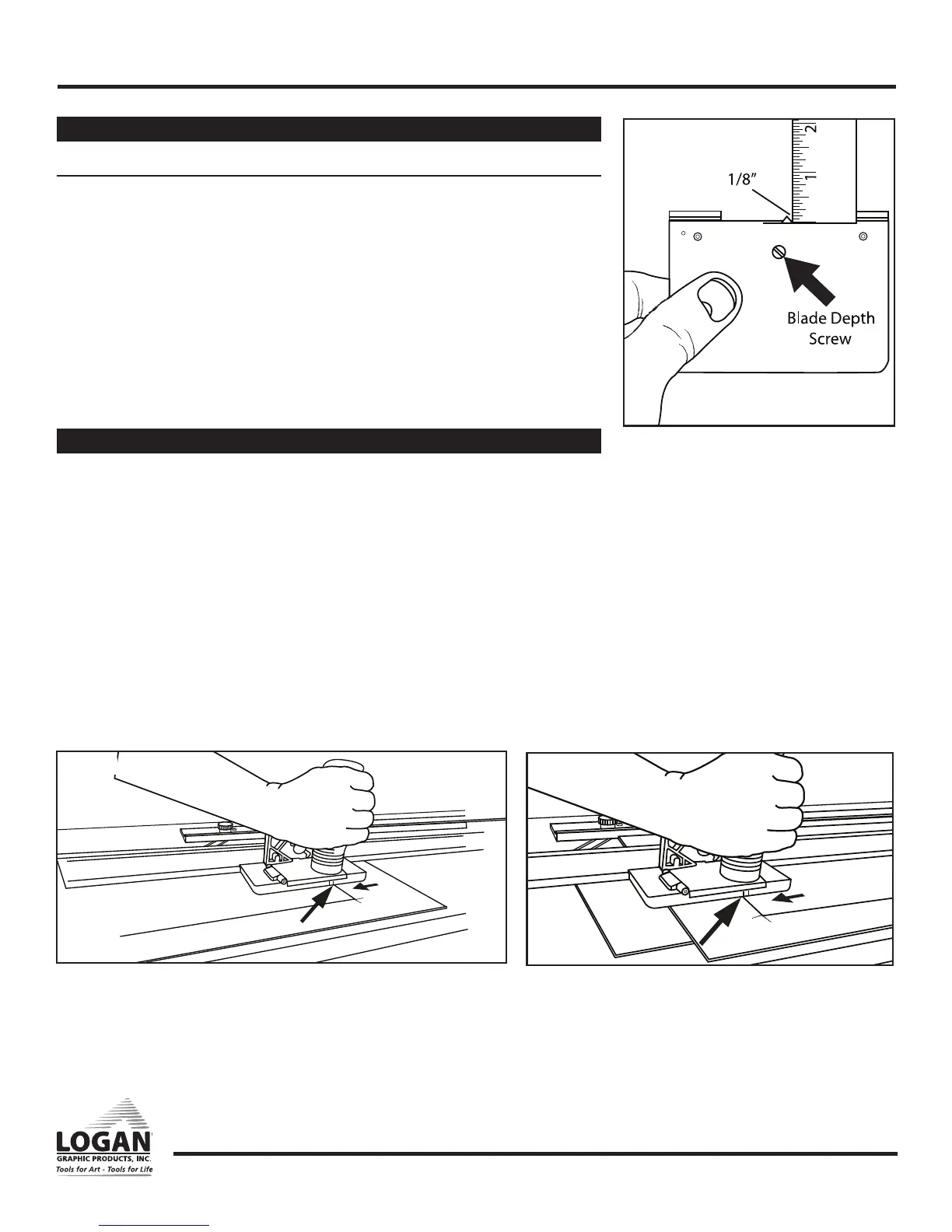
Fig. 22
Bevel Cutter Adjustments
Bevel blade depth adjustment
• Increase depth to increase overcuts - Decrease depth to reduce overcuts
1. Hold the 702-1 bevel cutter upside down in your hand with the blade activated
in the cutting position.
2.
Measure the exposed amount with a ruler at the same angle as the blade. For standard
thickness mat board (4 ply/1.4 mm) only 1/8” of blade should be seen (Fig. 22).
3. Turn blade depth screw (clockwise) to decrease blade depth and
(counterclockwise) to increase depth.
NOTE: Seeing roughly 1/8” of blade is usual for most standard thickness matboard;
however, yours may need slightly more or less to get best results.
NOTE: Always have blade depth set so that slip sheet is only slightly scored.
Straight Cut Mat Opening
EXAMPLE: Cutting a mat with a 2” border.
1. Set the mat guide to the 2” mark on the scale and retighten the black knobs.
2. Place the mat to be cut into the machine colored side down with the slip sheet
underneath and lower the guide rail.
3. Using a pencil, mark a line along the full length of the mat board using the
guide rail as a guide. Repeat this for remaining three sides.
4. Using the straight cutting head, align the top scribe line with the top border
line and press down on the handle until the cutting head sits flat on the
mat board and the nylon guides hook onto the guide rail lip (Fig. 23).
5. Pull the straight cutting head until the bottom scribe line lines up with the bottom
border line. Repeat until all borders are cut (Fig. 24).
Fig. 23
Fig. 24


 To Next Page