Operating Instructions
Loading Points before attaching the air line
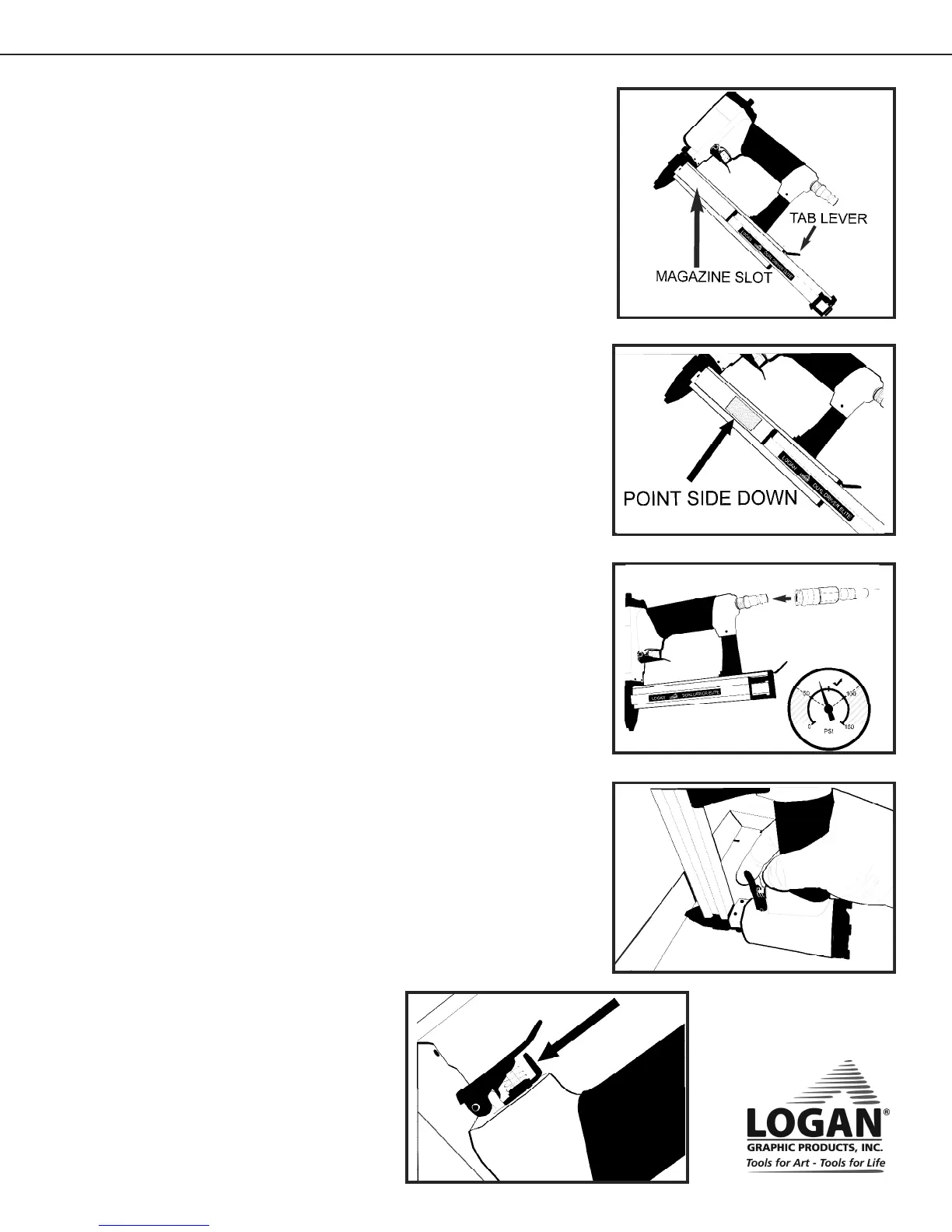
1. Use the metal tab lever at the rear of the magazine to
release and open the magazine loading slot. (Fig 1)
2. Insert full stacks of Logan points with the point side down.
(Fig 2)
3. Slide the magazine back until it locks and is properly closed.
Connect a suitable air line (not included) to the air supply nipple using a
quick release attachment. (Fig 3)
See that the compressor you are using has its regulator set to 50 psi (3.5
bar) for use on soft woods. Hardwood may require more air pressure but
do not exceed 100 psi (7 bar).
Attach the air line
Using the Air-Matic Dual Drive
Always wear safety glasses when using the Air-Matic Dual Drive
1. Place the framed art face down on a flat surface.
See that the frame is braced in position so it cannot slide.
NEVER PLACE YOUR HAND NEAR THE NOSE OF THE
TOOL TO HOLD THE FRAME IN PLACE
2. Rest the nose of the tool against the rabbet of frame with the
tool inverted as shown. (Fig 4)
3. Pull the trigger to fire a single point. Immediately release the
trigger after each point.
NOTE
The drive of the point is dependent on the psi of the
compressor.
Increase psi to drive deeper into harder woods.
DO NOT EXCEED 100 PSI (7 bar)
Fig 1
Fig 2
Fig 3
Fig 4
Instruction Manual
F500-4 Air-Matic Dual Drive Point Driver
Model F500-4
Fig 5
Trigger Lock
Engage the safety trigger lock when not in use but
connected to an air line.(Fig 5)



 To Next Page
 Loading...