
 Need help?
Do you have a question about the LogicMark 37920 and is the answer not in the manual?
Verify that all necessary parts are included with the Emergency Wall Communicator (EWC) package.
Insert 4 AAA batteries into the EWC, observing correct polarity as indicated inside the battery cover.
Pair the Emergency Wall Communicator (EWC) with the base station using the Code Learn button and test buttons.
Securely mount the EWC to the wall using provided screws or double-sided Velcro, positioning it for accessibility.
Test the EWC by pressing the Test button for at least 4 seconds to confirm it is operational and communicating.
The LogicMark Emergency Wall Communicator (EWC) is a two-way voice communication device designed to provide assistance in emergency situations. It is intended for use as part of a larger system, likely connected to a base unit that facilitates communication with emergency services or designated contacts.
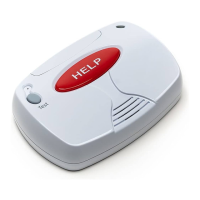
The primary function of the EWC is to enable users to call for help, particularly in locations where a traditional pendant might not be immediately accessible, such as a bathroom or shower. It features a prominent red "HELP" button that, when activated, initiates an emergency call through the connected base unit. The device also includes a "Test" button, allowing users to periodically check the system's functionality and battery status without triggering an actual emergency call.
The EWC operates by communicating wirelessly with a base unit. This communication link is established through a "learning" process, where the EWC is paired with the base. Once paired, the EWC can transmit signals to the base unit, which then processes the emergency request. The two-way voice communication capability means that users can speak directly through the EWC to a dispatcher or contact, and also hear responses, providing reassurance and facilitating effective communication during an emergency.
Installation: The EWC can be mounted to a wall using either screws or double-stick Velcro, offering flexibility in placement. For screw mounting, precise spacing of 3 1/8 inches is required. A key recommendation for installation is to mount the EWC low to the ground and in a location accessible from both inside and outside a tub, emphasizing its utility in fall-prone areas like bathrooms. A screwdriver is provided for convenience during installation.
Pairing with the Base Unit: To integrate the EWC into the system, a specific pairing procedure must be followed. This involves pressing and releasing the "Red Code Learn" button on the back of the console (base unit), which will prompt a "Pendant Learning" voice message. Subsequently, on the EWC itself, the user must simultaneously press and hold both the "Grey Test Button" and the "Red HELP Button" until the EWC announces "Pendant Learning." This process establishes the wireless connection between the EWC and the base unit.
System Check: After installation and pairing, it is crucial to check the system's functionality. This is done by pressing the "Grey Test Button" on the EWC for at least 4 seconds. A successful check will result in the voice prompt "All Systems are OK" followed by the battery status. If the system responds with "Base and Pendant Out of Range," it indicates a communication issue, and the pairing process (Step 2) should be repeated. If problems persist, customer support is available for assistance.
Battery Operation: The EWC is powered by 4 AAA alkaline batteries. The battery compartment is designed for easy access, and the manual specifies alternating positive and negative battery placement according to an internal diagram. This ensures the device remains operational even during power outages, providing continuous protection.
Battery Replacement: The EWC relies on 4 AAA alkaline batteries for power. The manual indicates that these batteries need to be installed, implying they will also need to be replaced periodically. The system check feature, which includes a battery status announcement, helps users monitor battery life and anticipate replacements. The provided screwdriver simplifies the process of opening the battery cover for replacement.
System Reset/Re-learning: If an EWC or pendant is being replaced, or if there are issues with the system, the manual outlines a procedure to erase all existing pendants and EWCs from the system before re-learning them. This is achieved by pressing and holding the "Red Code Learn" button on the base unit for at least 8 seconds, which will trigger the voice prompt "All Pendants Erased." This ensures a clean slate for re-pairing devices and resolving potential conflicts.
Warranty and Repair: The device comes with a one-year limited warranty covering defects in material and workmanship under normal use. During this period, defective products can be returned for repair or replacement at LogicMark's discretion. For out-of-warranty repairs or if the user is not the original owner, LogicMark offers options to replace the product with a functionally similar refurbished unit or repair the original product upon payment of charges. This provides long-term support for the device.
Troubleshooting: The manual provides clear instructions for troubleshooting common issues, such as an "Out of Range" message during a system check. By directing users to repeat specific steps or contact customer support, it helps users resolve problems efficiently and ensures the device remains functional.
In summary, the LogicMark Emergency Wall Communicator is a user-friendly, battery-operated device designed to enhance personal safety by providing a reliable means of communication during emergencies, particularly in high-risk areas within a home. Its simple installation, clear pairing process, and self-check features make it an accessible and effective tool for emergency preparedness.
 General
| Model | 37920 |
|---|---|
| Brand | LogicMark |
| Connectivity | Cellular |
| Battery Life | Up to 30 Days |
| Help Button | Yes |
| Two-Way Speaker | Yes |
| Type | Personal Emergency Response System (PERS) |
| Range | Nationwide (U.S.) |
| Monthly Fee | Yes |

 To Next Page
