6
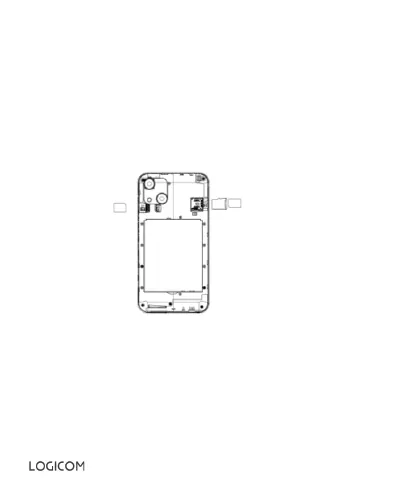
2. Inserting a SIM card.
Your smartphone is a dual SIM mobile phone, which allows you to use two
phone lines on the same smartphone. Your smartphone has two SIM ports
(1 and 2). To insert the SIM card(s):
• Switch off the phone and remove the back cover and the battery.
• Insert the SIM card correctly into the SIM card slot. Make sure that the
cards are inserted in the correct direction.
• SIM 1 uses a Nano-SIM card and SIM 2 uses a Nano-SIM card.
• Then replace the SIM compartment.
•
3. Inserting a MicroSD card
It is possible to increase the internal memory of the device with a MicroSD
card. (not supplied) (MicroSD card of 64GB maximum).
• Switch off the phone and remove the back cover and the battery.
• Insert the SD card correctly into the SD card slot.
• Then put the battery and the back cover of the smartphone back on.


 To Next Page