Ensure the vacuum cleaner is fully unplugged from the mains socket.
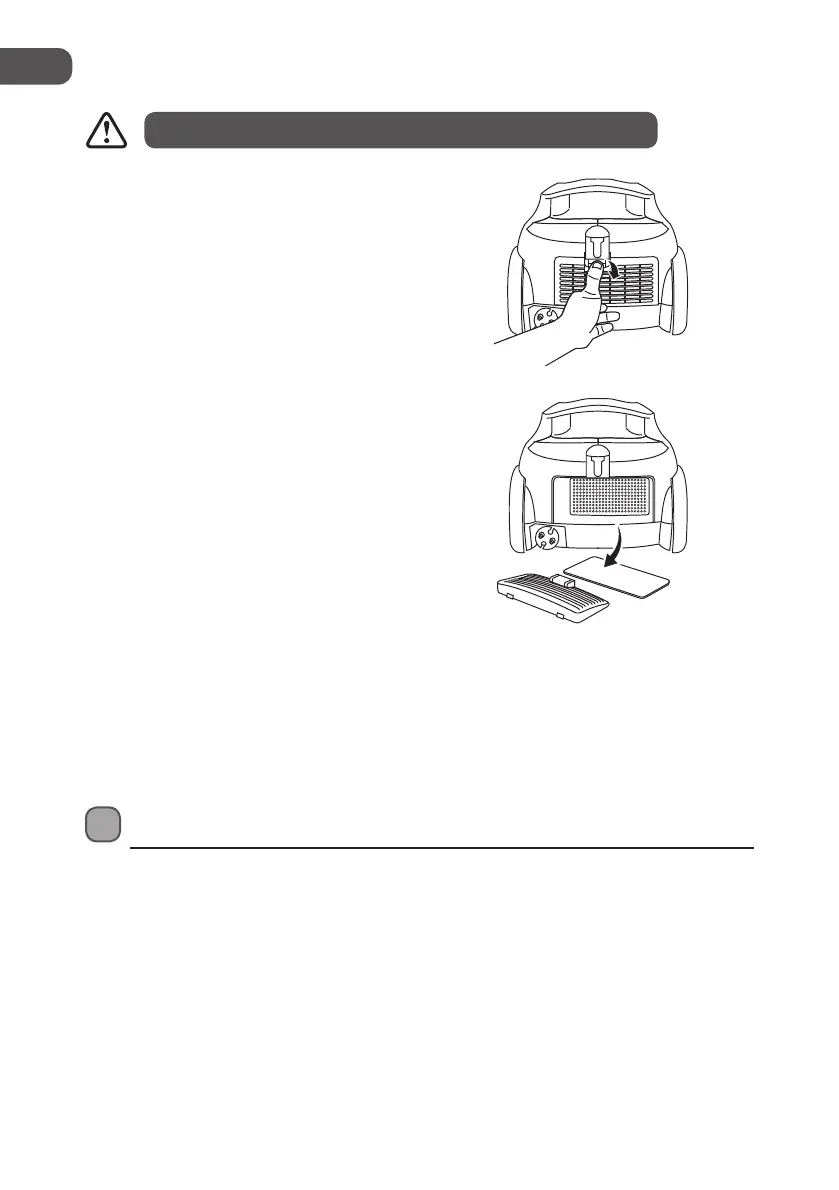
Cleaning the Exhaust Filter
1. Pull down on the recessed area of the
grille; it will automatically pop down and
out.
3. Wash the lter in lukewarm water; allow
it to dry thoroughly before replacing it.
4. Slot the grille and lter back into the
grille slots. Push rmly; the grille will click
when tted fully back into place.
2. The white lter will come o with the
grille.
Motor Thermostat
This vacuum cleaner is equipped with a motor protective thermostat. If for some reason the
vacuum cleaner should overheat, the thermostat will automatically turn the vacuum cleaner
o.
1. Switch O the vacuum cleaner at once.
2. Disconnect the plug from the mains. Find the source of the overheating problem.
(i.e. clogged hose or lter) If a clogged hose or lter is found, unclog the hose and replace
the lter. Wait at least 45 minutes before attempting to reuse the vacuum cleaner.
3. After the vacuum cleaner has cooled down for 45 minutes, plug it in and turn it “On”.
The vacuum cleaner should start again. If the vacuum cleaner fails to operate or the
thermostat switches the vacuum cleaner o again, return it to your nearest service centre
for examination or repair.
32
GB
L18BVR13E_7L_130515_Shaun.indb 32 15/05/2013 5:16 PM


 To Next Page