31.
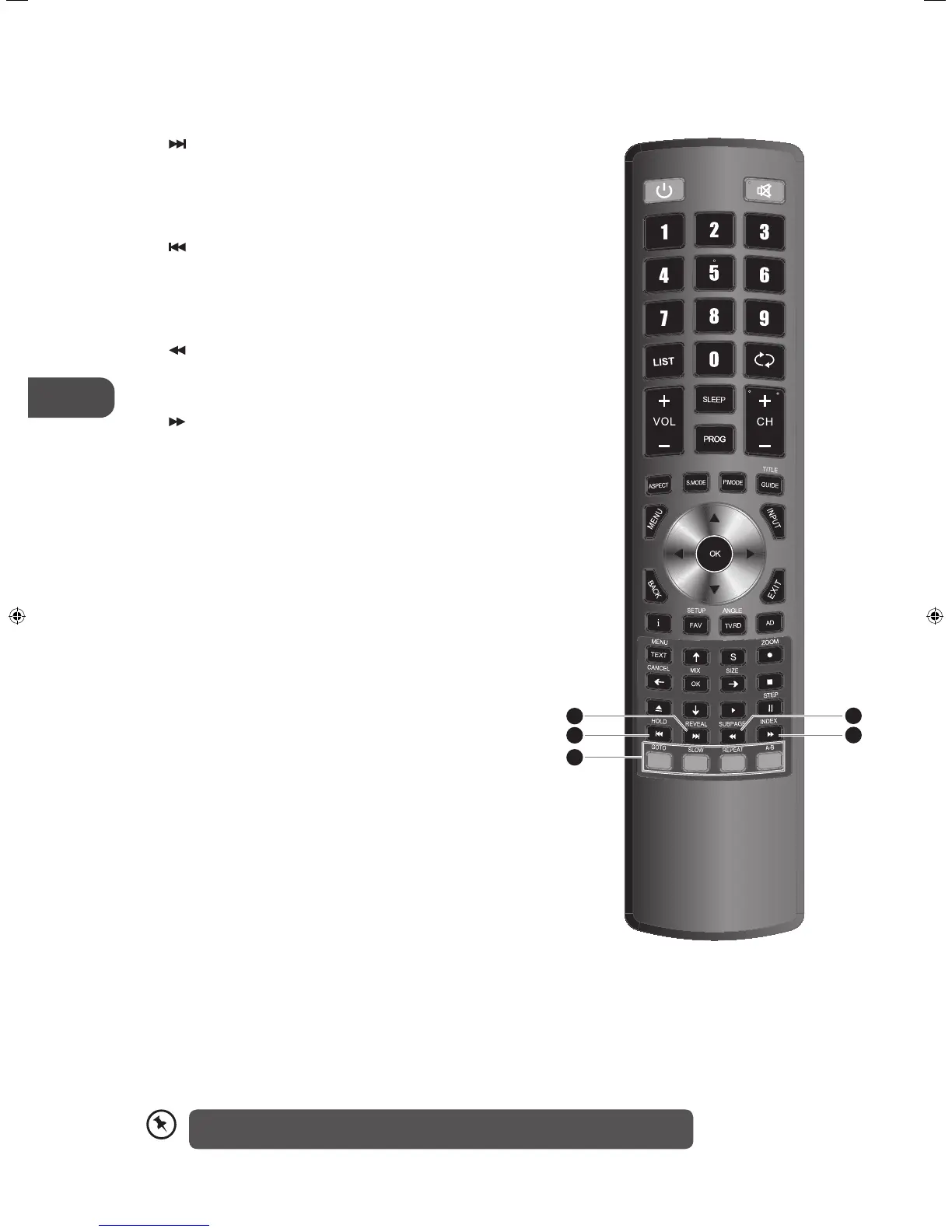
Skip to the beginning of the next chapter / track / photo.
(DVD / USB mode)
REVEAL
Reveal hidden information such as the answer to a quiz
in teletext. (ATV mode)
32.
To skip to the beginning of the previous chapter / track /
photo. (DVD / USB mode)
HOLD
Freeze a multi-page passage on screen in teletext. (ATV
mode)
33.
Reverse playback rapidly. (DVD / USB mode)
SUBPAGE
Display the subpage on the teletext screen. (ATV mode)
34.
Advance playback rapidly. (DVD / USB mode)
INDEX
Select the page number of the index from teletext. (ATV
mode)
35. Coloured buttons
Access the TELETEXT items or channel edit when using
Digital / Freeview TV Channels. (ATV / DTV mode)
GOTO (RED)
Skip to a specic location on a DVD / CD. (DVD mode)
SLOW (GREEN)
Play video slowly. (DVD mode)
REPEAT (YELLOW)
Select between dierent repeat modes. (DVD mode)
A–B (BLUE)
Repeat a segment between A and B. (DVD mode)
34
33
32
35
31
Please note that there are DVD mode functions on the remote control only operate on
TV models with a built-in DVD player.
L22_24FE12_IB_Running Change_120907_Annie.indd 12 12年9月7日 上午10:43


 To Next Page