8
1
2
3
4
5
8
7
6
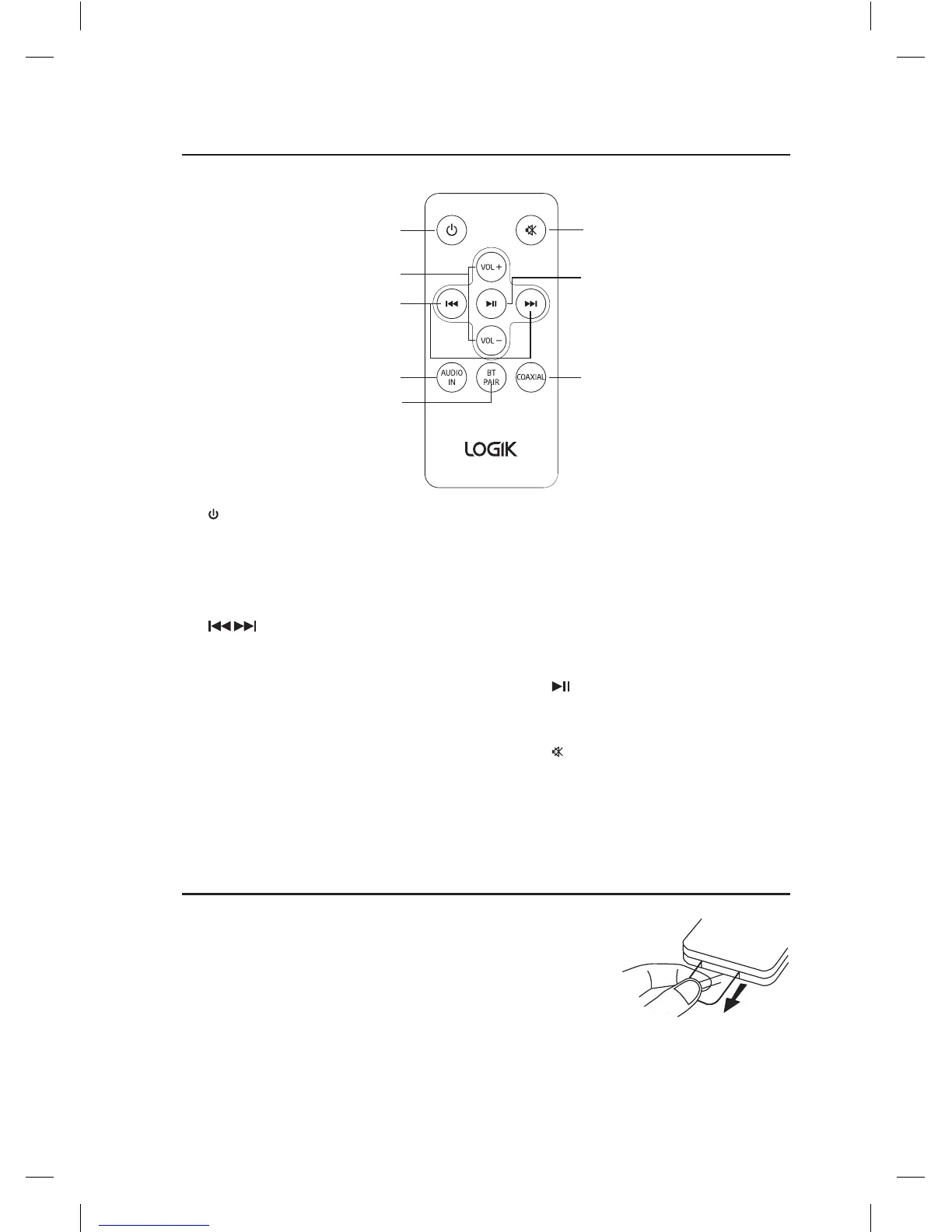
Remote Control
1. Button
Switch the unit between On and
Standby mode.
2. VOL+/– Buttons
Adjust the volume.
3. Buttons
Skip to previous/next track in
Bluetooth® mode.
4. AUDIO IN Button
Press to enter AUDIO IN mode.
Remove the Plastic Strip from the Remote
Control
Remove the plastic strip from the battery if the
battery is being used for the rst time. It is located
at the bottom rear of the remote control.
5. BT PAIR Button
• Press to enter BT mode.
• Activate the pairing function in
Bluetooth® mode and disconnect
the existing paired Bluetooth®
device.
6. COAXIAL Button
Press to enter COAXIAL mode.
7. Button
Play/pause/resume playback in
Bluetooth® mode.
8. Button
Silence the unit or restore the
sound.
L32SBT17_IB_Final180629V4.indd 8 29/6/2018 10:33 AM


 To Next Page