The Logitech CC4900e is a high-performance video conferencing camera designed for professional meeting spaces. This setup guide provides comprehensive instructions for its installation, operation, and maintenance, ensuring optimal performance for video calls.
Function Description:
The CC4900e is primarily a video conferencing camera that offers pan, tilt, and zoom (PTZ) capabilities. It is designed to capture high-quality video for meetings, whether used with a dedicated in-room computer or a laptop brought by team members. The camera integrates seamlessly into various meeting room setups, providing flexibility in its deployment. Its core function is to provide clear visual communication, enhanced by intelligent framing features and user-friendly controls.
Important Technical Specifications:
While specific resolution and sensor details are not explicitly listed in the provided pages, the camera's features imply advanced imaging capabilities.
- Connectivity: The camera connects via USB, utilizing a power splitter that also serves as a hub for power and data. It features a MIPI port and an expansion slot, suggesting potential for integration with other accessories or systems.
- Power: The device is powered via a dedicated power adapter connected to the power splitter, which then supplies power to the camera.
- Mounting Options: The CC4900e offers versatile mounting options, including placement on a table or shelf, wall mounting, and an optional TV mount bracket. This adaptability ensures it can be positioned optimally for various room layouts and viewing angles.
- Remote Control: A dedicated remote control is included, providing intuitive access to camera functions.
- Status Indicator: An LED status indicator provides visual feedback on the camera's connection status and video streaming activity.
- Security: A security slot is integrated, allowing for physical securing of the device.
- Tripod Thread: A standard tripod thread is available for secure mounting to the camera mount or other compatible accessories.
Usage Features:
The CC4900e is designed for ease of use, offering several features to enhance the video conferencing experience:
- Pan/Tilt/Zoom (PTZ) Control: Users can precisely control the camera's pan, tilt, and zoom functions using the remote control. Incremental movements are achieved with a single press, while continuous movement is activated by pressing and holding the buttons. A caution is given against manually rotating the camera head to prevent damage.
- Camera Presets: The camera supports up to two preset positions. Users can save a desired position by pressing and holding a button on the remote for 3 seconds and recall it with a single press. This allows for quick switching between common viewing angles.
- Camera Home Position: A "Home" position can be set, which the camera will return to upon startup. This position can be saved by holding the home button for 10 seconds.
- Video Mute: The remote control includes a video mute button, allowing users to quickly disable the video feed when needed.
- Camera Settings Application: A dedicated software application is available for download from Logitech's website. This application provides advanced control over camera parameters such as pan, tilt, zoom, focus, brightness, and contrast, allowing for fine-tuning of the image quality.
- RightSight Technology: This intelligent feature automatically adjusts the camera's pan, tilt, and zoom to comfortably frame meeting participants. RightSight is compatible with Windows 10 and macOS 10.14+ and can be enabled or disabled via the Logitech Sync application. Pressing pan, tilt, or zoom buttons on the remote temporarily disables RightSight, while pressing the home button restarts it.
- Remote Pairing: The camera and remote are pre-paired at the factory. However, instructions are provided for re-pairing a remote (e.g., if lost or replaced) by pressing a button on the back of the camera and the video mute button on the remote. An LED indicator guides the pairing process.
Maintenance Features:
While the manual does not detail extensive maintenance procedures, it provides resources for ongoing support and updates:
- Firmware Upgrades: Logitech offers firmware upgrades to improve camera performance and add new features. These can be accessed through the support website.
- Software Downloads: The camera settings application and Logitech Sync application are available for download, allowing users to manage and optimize camera functions.
- Technical Support: Users can consult the Logitech support website (www.logitech.com/support/rallycamera) or contact technical support for assistance with any issues.
- Documentation: Comprehensive documentation, including FAQs, warranty information, and information on replacement parts, is available online.
- Troubleshooting: The manual outlines basic troubleshooting steps, such as checking LED indicators for connection status and providing a resource for persistent issues.
In summary, the Logitech CC4900e is a versatile and intelligent video conferencing camera designed to deliver high-quality video and a seamless user experience in various meeting environments. Its robust feature set, including PTZ control, presets, RightSight technology, and comprehensive support resources, makes it a reliable choice for professional communication.

 Need help?
 General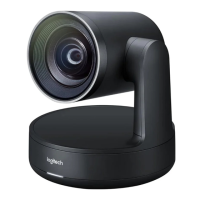

 To Next Page