EasyManua.ls Logo

Logitech Mevo Start - User Manual

Logitech Mevo Start
12 pages
Print Icon
To Next Page IconTo Next Page
Loading...
Mevo Start Reviewer's Guide
Thanks for taking the time to review Mevo, a purpose-built, wireless live streaming
ecosystem from Logitech For Creators. Our goal is to allow all creators and event
producers to stream and record their content with complete ease. Our wireless live
streaming camera and app ecosystems allow content creators to go live from
almost anywhere in the world, both indoors and outdoors.
What Makes Mevo Ideal for Live Streaming?
MULTI-CAMERA READY— Stream your story from multiple angles. Sync up to three Mevo Start
devices for HD multi-camera streaming, right out of the box.
STUNNING HD QUALITY — Live stream and record in stunning 1080p HD resolution with crisp,
detailed imaging.
STREAM ANYWHERE —Go where the story takes you. Stream live from anywhere in the world
using Wi-Fi or your device’s LTE connection —no cables required.
INTELLIGENT APP CONTROL — The Mevo Multicam App wirelessly controls your cameras to
create compelling content with features like Auto-Director.
BUILT FOR LONG STREAMS Live stream or record up to six hours using Mevo Start’s built-in
battery or connect to a power source for continuous use.
ADVANCED ONBOARD SOUND — Capture clean, clear audio using each camera’s built-in
microphone or connect external sound sources for advanced audio setups.
EFFORTLESSLY ADD CUSTOM GRAPHICS — Elevate your live stream with full-screen graphics,
lower thirds, or corner bugs using the Mevo Multicam App.
STREAM TO YOUR FAVORITE PLATFORMS — Start streaming on platforms like YouTube, Twitch,
Facebook, and more with just a few taps.
Mevo Start Reviewer’s Guide - Page 1
Question and Answer IconNeed help?

Do you have a question about the Logitech Mevo Start and is the answer not in the manual?

Summary

Mevo Start Technical Specifications

Mevo Multicam App Features

App Feature Highlights

Covers connectivity, instant streaming, live recording, Auto-Director, audio mixer, and graphics capabilities.

Connecting to Mevo Multicam App

Mevo App Interface and Switching

Switching Between Cameras

Swap cameras via thumbnails and customize transitions like Crossfade, Slide, and Wipe.

Auto-Director: Intelligent Live Switching

Automatically mixes and switches between cameras, enabling hands-free live stream production.

Camera Settings and Adjustments

Graphics and Overlays

Mixing Audio Inputs

Starting a Live Stream

Recording Options with Mevo App

ISO Recording Capability

Enables isolated camera feed recordings to microSD cards, offering post-production flexibility.

Overview

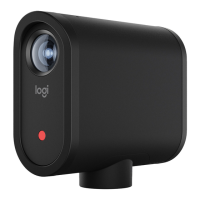
The Mevo Start is a purpose-built, wireless live streaming camera designed for creators and event producers to easily stream and record content. It's part of an ecosystem that allows users to go live from almost anywhere, both indoors and outdoors, with a focus on simplicity and high-quality output.

Function Description

The Mevo Start's primary function is to capture and stream live video content. It features a 1080p HD sensor for high-detail images and an 83.7º diagonal field of view without fisheye distortion, ensuring a natural look. The camera supports H.264 or HEVC encoding for recording to a microSD card. It incorporates electronic image stabilization to maintain steady footage and offers in-app controls for vertical flip, HDR, exposure, and white balance adjustments.

For audio, the Mevo Start includes an onboard array of three MEMS microphones with Fraunhofer upHear® Spatial Microphone Processing, providing immersive and clear audio. It also has a 3.5mm TRS input for external audio sources like microphones or line-level mixers, and a USB-C port that supports driverless USB audio interfaces, such as audio interfaces, Blue Yeti microphones, or mixers with USB output. An in-app audio mixer allows for muting and unmuting audio sources.

The camera is designed for multi-camera setups, allowing users to sync up to three Mevo Start devices for HD multi-camera streaming right out of the box. It can stream to popular platforms like YouTube, Facebook, Twitch, Twitter, and RTMP, and supports NDI HX video-over-IP. For webcam use, it can connect via wired or wireless webcam mode to applications such as Zoom, Skype, Microsoft Teams, Streamlabs OBS, Ecamm, and Google Hangouts.

Usage Features

The Mevo Start is controlled wirelessly via the Mevo Multicam App, available for Android and iOS devices. This app enables seamless control, live editing, and switching between cameras.

  • Multi-Camera Streaming: Users can connect multiple Mevo cameras wirelessly and stream via local Wi-Fi or their phone's LTE connection. The app provides in-app connections to various streaming platforms.
  • Live Editing and Switching: The app's main view displays the live stream (Program) at the top, with a gallery view of all connected cameras below. Users can tap on thumbnails to switch between cameras, with the active camera indicated by a red border.
  • Transitions: By default, camera switches are instant "cuts." However, users can add customized transitions like Crossfade, Slide, Edge Wipe, Box Wipe, and Dip to Color, with adjustable duration and direction.
  • Auto-Director: A powerful feature that intelligently and dynamically switches between connected cameras automatically, providing a hands-free live switching experience.
  • Crop & Zoom: Each camera offers live editing capabilities to cut to a closeup, zoom in, or pan virtually without physically moving the camera. Gestures like tapping for a closeup, swiping to pan, pinching to zoom, and long-pressing for quick action menus (cut, slow transition, quick transition) are supported.
  • Custom Graphics: The Mevo Multicam App allows users to add custom full-screen graphics, lower thirds, and corner bugs to their live streams, elevating the production quality.
  • Recording Options: The app supports two ways of recording:
    • Record to Device: Saves the final switched (edited) video directly to the internal storage of the phone or tablet running the app. Resolution can be adjusted to conserve space.
    • ISO Recording: Creates isolated, unedited recordings of each camera's view to a microSD card inserted in the camera. This provides greater flexibility for post-production editing.
  • Connectivity: The camera supports 802.11AC WiFi, Bluetooth 4.1/BTLE, and LTE via a mobile host device. It can stream from anywhere using Wi-Fi or a device's LTE connection, eliminating the need for cables.
  • App Menu Settings: Advanced features like transition type, camera input quality, and video source latency can be adjusted through the app's menu. Camera input quality can be adjusted based on network bandwidth for smooth operation, and video source latency can be lowered for quicker response times, though this consumes more bandwidth.
  • Individual Camera Settings: Long-pressing on a camera's thumbnail or tapping the "..." button brings up a menu for device-level adjustments. This includes viewing top status (network, battery, microSD space), changing camera names, formatting the SD card, setting a password for camera connection, defining the power button's short-press action (default is start/stop recording), controlling speaker system sounds, adjusting status light brightness, enabling USB-C power for external devices, setting auto power on/off with USB cable, auto turn off after 15 minutes of inactivity, and auto-wide on app disconnect.

Maintenance Features

  • Battery Life: The Mevo Start has a built-in battery that provides up to six hours of continuous use. It can also be connected to a USB-C power source for continuous operation.
  • Storage: It features a microSD slot for saving streams in 1080p HD. The app allows for formatting the SD card, which erases all files and optimizes it for recording.
  • Firmware Updates: The "About" section in the individual camera settings provides information on the device model, firmware, serial number, and connectivity, which is useful for troubleshooting and ensuring the camera is up-to-date.
  • Factory Reset: A "Reset to Factory Default" option is available in the camera settings to restore the device to its original settings.
  • Operating Temperature: The device is designed to operate within a temperature range of 0-35°C (32-95°F).
  • Mounting: Versatile threading allows mounting to most tripods or stands, including 5/8"-27 microphone-stand type, with an adapter for 3/8"-18 and 1/4"-20 threads. This ensures stable positioning for various setups.

Logitech Mevo Start Specifications

General IconGeneral
Battery LifeUp to 6 hours
ConnectivityWi-Fi, Bluetooth
StoragemicroSD card slot (up to 256GB)
Resolution1080p
AudioBuilt-in microphone
StreamingRTMP
Frame Rate30 fps
Field of View83.7 degrees

Related product manuals