
 Need help?
Do you have a question about the Logitech ERGO M575 and is the answer not in the manual?
Instructions for connecting the ERGO M575 trackball via its receiver or Bluetooth.
Steps to connect the ERGO M575 trackball using Bluetooth technology.
Steps to connect the ERGO M575 trackball using the Unifying USB receiver.
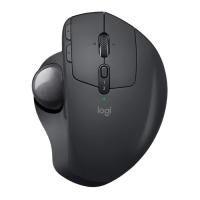
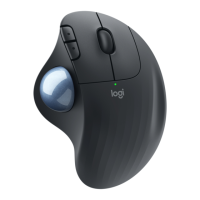
Visual breakdown of the ERGO M575 trackball's features and components.
Details the ergonomic design promoting a relaxed posture and comfortable use.
Explains precision tracking sensor and DPI adjustment for cursor speed.
Describes customizable buttons for quick navigation in apps and browsers.
Information on battery life, power indicator LED, and on-screen notifications.
Link to download Logitech Options software for macOS and Windows.
The Logitech ERGO M575 is a trackball mouse designed to provide a comfortable and ergonomic user experience, promoting a more relaxed posture and reducing arm movement. It offers versatile connectivity options, allowing users to connect via Bluetooth or a Unifying USB receiver, and features customizable buttons for enhanced productivity.
The ERGO M575 serves as an input device for computers, enabling users to control the cursor and interact with software applications. Unlike traditional mice that require arm movement, the ERGO M575 is thumb-operated, meaning the user moves a trackball with their thumb to navigate the cursor. This design minimizes arm and wrist strain, making it suitable for extended use. The device is compatible with both macOS and Windows operating systems.
Ergonomic Design: The ERGO M575 boasts a hand-sculpted shape that naturally fits the user's hand, providing full palm support. This ergonomic design is intended to promote a more relaxed posture and prevent discomfort often associated with prolonged mouse use. The trackball operation eliminates the need to move the arm, further contributing to a relaxed and comfortable experience. The extra-wide main clicks and scroll wheel are angled to match the overall shape, enhancing intuitive usability and comfort for finger movement. Users are advised to keep their hand and forearm well supported and avoid resting their wrist or forearm on cold surfaces or sharp table edges for optimal comfort.
Connectivity Options: The ERGO M575 offers dual connectivity, allowing users to choose between Bluetooth and a Unifying USB receiver.
Precision Trackball Navigation: The ERGO M575 features a precision tracking sensor that allows users to adjust the DPI (dots per inch) setting of the trackball. This adjustability, ranging from 100DPI to 2000DPI, enables users to customize the cursor speed to their preference, enhancing control and accuracy. The speed can be adjusted through Logitech Options software.
Back-/Forward Buttons: The device includes dedicated Back/Forward buttons, providing quick access to shortcuts for navigating in web browsers or other applications. These buttons can be customized using Logitech Options software to perform specific functions tailored to the user's workflow, thereby improving efficiency and productivity.
Scroll Wheel: A wide, comfort scroll wheel is integrated into the design, facilitating smooth and precise scrolling through documents and web pages. Its ergonomic placement and angle contribute to comfortable finger movement.
Power Management: The ERGO M575 is battery-powered, utilizing a single AA battery. The battery life is impressive, lasting up to 24 months when connected via the Unifying USB receiver and up to 20 months with Bluetooth Low Energy. An integrated power LED indicates the battery status. When the power is low, the LED will alert the user. For on-screen notifications regarding battery levels, users can install Logitech Options. The LED displays green for more than 10% battery life and red for less than 10% battery life.
Logitech Options Software: To unlock the full potential and customize the ERGO M575, users are encouraged to download Logitech Options software. This application allows for personalization of button functions, adjustment of trackball speed, and provides battery status notifications.
Battery Replacement: The ERGO M575 uses a single AA battery, which can be replaced when depleted. The battery door is located on the underside of the device, allowing for easy access.
Receiver Storage: For convenience and portability, the Unifying USB receiver can be stored within the device itself, next to the battery compartment. This secure storage prevents loss of the small receiver when the trackball is not in use or is being transported.
Trackball Eject Hole: The device includes a trackball eject hole, which can be used to remove the trackball for cleaning. This feature ensures that dust and debris, which can accumulate under the trackball over time and affect performance, can be easily cleared, maintaining optimal tracking precision. Regular cleaning of the trackball and its housing is recommended to ensure smooth operation and longevity of the device.
 General
| Battery Life | Up to 24 months |
|---|---|
| Number of Buttons | 5 |
| Scroll Wheel | Yes |
| Connectivity | Bluetooth |
| Battery Type | 1 x AA |
| DPI Range | 400 - 2000 DPI |
| Compatibility | Windows, macOS, iPadOS |
| Wireless Range | 10 m |
| Color | Graphite |
| Weight | 145 g (including battery) |




 To Next Page