
 Need help?
Do you have a question about the Logitech MX800 and is the answer not in the manual?
Organized zones for applications, convenience, multimedia navigation, and volume.
Includes FN key, light sensor, battery indicator, and power switch.
Details on left/right buttons, scroll wheel, and mode shift button functions.
Covers battery indicator, navigation buttons, zoom, application button, and power switch.
Instructions for charging the wireless mouse using a USB port.
Guidance on recharging the keyboard battery via USB cable.
Explanation of how Unifying technology connects up to six devices to one receiver.
The Logitech Wireless Performance Combo MX800 is a comprehensive input solution designed to enhance productivity and user experience through its advanced wireless keyboard and mouse. This combo leverages Logitech's Unifying technology, allowing multiple compatible devices to connect to a single USB receiver, thereby freeing up valuable USB ports and simplifying setup. The primary function of this combo is to provide a reliable, comfortable, and feature-rich interface for interacting with a computer, suitable for a wide range of tasks from general office work to more demanding creative applications.
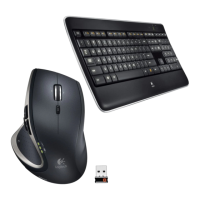
The keyboard, a central component of the MX800 combo, is engineered with a focus on both functionality and user comfort. It features a full-size layout, including a dedicated numeric keypad, ensuring that users have access to all necessary keys for data entry and navigation. A key highlight of the keyboard is its intelligent backlighting system. This system incorporates an automatic light sensor (ALS) that detects ambient light conditions and adjusts the keyboard's backlighting intensity accordingly. This not only conserves battery life but also ensures optimal visibility of the keys in various lighting environments, from brightly lit offices to dimly lit rooms. Users also have manual control over the backlighting, with dedicated function keys to decrease or increase the backlight intensity by 25% increments. This level of customization allows users to fine-tune the illumination to their personal preference, reducing eye strain and enhancing the typing experience.
Beyond standard alphanumeric keys, the keyboard integrates several convenience and application-specific function keys. The "Application zone" includes shortcuts for launching the internet browser (FN + F1), e-mail application (FN + F2), Windows Search (FN + F3), and an "Application Switcher" (FN + F4) which, when SetPoint® software is installed, functions as a "One Touch Search." These shortcuts streamline common tasks, allowing users to quickly access frequently used applications without navigating through menus. The "Convenience zone" further enhances usability with keys for backlight control (FN + F5, FN + F6), a battery check function (FN + F7) to monitor power levels, and a sleep mode key (FN + F8) to conserve energy when the keyboard is not in use.
For multimedia control, the keyboard is equipped with a "Multimedia navigation zone" and a "Multimedia volume zone." These zones provide quick access to media playback functions, including launching media (FN + F9), navigating to the previous track (FN + F10), playing/pausing content (FN + F11), and skipping to the next track (FN + F12). The volume zone offers dedicated keys for muting audio, decreasing volume, and increasing volume, along with a calculator shortcut. These features are particularly useful for users who frequently consume or manage media on their computers, offering an intuitive and efficient way to control audio and video playback directly from the keyboard. The presence of an FN key allows users to toggle between standard F-key functions and the enhanced functions, providing flexibility based on their workflow. A keyboard power switch is also included for complete power off when not in use for extended periods.
The mouse component of the MX800 combo, the Performance MX, is designed for ergonomic comfort and precision. It features a contoured shape that fits comfortably in the hand, reducing fatigue during prolonged use. The mouse includes standard left and right buttons, essential for most computer interactions. A key feature is the scroll wheel, which offers versatile scrolling capabilities. Users can press the wheel down for a middle click, or tilt it left and right to scroll horizontally, which is particularly useful for navigating wide spreadsheets or timelines.
A standout feature of the Performance MX mouse is its "scroll wheel mode shift button." This button allows users to instantly switch between two distinct scrolling modes: hyper-fast (free-spinning) scrolling and precision (click-to-click) scrolling. Hyper-fast scrolling is ideal for quickly navigating long documents or web pages, allowing the wheel to spin freely with minimal effort. Precision scrolling, on the other hand, provides tactile feedback with each increment, offering greater control for tasks that require fine adjustments, such as navigating menus or image editing. This adaptability makes the mouse suitable for a wide range of applications and user preferences.
Further enhancing the mouse's functionality are dedicated "back and forward buttons," typically located on the side, which facilitate quick navigation through web pages or file folders. A "zoom button" provides instant access to magnification features, useful for detailed work or viewing small text. An "application button" offers additional customization options, often programmable via Logitech's SetPoint software to perform specific tasks or launch applications. The mouse also includes an on/off switch to conserve battery life and a battery door release for accessing the battery compartment. A battery indicator light provides visual feedback on the mouse's power status.
Maintenance features for the Logitech Wireless Performance Combo MX800 primarily revolve around battery management and recharging. Both the keyboard and mouse are rechargeable, eliminating the need for disposable batteries and promoting environmental sustainability.
The mouse is recharged by plugging its charging cable into a powered USB port. The battery indicator on the mouse blinks red when it requires recharging, providing a clear visual cue to the user. It is important to note that only AA NiMH replacement batteries (with a minimum capacity of 1800 mAh) should be used, and the receiver extender cable should not be used for recharging the mouse.
The keyboard also features a rechargeable battery. Typically, users can expect approximately 10 days of battery life, though this can vary significantly based on usage patterns, especially the backlighting level. If the backlighting is set to 100%, the battery life reduces to about 15 hours. To recharge the keyboard, it is connected to the computer using the provided USB recharging cable. A full battery recharge takes approximately 5 hours. However, if the keyboard is switched off during charging, the recharge time is significantly reduced to about 3 hours. This feature allows users to quickly top up the battery, especially when time is limited. The battery life of both devices is influenced by computing conditions and the intensity of usage, with heavy usage generally leading to shorter battery life.
The Unifying technology is a core aspect of the MX800 combo's usage features. It allows up to six compatible Logitech devices to connect to a single, small USB receiver. This means users can expand their setup with other Unifying-compatible mice or keyboards without occupying additional USB ports. The setup process is straightforward: simply plug the Unifying receiver into a USB port on the computer, and the devices should connect automatically. For advanced customization and to manage multiple Unifying devices, Logitech's SetPoint software can be downloaded from the Logitech website. This software allows users to personalize button assignments, adjust tracking speed, and configure other settings to optimize their workflow.
In summary, the Logitech Wireless Performance Combo MX800 is a versatile and user-friendly input system that combines ergonomic design with advanced features. Its intelligent backlighting, customizable function keys, and adaptable scrolling mouse are designed to provide a comfortable, efficient, and personalized computing experience, supported by convenient recharging capabilities and the flexibility of Unifying technology.
 General
| Purpose | Universal |
|---|---|
| Keyboard layout | QWERTY |
| Device interface | RF Wireless |
| Keyboard language | - |
| Keyboard form factor | Full-size (100%) |
| Connectivity technology | Wireless |
| Wrist rest | No |
| Product color | Black |
| Keyboard style | Straight |
| Ergonomic design | Yes |
| Surface coloration | Monochromatic |
| Cables included | USB |
| Wireless receiver interface | USB Type-A |
| Scroll type | Wheel |
| Scrolling directions | Vertical/Horizontal |
| Number of scroll wheels | 1 |






 To Next Page