The Logitech Rally Mic Pod is a crucial component for optimizing audio pickup in various conference room setups, designed to enhance the video conferencing experience across Logitech's Rally family of products. This guide details its placement and configuration to ensure clear and consistent audio, adapting to different room sizes and table layouts.
Function Description
The primary function of the Rally Mic Pod is to capture voices during video conferences, ensuring that all participants are heard clearly, regardless of their position in the room. It works in conjunction with Logitech Rally Bar, Rally Bar Mini, and Rally Plus systems, extending the microphone pickup range beyond the built-in capabilities of the video bars. The mic pod is engineered to provide high-quality audio input, contributing to an immersive and effective meeting environment. Its design focuses on delivering consistent voice pickup, minimizing background noise, and integrating seamlessly into professional settings.
Usage Features
The Rally Mic Pod offers several usage features that make it versatile and effective in various meeting scenarios:
- Flexible Placement: Mic pods can be placed on tables or mounted on ceilings. Both options offer comparable performance, provided the mic pods are correctly positioned and spaced, especially in rooms with ceiling heights of 10 ft or less. For higher ceilings, closer spacing is recommended. This flexibility allows for optimal audio capture in diverse architectural and furniture arrangements.
- Scalability for Room Sizes: The number of mic pods can be scaled to suit different room sizes and capacities.
- Rally Bar Mini supports up to three mic pods, ideal for small to medium rooms (3 to 12 people, up to 18' x 20').
- Rally Bar supports up to four mic pods, suitable for medium to large rooms (up to 20 people, up to 15' x 26').
- Rally Plus, designed for larger rooms (up to 46 people, up to 28' x 40'), supports up to seven mic pods.
This scalability ensures that even expansive conference spaces receive comprehensive audio coverage.
- Mic Pod Configurations: The guide provides specific configurations for different table layouts:
- Rectangular Tables (Default Mode): For a basic setup, the first mic pod should be placed 12 ft (3.7 m) from the video bar, with subsequent mic pods spaced 8 ft (2.4 m) apart. This spacing ensures optimal overlapping coverage, leveraging the mic pod's 15 ft (4.6 m) diameter pickup range. In this default mode, both external mic pods and the internal microphones of the video bar are active, with internal mics covering closer voices and external mics covering farther ones.
- Triangle-Shaped Tables (Default Mode): Two mic pods are recommended, mounted on either side of the table. This configuration provides coverage for participants at the table and those along walls or near whiteboards.
- U-Shaped Tables or Classrooms (Default Mode): Three mic pods are ideal. The two mic pods closest to the video bar should be spaced no more than 12 ft (3.7 m) from the camera. This setup ensures excellent mic coverage for all participants.
- Speaker Boost Mode: This mode is particularly useful for larger rooms or specific audio requirements. When activated, only the external mic pods are active, and the camera's internal microphones are turned off. This allows the speaker volume to be increased by 3 decibels (dB) without creating echo, resulting in a louder and more consistent audio experience as all voices are picked up by the same type of microphone.
- Rectangular Tables (Speaker Boost Mode): An additional mic pod is used closer to the video bar to ensure voices near the front of the room are captured effectively, as the internal mics are off.
- Triangle-Shaped Tables (Speaker Boost Mode): Two mic pods are used, focusing on capturing voices seated at the table.
- U-Shaped Tables (Speaker Boost Mode): Mic pods are biased towards the front of the room, spaced no more than 8 ft (2.4 m) apart, to ensure appropriate coverage for participants facing the camera.
- Longer Tables (Speaker Boost Mode for Rally Plus): With Rally Plus, up to seven mic pods can be used for very long or V-shaped tables, spaced a maximum of 8 ft (2.4 m) apart, ensuring comprehensive coverage across the entire table and any additional seating along walls.
- Acoustic Optimization: The guide emphasizes testing configurations in individual rooms due to variations in room acoustics and HVAC systems. This practical approach ensures that the chosen mic pod placement delivers the best possible audio performance for each unique environment.
- Integration with Rally Mic Pod Extension Cable: For scenarios requiring greater spacing between mic pods, such as when seats are along the periphery of the room or whiteboards are used, a 10-meter plenum- and ECA-rated extension cable can be used. This cable allows for more flexible placement, ensuring coverage even in extended layouts. Rally Bar and Rally Bar Mini support up to two extension cables, while Rally and Rally Plus support one, connected to the table hub.
- Rally Mic Pod Hub: This accessory provides three connectors and a 9.5 ft (2.9 m) cable, offering installers flexibility in customizing microphone placement. Rally Bar supports two Mic Pod Hubs and four Mic Pods, Rally Bar Mini supports two Mic Pod Hubs and three Mic Pods, and Rally Plus supports seven Mic Pod Hubs and seven Mic Pods.
Maintenance Features
While the guide does not explicitly detail maintenance features for the mic pods, the design and accessory recommendations imply ease of installation and upkeep:
- Hidden Cabling: The Rally Mic Pod Mount is designed to secure the mic pod in a desired location (table or ceiling) while keeping cables hidden. This not only contributes to a clean aesthetic but also protects the cables from damage, reducing the need for frequent maintenance or repairs. Available in graphite or white, these mounts blend seamlessly with various room decors.
- Durable Design: Logitech products are generally built for durability in professional environments, suggesting that the mic pods are robust enough to withstand regular use without requiring extensive maintenance.
- System Integration: The mic pods are part of a larger Logitech Rally ecosystem, which typically includes software updates and support that can address performance issues and ensure long-term functionality. Regular system checks and software updates, as recommended for the overall Rally system, would indirectly contribute to the optimal performance and longevity of the mic pods.
In summary, the Logitech Rally Mic Pod is a highly adaptable and essential accessory for achieving superior audio quality in video conferencing. Its flexible placement, scalability, and specialized configurations, combined with thoughtful accessory integration, ensure that every participant is heard clearly, making meetings more productive and engaging.

 Need help?
 General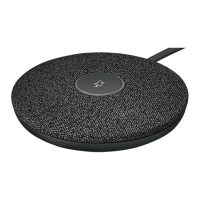

 To Next Page
