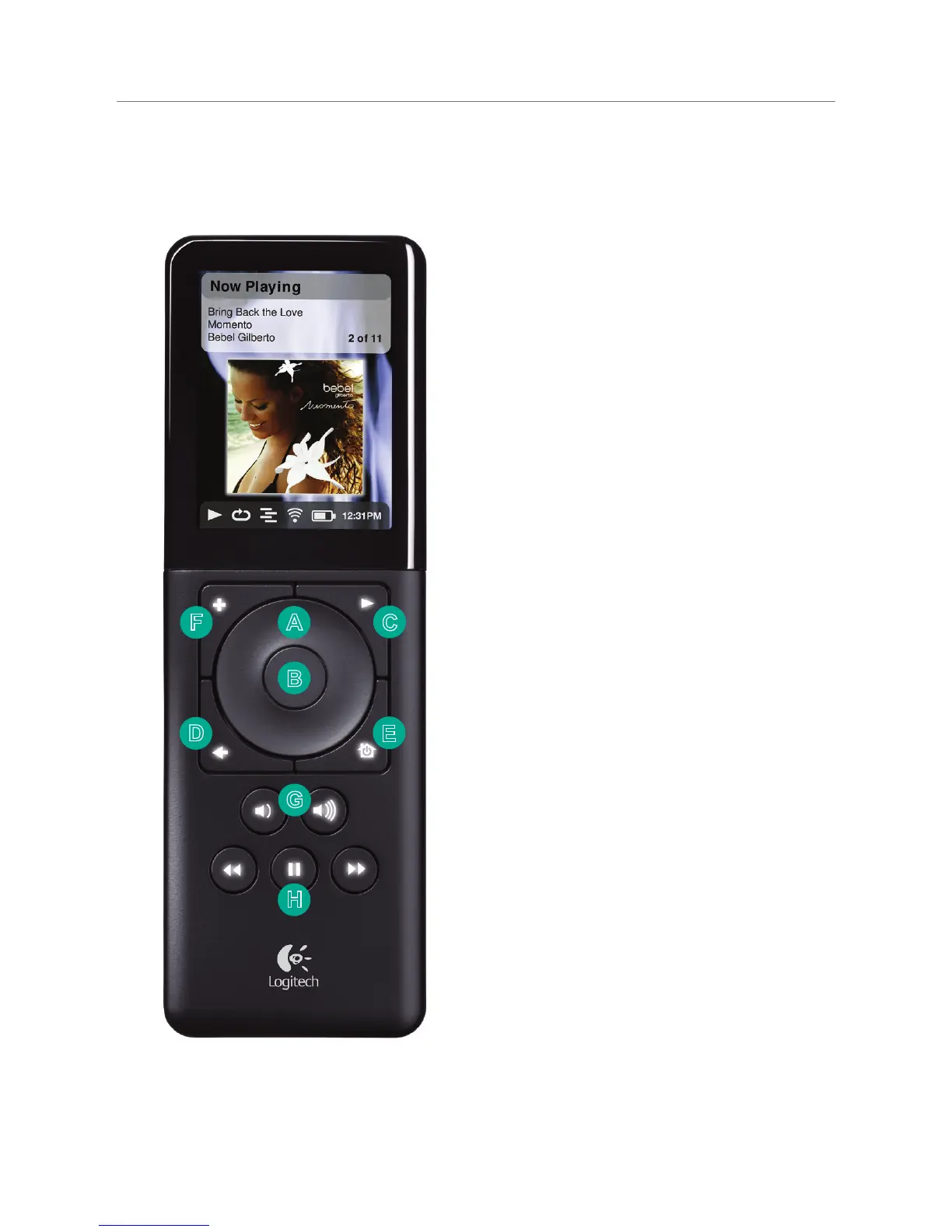
Squeezebox Controller Interface
A. The SCROLL WHEEL allows you to
easily move up and down through
lists and menus.
B. Press the CENTER button to open
a menu item, song, album, artist,
or genre.
C. Press PLAY to play a song, album,
artist, or genre. This will replace
your current selection.
D. Press BACK to move back one menu
item or screen.
E. Press HOME to go to the top level
menu. Press home again to see
the Now Playing screen. HOME
also turns the Controller on and
off. Press and hold to power down;
press once to power on.
F. Press ADD to add a song, album,
artist, or genre to the current
playlist.
G. Use the VOLUME UP and DOWN
keys to control volume. A pop-up
volume bar appears showing the
current level; while the pop-up is
on screen, the SCROLL WHEEL will
also adjust the volume
H. REW, PAUSE, and FWD control
the playback of your music.
Press and hold pause to stop.



 To Next Page