Need help?
Do you have a question about the Logitech Z207 and is the answer not in the manual?
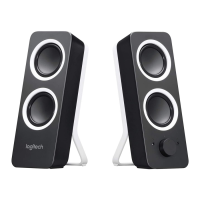
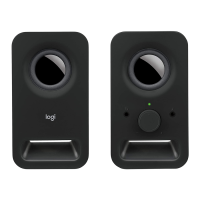
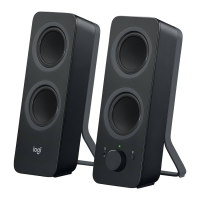
The Logitech Z207 Bluetooth Computer Speakers are designed to provide a versatile audio experience for your computer or other compatible devices. These speakers offer both wired and wireless connectivity options, making them adaptable to various setups and user preferences. The system comprises two speakers, a left and a right unit, with the right speaker housing the primary controls and connectivity ports.
At its core, the Z207 system functions as an external audio output for your devices. Whether you're listening to music, watching videos, or engaging in online meetings, these speakers aim to deliver clear and robust sound. The dual connectivity options are a key feature, allowing users to choose between a traditional 3.5mm auxiliary input and modern Bluetooth wireless pairing. This flexibility ensures compatibility with a wide range of devices, from older computers and media players to contemporary smartphones and tablets.
Setting up the speakers is designed to be straightforward. The process begins with connecting the DC power plug to the back of the right speaker and then plugging the AC adapter into an electrical outlet. For wired audio, a 3.5mm auxiliary cable connects from the back of the right speaker to the audio jack on your source device. This simple plug-and-play approach allows for immediate audio output without complex configurations.
For wireless connectivity, the Z207 speakers leverage Bluetooth technology. The right speaker features a dedicated Bluetooth pairing button. To initiate pairing, users press and hold this button for approximately three seconds. An indicator light (LED) on the speaker will begin to blink, signaling that the speakers are in pairing mode. At this point, users can enable Bluetooth on their source device (e.g., smartphone, tablet, or computer) and select "Logi Z207" from the list of available devices. Once successfully paired, the LED on the speaker will transition to a steady blue light, confirming the wireless connection. This seamless pairing process allows for quick and convenient audio streaming without the clutter of cables.
Beyond basic audio output, the Z207 speakers incorporate several user-friendly features for enhanced control and convenience. The right speaker serves as the central control hub, featuring a prominent power knob that also doubles as a volume control. Rotating this knob clockwise increases the volume, while rotating it counter-clockwise decreases it. This integrated control simplifies audio adjustments, making it easy to fine-tune the listening experience.
Another practical feature is the headphone jack located at the front of the right speaker. This allows users to connect their headphones directly to the speakers, providing a private listening option without needing to unplug the speakers from the audio source. When headphones are plugged in, the audio output typically switches from the speakers to the headphones, offering a convenient way to transition between shared and personal listening.
The design of the speakers includes indicator lights (LEDs) that provide visual feedback on the device's status. These lights are crucial for understanding the pairing status during Bluetooth setup and for confirming power on/off. The overall aesthetic is clean and functional, with a focus on ease of use.
While the manual primarily focuses on setup and usage, it implicitly suggests a low-maintenance design. The absence of specific maintenance instructions implies that the speakers are largely self-sufficient once set up. General care for electronic devices, such as keeping them free from dust and moisture, would apply to ensure their longevity. The robust build and straightforward operation contribute to a user experience that prioritizes functionality and reliability.
In summary, the Logitech Z207 Bluetooth Computer Speakers are designed to be a versatile and user-friendly audio solution. They combine the reliability of a wired connection with the convenience of Bluetooth wireless technology, offering flexible options for various devices. With intuitive controls for power, volume, and Bluetooth pairing, along with a convenient headphone jack, these speakers aim to provide an accessible and enjoyable audio experience for everyday use.
 General
| Package type | Box |
|---|---|
| Package depth | 217 mm |
| Package width | 125.6 mm |
| Package height | 244 mm |
| Package weight | 1307 g |
| Product color | White |
| Volume control | Rotary |
| Recommended usage | PC |
| Speaker type | - |
| Number of drivers | 4 |
| Speaker placement | Tabletop/bookshelf |
| Audio output channels | 2.0 channels |
| RMS rated power | 5 W |
| Peak Music Power Output (PMPO) | 10 W |
| Bluetooth | Yes |
| Bluetooth range | 20 m |
| Bluetooth version | 4.1 |
| Headphone outputs | 1 |
| Headphone connectivity | 3.5 mm |
| Connectivity technology | Wired & Wireless |
| Cables included | Audio (3.5mm) |
| Quantity per pack | 2 pc(s) |
| Power plug type | Type G |
| Power source type | AC |
| Suitable for use in country/location | United Kingdom |
| Master (outer) case width | 231 mm |
| Master (outer) case height | 262 mm |
| Master (outer) case length | 522 mm |
| Master (outer) case weight | 5750 g |
| Harmonized System (HS) code | 85182200 |
 Weight and Dimensions
| Depth | 124 mm |
|---|---|
| Width | 90 mm |
| Height | 241 mm |
| Weight | 900 g |

 To Next Page