EasyManua.ls Logo

Logitech Z213 - User Manual

Logitech Z213
6 pages
Print Icon
To Next Page IconTo Next Page
Loading...
Logitech® Multimedia Speaker Z213
Setup Guide

Other manuals for Logitech Z213

Question and Answer IconNeed help?

Do you have a question about the Logitech Z213 and is the answer not in the manual?

Summary

Whats in the Box

Satellite Speakers

Identifies the two main speaker units included in the package.

Subwoofer Unit

Details the bass module component of the speaker system.

User Documentation

Refers to the printed instructional materials provided with the product.

Speaker Setup Guide

Connect Satellite Speakers

Connect the satellite speakers to the subwoofer unit using their cables.

Connect Power Cord

Plug the speaker system's power cord into an electrical outlet.

Connect Audio Source

Insert the wired remote's 3.5mm plug into your device's audio jack.

Power On Speaker System

Activate the multimedia speaker system via the ON/OFF button on the wired remote.

Product Features and Usage

Adjusting Speaker Volume

Control the audio output volume using the wheel on the wired remote.

Headphone Usage

Connect headphones to the wired remote; speaker output mutes automatically.

Adjusting Bass Controls

Modify the bass level by turning the control knob on the subwoofer.

Summary

Whats in the Box

Satellite Speakers

Identifies the two main speaker units included in the package.

Subwoofer Unit

Details the bass module component of the speaker system.

User Documentation

Refers to the printed instructional materials provided with the product.

Speaker Setup Guide

Connect Satellite Speakers

Connect the satellite speakers to the subwoofer unit using their cables.

Connect Power Cord

Plug the speaker system's power cord into an electrical outlet.

Connect Audio Source

Insert the wired remote's 3.5mm plug into your device's audio jack.

Power On Speaker System

Activate the multimedia speaker system via the ON/OFF button on the wired remote.

Product Features and Usage

Adjusting Speaker Volume

Control the audio output volume using the wheel on the wired remote.

Headphone Usage

Connect headphones to the wired remote; speaker output mutes automatically.

Adjusting Bass Controls

Modify the bass level by turning the control knob on the subwoofer.

Overview

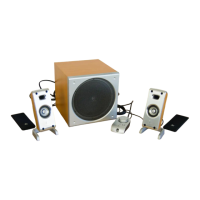
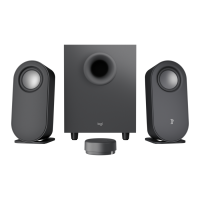
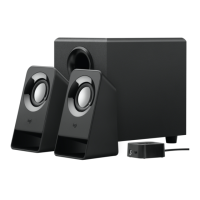
The Logitech Multimedia Speaker Z213 is a 2.1 speaker system designed to enhance your audio experience across various devices. This setup guide provides a comprehensive overview of its components, setup process, and key features, ensuring users can quickly and effectively integrate it into their entertainment or workspace. The system comprises two satellite speakers and a subwoofer, along with a wired remote control that offers convenient access to essential functions.

Function Description

The primary function of the Logitech Multimedia Speaker Z213 is to deliver clear and robust audio from a range of sources. It's designed to be compatible with devices such as computers, tablets, and smartphones, making it a versatile audio solution for personal entertainment, gaming, or general media consumption. The 2.1 configuration means it includes two satellite speakers for stereo sound and a dedicated subwoofer for deep bass, providing a fuller and more immersive audio experience compared to built-in device speakers.

The satellite speakers are responsible for reproducing mid-range and high-frequency sounds, ensuring vocals and instruments are clear and distinct. Their compact size allows for flexible placement on a desk or shelf without occupying too much space. The subwoofer, on the other hand, is specifically engineered to handle low-frequency sounds, adding depth and impact to music, movies, and games. This combination creates a balanced sound profile, where both subtle details and powerful bass are well-represented.

Connectivity is straightforward, utilizing a standard 3.5mm audio jack. This universal connection ensures compatibility with almost any audio source that has a headphone output. The system is powered via a standard electrical outlet, providing consistent and reliable power for optimal performance.

Usage Features

The Logitech Multimedia Speaker Z213 is designed with user convenience in mind, offering several features that simplify its operation and enhance the listening experience.

  • Wired Remote Control: A central component of the Z213 system is its wired remote control. This remote puts essential functions within easy reach, eliminating the need to access the subwoofer or individual satellite speakers for adjustments.
    • Volume Adjustment: The remote features a prominent wheel for adjusting the speaker volume. This allows for quick and precise control over the overall sound level, enabling users to easily adapt the audio to their environment or preference.
    • Power ON/OFF Button: A dedicated ON/OFF button on the wired remote provides a convenient way to power the multimedia speaker system on or off without reaching for the main power source or the subwoofer. This ensures that the system can be activated or deactivated with minimal effort.
    • Headphone Jack: The wired remote also includes a 3.5mm headphone jack. This is a particularly useful feature, as it allows users to plug in their headphones directly into the remote. When headphones are connected, the speaker system automatically mutes, seamlessly transitioning from speaker output to private listening. This eliminates the need to unplug the speakers from the audio source or manually mute them, streamlining the switch between shared and personal audio.
  • Bass Control: Beyond the main volume, the Z213 offers adjustable bass levels. A dedicated bass control knob is located on the back of the subwoofer. This allows users to fine-tune the intensity of the low-frequency output, catering to different audio content and personal preferences. For instance, users might prefer a stronger bass for action movies or certain music genres, while a more subdued bass might be suitable for podcasts or acoustic music. Turning the knob clockwise increases the bass level, providing a customizable audio experience.
  • Easy Setup: The setup process for the Z213 is designed to be intuitive and quick.
    1. Satellite Connection: The cables from the two satellite speakers plug directly into designated jacks on the subwoofer. This ensures a secure and proper connection for stereo sound.
    2. Power Connection: The subwoofer's power cord plugs into a standard electrical outlet, providing the necessary power for the entire system.
    3. Audio Source Connection: The 3.5mm plug from the wired remote connects to the audio output jack of your device (e.g., computer, tablet, smartphone). This establishes the audio signal path from your device to the speakers.
    4. Power On: Finally, the system is turned on using the ON/OFF button on the wired remote. This simple, step-by-step process ensures that users can get their speakers up and running in minutes.
  • Automatic Muting with Headphones: As mentioned, when headphones are plugged into the wired remote, the speakers automatically mute. This intelligent design prevents sound from playing simultaneously through both the speakers and headphones, ensuring a smooth transition to private listening. When headphones are in use, the main control volume for the headphones is typically managed through the connected audio device (computer, tablet, or smartphone), rather than the speaker's wired remote volume wheel. This ensures that headphone volume can be adjusted independently of the speaker system's volume settings.

Maintenance Features

The Logitech Multimedia Speaker Z213 is designed for low maintenance, focusing on durability and ease of use rather than requiring complex upkeep.

  • Durable Construction: The components of the Z213 system are built with robust materials, designed to withstand regular use in various environments. The black finish is generally resistant to minor scuffs and marks, maintaining its aesthetic appeal over time.
  • Simple Cleaning: The smooth surfaces of the satellite speakers, subwoofer, and wired remote make them easy to clean. A soft, dry cloth is typically sufficient to wipe away dust and fingerprints, keeping the system looking neat. For more stubborn marks, a slightly damp cloth can be used, ensuring no liquid enters any openings.
  • No Software or Driver Installation: The Z213 is a plug-and-play audio system. It does not require any specialized software or driver installations, simplifying its integration with various devices. This eliminates the need for software updates or troubleshooting related to drivers, contributing to its low-maintenance profile.
  • Self-Contained System: The system is largely self-contained, with all necessary cables and controls integrated. There are no user-serviceable parts inside the speakers or subwoofer, which means users do not need to perform internal maintenance. Any issues beyond basic troubleshooting would typically require professional service or replacement, aligning with a low-maintenance design philosophy.
  • User Documentation: The included user documentation provides clear instructions for setup and usage, which serves as a maintenance feature by empowering users to correctly operate the device and troubleshoot common issues. This reduces the likelihood of user-induced problems and extends the lifespan of the product through proper handling.

In summary, the Logitech Multimedia Speaker Z213 offers a straightforward, effective, and user-friendly audio solution. Its 2.1 speaker configuration delivers enhanced sound quality, while the intuitive wired remote control and adjustable bass provide a customizable listening experience. Designed for ease of use and minimal upkeep, it's a practical choice for anyone looking to upgrade their device's audio output.
Logitech Z213 Specifications

General IconGeneral
BrandLogitech
ModelZ213
CategorySpeakers
LanguageEnglish

Related product manuals