8 English
AUX
CHANNEL
LEVEL
—
VOL
+
VOL
RCA
5.1
2.1
1
4
6
8
11
9
12
7
5
2 3
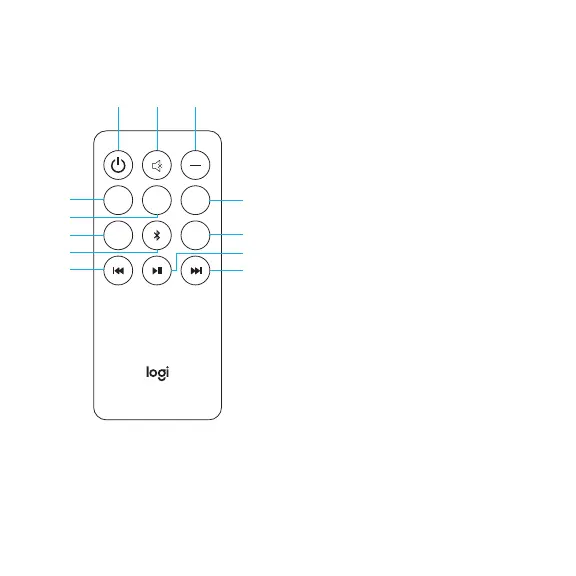
1. Power ON/OFF:
Turns unit on/o.
2. Mute: Mutes the system.
3. 5.1 / 2.1: Switches from 5.1
to2.1channels as needed
(onlyifinput supports 5.1 channels).
4. -Vol:
a. Decreases the master volume.
b. When selecting channel level
button rst, -voldecreases
thevolume of the selected
channel.
5. Channel Level:
Controls volume of speaker
channels. Press once to cycle
through front (F) speakers, rear(R)
speakers, center (C) speaker,
andsubwoofer (S), selectthe
channel and adjust thevolume of
that unit or channel from 5 to -5.
System will save channel volume
adjustment.
REMOTE CONTROL


 To Next Page