5
Camera Specs/Looxcie Desktop
Camera Specs
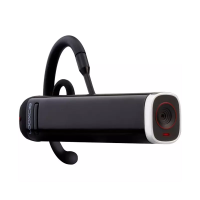
CAMERA BODY
• WiFi connectivity
• Fast-charging 3.7v, 700mAh Li-Ion battery
• Micro-USB port for charging battery and data transfer
• UL/CSA-approved power supply
• Dimensions: 1.875 in x 1.875 in x 0.625 in (W x H x D)
(4.8cm x 4.8cm x 1.5cm)
• Weight: 22g (less than 1 oz.)
CAMERA SENSOR & VIDEO
• Image sensor: HD 720p/30fps
• Lens: aperture f2.2
• 100° eld of view (FOV)
• Focal range: 25cm—innity
• Codec: MPEG-4 video, AAC audio
• Streaming video resolution: WQVGA
SYSTEM REQUIREMENTS
• Looxcie mobile app (free download)
• Smartphone or tablet with Android 2.4 or higher or iPhone
or iPad with iOS 6.1 or higher
• Looxcie computer desktop application (free download)
• Windows XP (32-bit), Windows Vista, Windows 7, Windows
8 or higher, or Mac OS X (10.6.8, 10.7.5, and 10.8.3 and up)
• 1 available USB 2.0/3.0 Port
Using the Looxcie Desktop Utility
Use the Looxcie Desktop utility to:
• Update your camera’s rmware.
• Adjust your camera’s settings.
• Download video or photos from your camera to your computer.
UPDATE CAMERA FIRMWARE
To update your camera’s rmware, see “Download & Update”, page 2.
Password and Sounds
In Settings, you can:
• Change your WiFi password
• Turn your camera beeping sounds on and o


 To Next Page