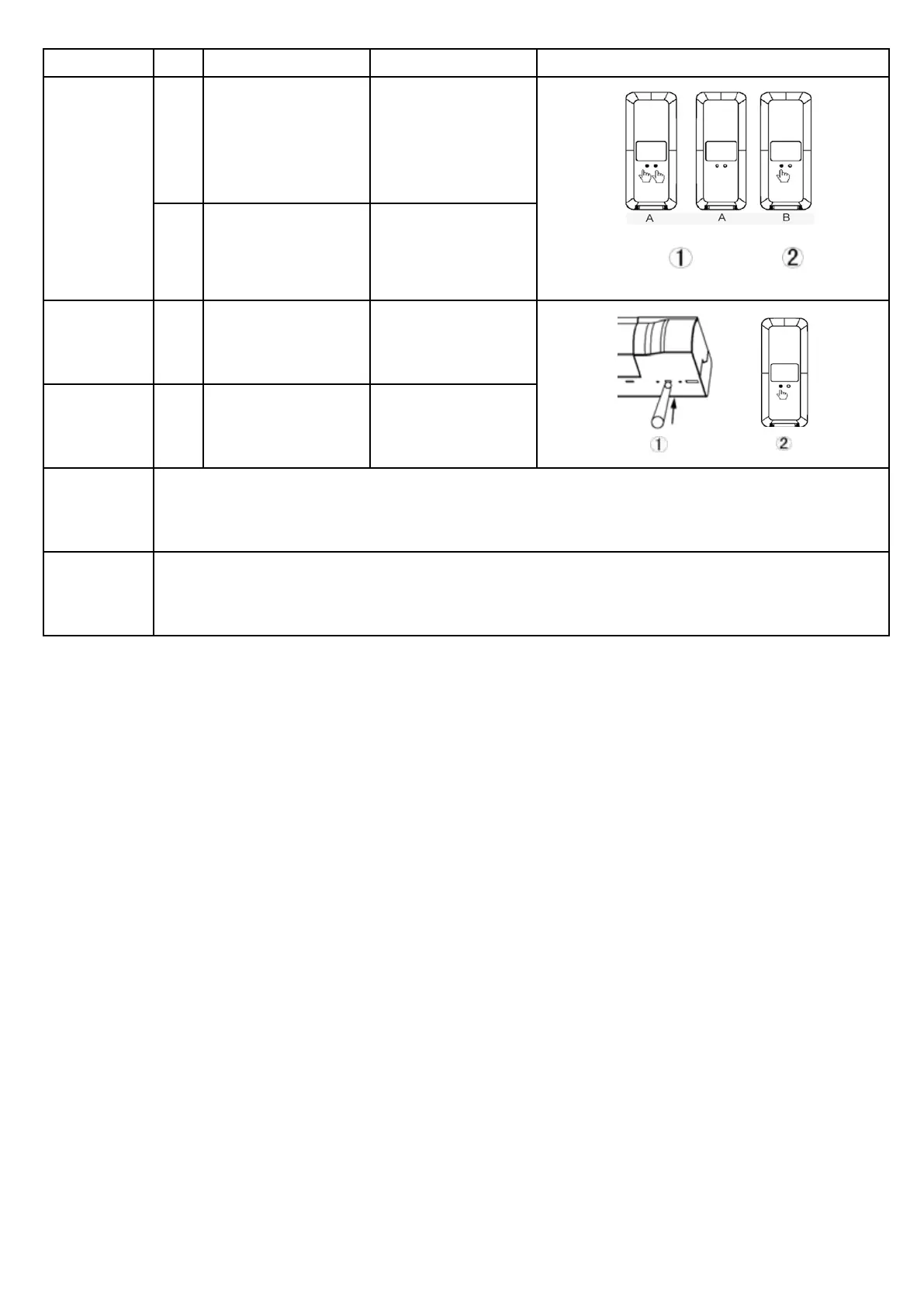
Operation Step Operation Result Illustration
Program
a second
remote with
an already
programmed
remote
1
Press and hold the
LIMIT button on the
rst programmed
remote A then press
the CONFIRM button
Release both buttons
when the Red LED
ashes
2
Now press the
CONFIRM button on
remote B
Green LED ashes,
now all programmed
remotes have been
detected
Delete all
remotes
1
Press SETTING
button on the motor
3 times
Green LED ashes,
now all programmed
remotes have been
deleted
Delete one
remote from
the motor
2
Press CONFIRM
button 2 times on the
back of the remote
Green LED ashes,
now the remote has
been deleted from
the motor
Charging
The motor works with Li-ion battery, please charge it when the motor alarms or work are faltering.
Please charge the motor using a professional charger DC5V.
Charging time: Charge for 6 hours or when the indicator turns Green.
Please remove the charger once it’s full.
FAQ
If nothing works then please check the following:
- Make sure you change the motor battery rst.
- If the motor continues to turn continuously, the user hasn’t setup the limit successfully. You will need
to re-set the limit.



 To Previous Page