I681 GB 12 23 31100514
4
– For many pages, the ✔ button permits access to sub-pages (for example, to display the maximum and minimum values recorded).
– The sub-page displayed currently is indicated at the bottom left by one of the following icons:
•
IN = instantaneous value – Current instantaneous value of the measurement, displayed by default every time the page is changed
•
HI = maximum instantaneous value – Highest value measured by the SPI for the corresponding measurement. HIGH values are stored and preserved even in the absence of a power supply. They can be reset
through a dedicated command (see COMMANDS MENU on page 8)
•
AV = average value – Average value of the measurements, with slowed variations (average of the last minute)
•
LO = minimum instantaneous value – Lowest value measured by the SPI from the moment voltage is applied. It is reset with the same command used for the HI values
•
GR = graphic bars – Display of measurements through graphic bars.
– The user can specify the page and sub-page to return to automatically after no buttons have been pressed for a given time.
– It is also possible to program the PMVF52 so that the display always remains that which was last selected.
– For the Setup of these functions, see MENU M02 – UTILITY on page 7.
TABLE OF DISPLAY PAGES
No. Selection via
s
and
t
Selection via ✔
PAGES SUB-PAGES
1 VOLTAGES, FREQUENCY HI LO AV GR
V(L1-L2), V(L2-L3), V(L3-L1), F(Hz)
2 SPI STATE OVERVIEW
STATE OF IS/BACKUP CONTROL OUTPUTS, FEEDBACK INPUTS, EXTERNAL SIGNAL, INTERTRIPPING
3 ACTIVE THRESHOLDS – DELAYS IN USE
V/F THRESHOLDS AND DELAYS CURRENTLY ACTIVE
4 SPI TRIP COUNTER
IS TRIP CNT, BACKUP TRIP CNT
5 VOLTAGE THRESHOLD TRIP COUNTERS
CNT 59.S2,CNT 59.S1,CNT 27.S1,CNT 59.S2
6 FREQUENCY THRESHOLD TRIP COUNTERS
CNT 81>.S2, CNT 81>.S1, CNT 81<.S1, CNT 81<.S2
7 PHASE-TO-PHASE VOLTAGES HI LO AV GR
V(L1-L2), V(L2-L3), V(L3-L1), V(LL)EQV
8 PHASE-TO-NEUTRAL VOLTAGES HI LO AV GR
V(L1-N), V(L2-N), V(L3-N), V(L-N)EQV
9 MOVING AVERAGE VOLTAGE HI LO
VM(L1-L2), VM(L2-L3), VM(L3-L1)
10 INPUTS STATUS
11 OUTPUTS STATUS
12 EVENTS LOG
13 EXPANSION MODULES
14 INFO-REVISION-SERIAL NO.
MODEL, REV SW, REV HW, SER. No.
15 LOGO
– Note: the moving average voltage measurement is not available for the first 10 minutes after switching on or resetting the system. During this time, dashes and a countdown indicating the time left before
measurement display are shown.
MAIN MENU
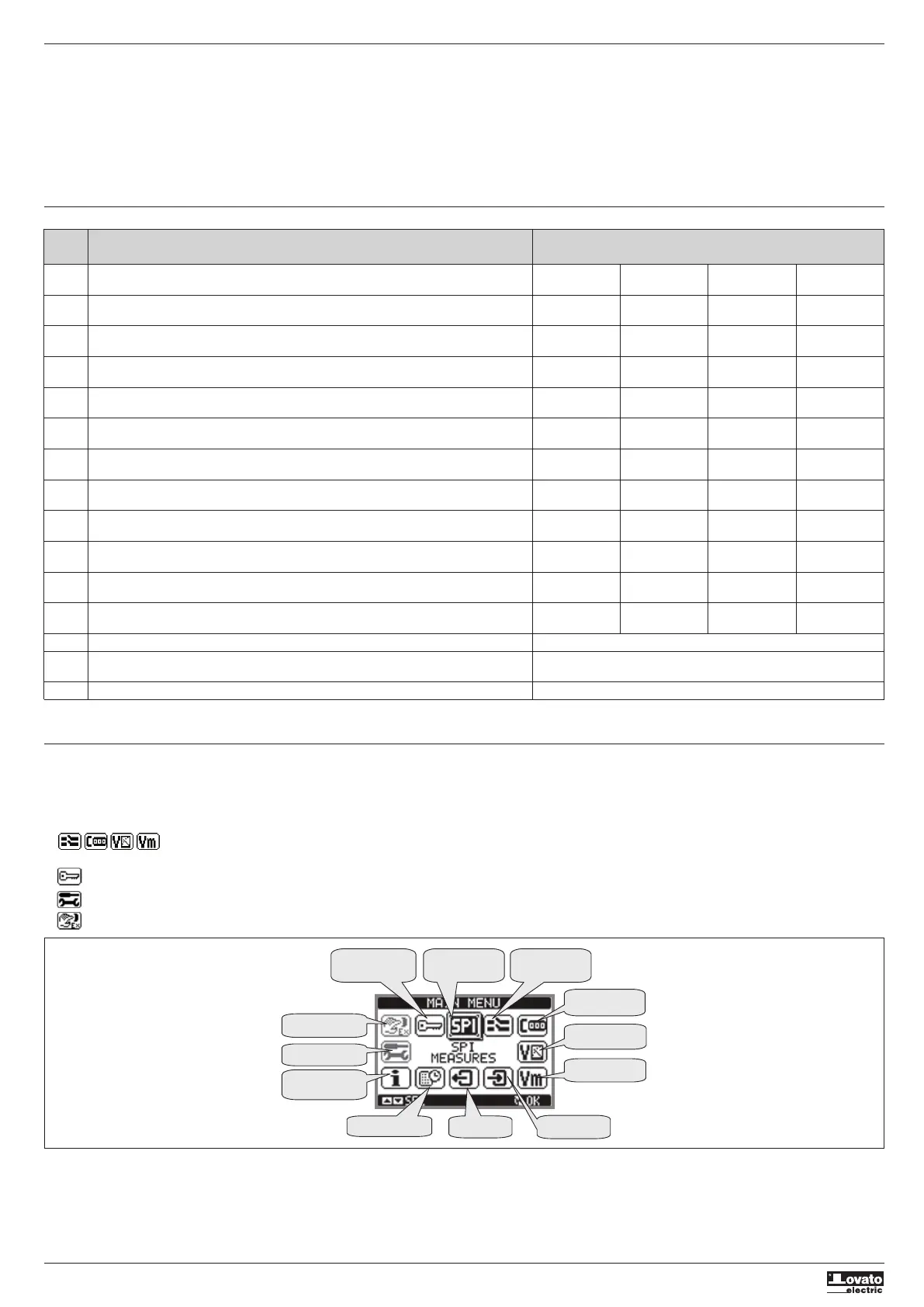
– The main menu consists of a set of graphic icons which allow rapid access to measurements and settings.
– Starting from the normal measurement display, press the MENU button. The display shows the quick menu (see figure below).
– Press
s
or
t
to select the desired function. The selected icon is highlighted and the message in the middle of the display indicates the description of the function.
– Press ✔ to activate the selected function.
– If some functions are not available, the corresponding icon will be deactivated, i.e. greyed out.
– etc. - Operate as shortcuts which allow quicker access to pages for displaying measurements, going directly to the selected group of measurements, from which it is possible to move
forwards and backwards as usual.
– – Setting the numeric code which permits access to protected functions (setting parameters, executing commands).
– – Parameter programming access point. See the Setting Parameters (Setup) section on page 5.
– – Commands Menu access point, where authorised users can perform a number of resetting and restoring operations.
Voltages
Voltage moving
average
Inputs status
Outputs status
Event log
Information
page
Setup menu
Commands menu
Password
SPI measurements/
thresholds
SPI overview
Trip
counters



 To Next Page
 Loading...