I446 GB I 09 17 31100242
3
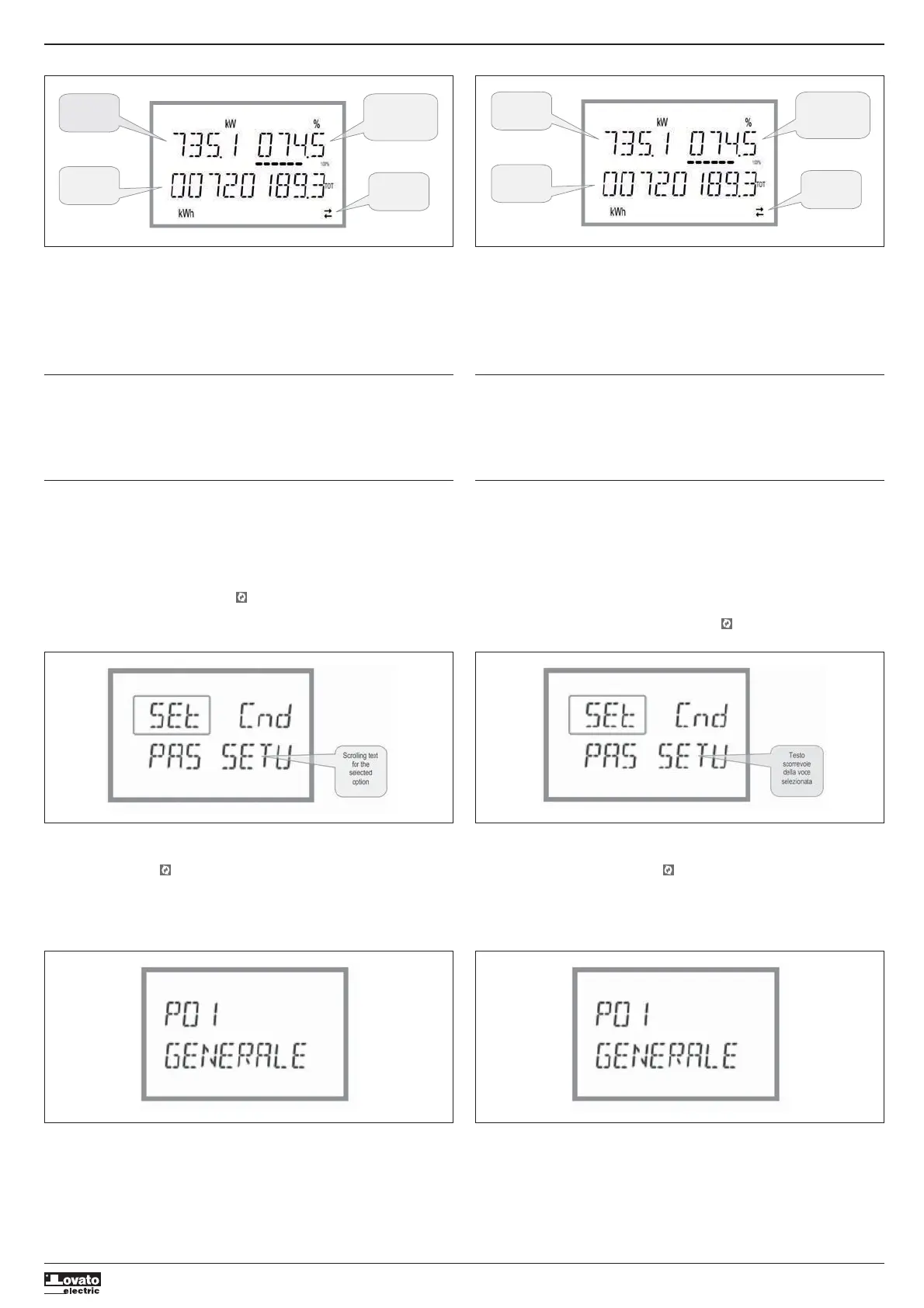
MAIN PAGE PAGINA PRINCIPALE
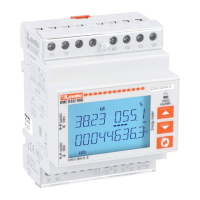
Active power
measured on the
system
Active power
percentage with
respect
to the rated
value for the system
Total active
energy meter
RS485
communication
active (flashing)
Potenza attiva
misurata
sull’impianto
Percentuale della
potenza attiva rispetto
alla nominale
dell’impianto
Contatore di
energia attiva
totale
Comunicazione
RS485 attiva
(lampeggiante)
– La pagina principale visualizza la potenza attiva attualmente impegnata nell’impianto, la percentuale
della potenza attiva rispetto a quella nominale dell’impianto ed il contatore di energia attiva totale di
sistema.
– L’utente ha la possibilità di specificare su quale pagina e su quale sotto-pagina il display DMED330
deve ritornare automaticamente dopo che è trascorso un tempo senza che siano premuti dei tasti.
– E’ anche possibile programmare il contatore di energia in modo che la visualizzazione resti sempre
nella posizione in cui è stata lasciata.
– Per l’impostazione di queste funzioni vedere menu P02 – Utilità.
LED METROLOGICO FRONTALE
– Il LED rosso frontale emette 10000 impulsi per ogni kWh di energia consumata, riferita al secondario
del TA.
– La frequenza di lampeggio del LED dà un’immediata indicazione dell’entità della potenza richiesta in
un determinato istante.
– La durata del lampeggio, il colore e l’intensità del LED sono conformi alle norme che prescrivono il
suo utilizzo ai fini di una verifica metrologica della accuratezza del contatore di energia.
MENU PRINCIPALE
Per accedere al menu principale:
– Premere contemporaneamente
L
e
M
. Viene visualizzato il menu principale (vedi figura) con le
possibili scelte:
• SET – Accesso al menu impostazioni Setup
• CMD – Accesso al menu comandi
• PAS – Inserimento della password
– La scelta selezionata lampeggia. Nel display alfanumerico scorre una scritta descrittiva della scelta
effettuata.
– Se è necessario impostare la password, il menu si apre con la voce PAS già selezionata.
– Premere
LM
per selezionare la voce volute e poi premere per confermare la scelta.
– Se si vuole tornare alla visualizzazione misure premere di nuovo contemporaneamente
L
e
M
.
– The main page displays the active power currently used in the system, the active power percentage
with respect to the rated value for the system and the total active energy meter for the system.
– The user can choose the page and sub-page that the DMED330 display returns to automatically after
a certain time has elapsed without the buttons being pressed.
– It is also possible to program the energy meter so that the display always remains that which was last
selected.
– For the setup of these functions, see the P02 – Utility menu.
FRONT METROLOGY LED
– The red front LED pulses 10,000 times for each kWh of energy consumption, referred to the CT
secondary.
– The flashing frequency of the LED provides an immediate indication of the amount of power required
in a given moment.
– The duration of the flashing, the colour and the intensity of the LED comply with the standards that
prescribe its use for metrological checking of the energy counter’s accuracy.
MAIN MENU
To access the main menu:
– Press
L
and
M
simultaneously. The main menu is displayed (see figure), with the available options:
• SET – Access to the setup menu
• CMD – Access to the commands menu
• PAS – Password entry
– The selected option flashes. Descriptive text for the selection scrolls in the alphanumeric display.
– If the password needs to be set, the menu opens with the PAS option already selected.
– Press
LM
to select the desired option, then to confirm.
– To return to the measurement display, press
L
and
M
simultaneously again.
IMPOSTAZIONE DEI PARAMETRI (SETUP)
– Dalla normale visualizzazione misure, premere contemporaneamente
L
e
M
per richiamare il menu
principale, quindi selezionare SET e premere per accedere al menu impostazioni.
– Il display indica il primo livello di menu P.01 nel display in alto a sinistra, con la selezione 01
lampeggiante.
– Selezionare il menu desiderato (P.01, P.02, P.03) tramite i tasti
LM
. Mentre si seleziona, il display
alfanumerico riporta una breve descrizione scorrevole del menu attualmente selezionato.
– Se si vuole uscire e tornare alla visualizzazione misure, premere contemporaneamente
L
e
M
.
PARAMETER SETTING (SETUP)
– From the standard measurement display, press
L
and
M
simultaneously to call up the main menu,
then select SET and press to access the settings menu.
– The display indicates the first menu level P.01 at the top left of the display, with selection 01 flashing.
– Select the desired menu (P.01, P.02, P.03) using the
LM
buttons. During selection, the
alphanumeric display scrolls a brief description of the currently selected menu.
– To exit and return to the measurement display, press
L
and
M
simultaneously.
Setup: menu selection Impostazione: selezione menu


 To Next Page
 Loading...