I446 GB I 09 17 31100242
6
CODE COMMAND ACCESS LEVEL DESCRIPTION
COD. COMANDO LIVELLO ACCESSO DESCRIZIONE
C.01 RESET HI-LO User / Advanced Resets the HI and LO values of all measurements
RESET HI-LO Utente / Avanzato Azzera i valori di picco HI e LO di tutte le misure
C.02 RESET MAX DEMAND User / Advanced Resets Max Demand values for all measurements
AZZERAMENTO MAX DEMAND Utente / Avanzato Azzera i valori Max demand di tutte le misure
C.03 RESET PARTIAL ENERGY METERS User / Advanced Resets partial energy meters
AZZERAMENTO ENERGIE PARZIALI Utente / Avanzato Azzera contatori di energia parziali
C.04 RESET PARTIAL HOUR COUNTER User / Advanced Resets partial hour counters
AZZERAMENTO CONTAORE PARZIALI Utente / Avanzato Azzera contaore parziali
C.06 RESET TARIFFS User / Advanced Resets energy meters with tariff 1 and 2
AZZERAMENTO TARIFFE Utente / Avanzato Azzera contatori di energia con tariffa 1 e 2
C.07 RESET ALARMS User / Advanced Resets alarms with latch
AZZERAMENTO ALLARMI Utente / Avanzato Azzera allarmi con memoria
C.08 RESET LIMITS User / Advanced Resets limit thresholds with latch
AZZERAMENTO LIMITI Utente / Avanzato Azzera soglie limite con memoria
C.11 RESET TOTAL ENERGY METER Advanced Resets total and partial energy meters
AZZERAMENTO ENERGIE TOTALI Avanzato Azzera contatori di energia totali e parziali
C.12 RESET TOTAL HOUR COUNTERS Advanced Resets total hour counters
AZZERAMENTO CONTAORE TOTALI Avanzato Azzera contaore totali
C.13 PARAMETERS TO DEFAULT Advanced Restores all settings to factory default values
PARAMETRI A DEFAULT Avanzato Ripristina tutte le impostazioni ai valori di default di fabbrica
C.14 PARAMETER BACKUP Advanced Saves a backup copy of all setup parameters
BACKUP PARAMETRI Avanzato Salva una copia di sicurezza (backup) delle impostazioni
C.15 PARAMETERS RESTORE Advanced Reloads the settings from the backup copy
RIPRISTINO PARAMETRI Avanzato Ricarica le impostazioni dalla copia di sicurezza
C.16 WIRING TEST Advanced Runs the test to check that the DME D330 is connected correctly - See wiring test
TEST COLLEGAMENTO Avanzato Esegue il test per verificare la correttezza del collegamento del DME D330 -
Vedere capitolo Test collegamento
COMMANDS MENU
– The commands menu permits the execution of occasional operations such as resetting
measurements, meters, counter, etc.
– If the Advanced level password has been entered, the commands menu can also be used to perform
some automatic operations that are useful for configuring the instrument.
– The following table lists the functions available in the commands menu, divided by access level
required.
MENU COMANDI
– Il menu comandi permette di eseguire operazioni saltuarie quali azzeramenti di misure, contatori,
allarmi, ecc.
– Se è stata immessa la password per accesso avanzato, allora tramite il menu comandi è anche
possibile effettuare delle operazioni automatiche utili ai fini della configurazione dello strumento.
– Nella seguente tabella sono riportate le funzioni disponibili con il menu comandi, divise a seconda del
livello di accesso necessario.
– Once the required command has been selected, press to execute it. The device will prompt for a
confirmation. Pressing again will execute the command.
– To cancel the command execution, press MENU.
– To quit the commands menu, press
L
and
M
simultaneously.
WIRING TEST
– The wiring test permits verification of the correct installation of the energy meter.
– In order to run the test, the energy meter must be connected to an active system with the following
conditions:
• Three-phase system with all phases present (V > 187VAC PH-N)
• Minimum current flow in each phase > 1% of the CT full scale set
• Positive flow of energies (i.e. a normal system where the inductive load draws power from the
supply).
– To launch the test execution, enter the commands menu and select command C.16, according to the
instructions in the Commands Menu section.
– The test allows to verify the following points:
• Reading of the three voltages
• Phase sequence
• Voltage unbalance
• Reverse polarity of one or more CTs
• Mismatch between voltage/current phases
– If the test does not succeeds, the display shows the reason of the failure.
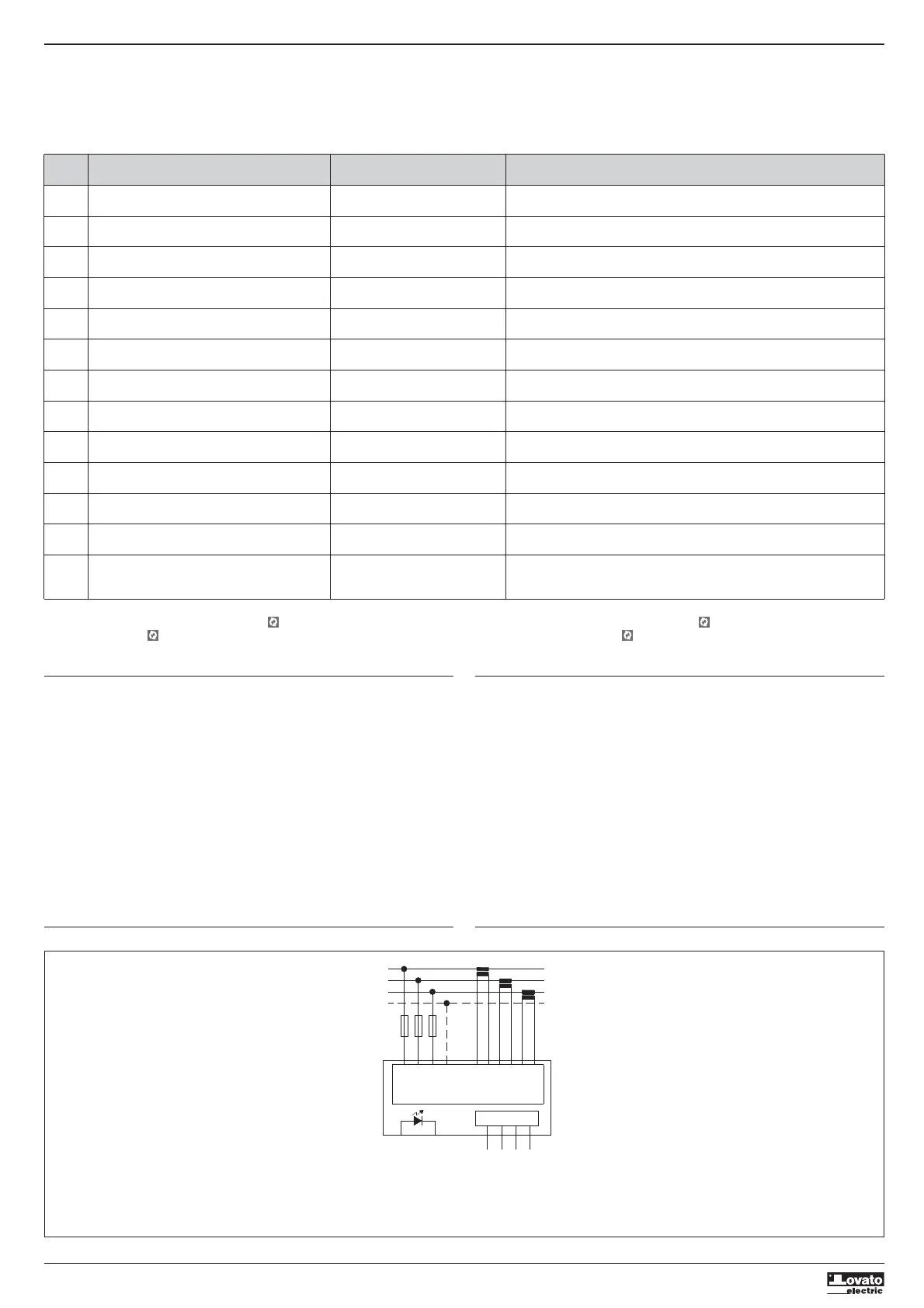
WIRING DIAGRAM
– Una volta selezionato il comando desiderato, premere per eseguirlo. Lo strumento chiederà una
conferma. Premendo nuovamente il comando verrà eseguito.
– Per annullare l’esecuzione di un comando selezionato premere MENU.
– Per abbandonare il menu comandi premere
L
e
M
contemporaneamente.
TEST DI COLLEGAMENTO
– Il test di collegamento consente di verificare se l’installazione del contatore di energia è stata
effettuata correttamente.
– Per poter eseguire il test, il contatore di energia deve essere inserito in un impianto attivo con le
seguenti condizioni:
• sistema trifase con presenza di tutte le fasi (V > 187VAC L-N)
• corrente minima circolante su ciascuna fase > 1% del fondo scala del TA impostato
• verso positivo delle energie (cioè in un comune impianto dove il carico induttivo assorbe energia
dalla fornitura).
– Per lanciare l’esecuzione del test, entrare nel menu comandi e selezionare il comando appropriato
secondo le istruzioni del capitolo Menu comandi.
– Il test consente di verificare i seguenti punti:
• lettura delle tre tensioni
• sequenza delle fasi
• sbilanciamento delle tensioni
• inversione della polarità di uno o più TA
• scambio delle fasi fra tensioni/correnti
– Se il test non viene superato, il display visualizza la ragione dell’errore.
SCHEMA DI COLLEGAMENTO
L1
L3
L2
N
VN
S2
I2
T2T1
METER
V2
V1
V3
S1
I1
S2
S1
I3
S2
S1
RS485
TR
A
B
SG
100...240V~
Tariff input
NOTES
1. Recommended fuses: F1A (fast).
2. The S2 terminals are connected to each other internally.
NOTE
1. Fusibili raccomandati: F1A (rapido).
2. I morsetti S2 sono internamente connessi fra di loro.


 To Next Page
 Loading...