12:35
Weather
Tue, 02 Feb 2010
Guangzhou
Mostly Cloudy
73%
17/23 C
5
Wind:
High/Low Temperatre:
UV Index:
Humidity:
From SSE at 17.7km/h
23 C
17/23C
Tue The Fri SatWed
16/28C 15/17C 15/18C 16/21C
Help
Time Weather Radio Setting
Help
Alarm
setting
Time
Weather
Setting
Radio
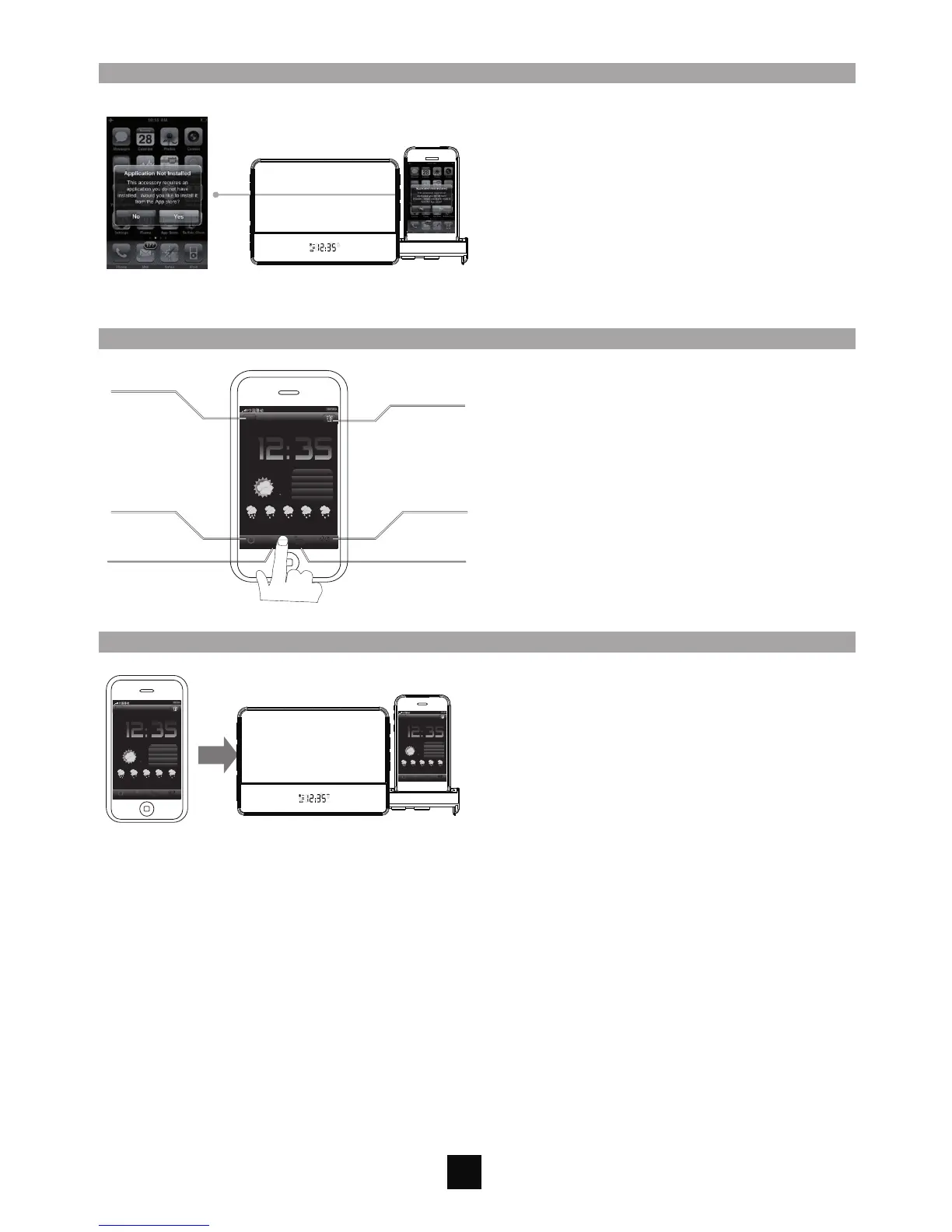
To setup,dock your iPhone/iPod Touch to the
GSIPDS 1001, Application not installed dialogue
box appears. Select yes. The iTunes App store will
open automatically to the iDock Speaker
Application. Follow the on-screen instruction to
install the application. Once installed, you can
start to use the GSIPDS1001 with the App
Tips:Please ensure you are WIFI connect when
downloading the App
3
FM
AUX
5.Install the App
6.Preset Time/Alarm/Weather/FM Radio in the App
Set up your personal settings in the App.For
details, please follow the SETUP instructions in
App by pressing HELP
Tips:Please ensure you connect to the network
all the times when using the App to get the latest
Time and Weather update.
Note:Please leave the App open in working with
GSIPDS1001. When App is turned off, the
Time/Weather sync to the GSIPDS1001 will be
stopped.
7.Sync App to the Unit
12:35
Weather
Tue, 02 Feb 2010
Guangzhou
Mostly Cloudy
73%
17/23 C
5
Wind:
High/Low Temperatre:
UV Index:
Humidity:
From SSE at 17.7km/h
23 C
17/23C
Tue The Fri SatWed
16/28C 15/17C 15/18C 16/21C
Help
Time Weather Radio Setting
12:35
Weather
Tue, 02 Feb 2010
Guangzhou
Mostly Cloudy
73%
17/23 C
5
Wind:
High/Low Temperatre:
UV Index:
Humidity:
From SSE at 17.7km/h
23 C
17/23C
Tue The Fri SatWed
16/28C 15/17C 15/18C 16/21C
Help
Time Weather Radio Setting
FM
AUX
After the App setting completed, the current
Time/Weather/Alarm will be synced to the
GSIPDS1001.
Go to operate the unit now.


 To Next Page