ALAR M CLOCK RA DIO FO R iPod AND i Phone
User man ual
Model nu mber :GSIPD S 1001
Please r ead th ese inst ruct ions car eful ly and kee p them f or futur e refe rence
Warning: Do not expose batteries to heat of fire. Do not short-circuit the batteries,
disassemble them or try to recharge them. They may explode and cause
serious injury. Store batteries out of children's reach. If batteries are swallowed,
there is the danger of choking or poisoning.
Conformity
This device has been tested for compliance with the basic and other relevant
requirements of the EMC Directive 2004/108/EC and the Low Voltage Directive 2006/95/EC.
CONFORMITY, DISPOSAL
SAFETY AND WARNING
This symbol on the product or in the instructions means that your electrical and electronic
equipment should be disposed at the end of its life separately from your household waste.
There are separate collection systems for recycling in the EU. For more information,
please contact the local authority or your retailer where you purchased the product.
iPod is a trademark of Apple Computer, Inc., registered in the U.S. and other
countries.
QUICK START
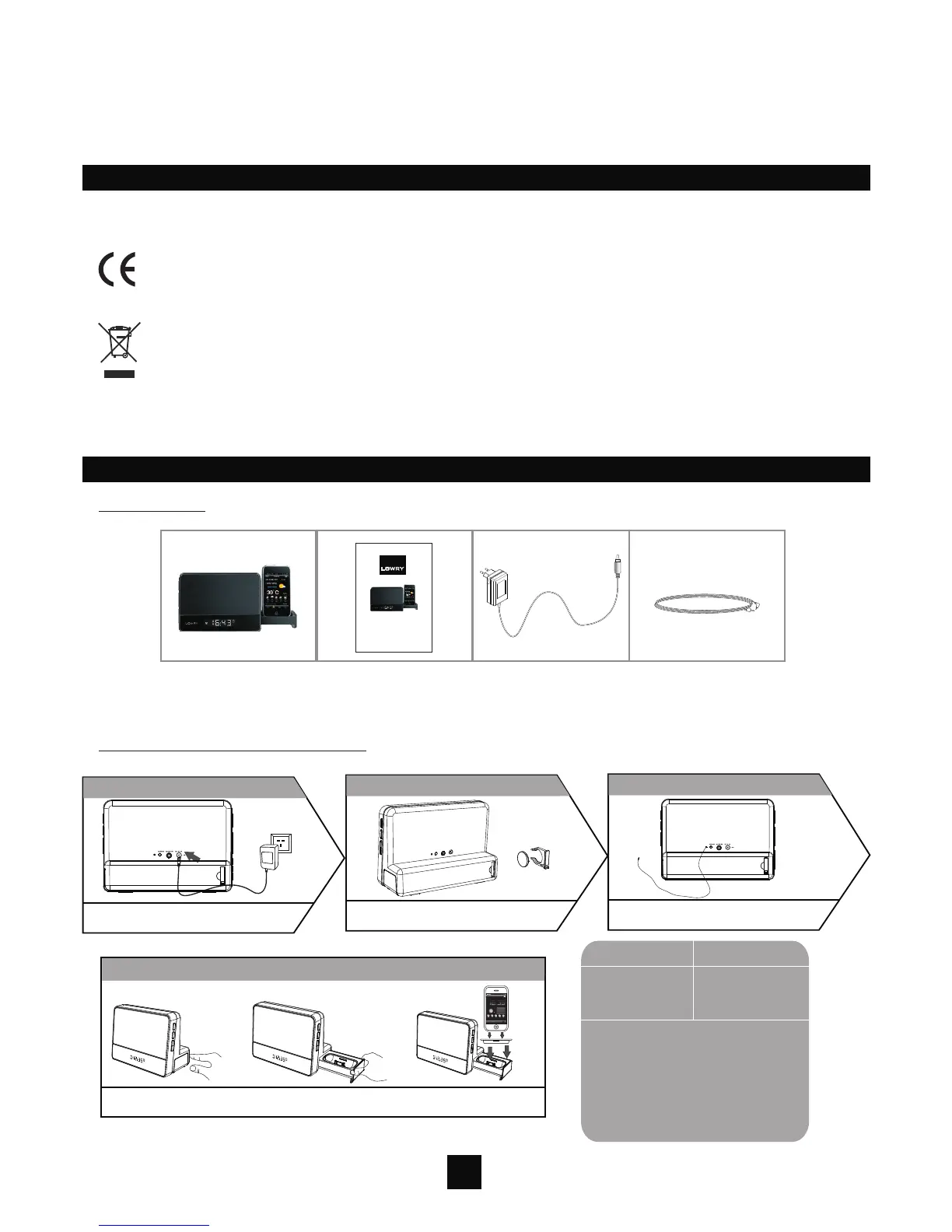
Box Content
User Manual
AC Adapter
3.5mm Audio Cable
3.5mm Audio Cable
GSIPDS1001
Alarm clock radio
for iPod and iPhone
Connections and Initial Set Up
1.Connect the Power Supply
Plug the AC adapter into GSIPDS1001 and a
wall socket.
2.Install the Backup Batter y
3.Extend the FM Wire
Pull the batter y holder at the back of the unit,
and insert the cell batter y CR2032(not included)
Extend the FM wire as much as you can to increase
reception sensitivity.
4.Prepare the Docking
PUSH OPEN the docking tray and pull it all the way out,dock the iPhone/iPod into the unit with
the correct insert.
12:35
Weather
Tue, 02 Feb 2010
Guangzhou
Mostly Cloudy
73%
17/23 C
5
Wind:
High/Low Temperatre:
UV Index:
Humidity:
From SSE at 17.7km/h
23 C
17/23C
Tue The Fri SatWed
16/28C 15/17C 15/18C 16/21C
Help
Time Weather Radio Setting
2
for this iPhone/iPod
iPhone 3G/3GS
iPod touch 2G
nano 4G
Use this insert
insert 15
insert 16
insert 17
Note: When inserting an iPhone/iPod
Touch into GSIPDS1001, make sure to
use the correct dock insert supplied
with your device or commercially
available from Apple Inc. If you do not
have an insert for your iPhone/iPod T
ouch, check thewebsite of Apple Inc.
and purchase one.


 To Next Page
 Loading...