Need help?
Do you have a question about the Loxjie A30 and is the answer not in the manual?
Explains the functions of the multi-function knob for power, menu navigation, and volume adjustment.
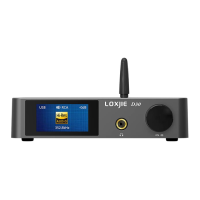
Describes the elements displayed on the main screen, including volume, input selection, and sampling rate.
Details the available input options for the device, such as Bluetooth, USB, Optical, Coaxial, and AUX IN.
Allows selection between Speaker and Headphone output modes.
Provides various EQ presets like Direct, Tone, Bass, Super Bass, Rock, and Soft for audio tuning.
Enables manual adjustment of treble and bass levels within a range of -10dB to +10dB.
Allows users to change the display color from a palette including White, Red, Green, Blue, Yellow, Cyan, Orange, and Purple.
Provides options to clear paired Bluetooth devices or confirm successful clearing.
Offers settings for the display brightness, with options for 'Always ON' or 'Auto Off'.
The Loxjie A30 is a versatile audio device that functions as a power amplifier and headphone amplifier, designed to deliver high-quality sound for various audio setups. It incorporates professional-grade chips from Infineon Germany, ensuring high efficiency and superior audio performance. The design emphasizes both aesthetic appeal and practical functionality, with an elaborate and well-adjusted circuit for optimal operation.
At its core, the A30 serves as a central hub for your audio system, capable of driving both speakers and headphones. It features multiple input options, allowing for broad compatibility with various audio sources. These inputs include USB, optical, coaxial, Bluetooth, and a line-in connection, making it adaptable to modern digital and traditional analog setups. The device is equipped with a high-performance Class D power amplifier chip, known for its efficiency and ability to reduce power consumption while maintaining excellent sound quality.
For precise volume control and minimal distortion, the A30 utilizes NJRC's electronic volume control chip NJW1194. This ensures that volume adjustments are smooth and accurate, preserving the integrity of the audio signal. The USB audio input supports high-resolution playback up to 32-bit/384kHz, and notably, it offers driverless operation, simplifying setup for many users.
A key feature for expanding your audio system is the subwoofer pre-out. This allows users to connect active subwoofers, transforming a standard stereo setup into a 2.1 audio system, which can significantly enhance bass response and overall sound immersion.
The A30 also integrates a variety of built-in EQ modes, along with adjustable treble and bass controls. This flexibility enables users to tailor the sound profile to match different types of speakers and musical genres, ensuring an optimized listening experience.
For wireless connectivity, the device includes Bluetooth 5.0 reception with APTX support. This advanced Bluetooth standard provides better sound quality and a longer transmission distance compared to older versions, allowing for convenient wireless streaming from compatible devices.
The user interface of the A30 is designed for ease of use, featuring a high-resolution full-view color IPS display. This display provides clear visual feedback on the device's status, including digital volume, sound display, input selection, and sampling rate for Bluetooth, optical, and coaxial inputs.
Control is primarily managed through a multi-function knob on the front panel and a full-function remote control. The knob allows for turning the device on/off with a long press, accessing the menu with a short press, and adjusting volume or navigating menu functions by turning it left or right. The remote control offers comprehensive control over all functions, including power, display dimmer, mute, Bluetooth reconnect, menu navigation, output switching, input selection, and volume adjustments. All settings and selections made are remembered by the device, ensuring a consistent experience upon restart.
The remote control requires two AAA batteries and should be pointed towards the signal receiver on the main unit from a distance of up to 5 meters (16 feet) without obstructions. Users should be aware that direct sunlight or bright light might interfere with the remote's operation, and its use could potentially trigger other infra-controlled devices.
Input selection is straightforward, allowing users to choose between Bluetooth, USB audio, optical, coaxial, and AUX IN. The coaxial signal and analog input share the same interface, meaning they cannot be connected simultaneously.
Output options include speakers and headphones, providing flexibility for different listening preferences. The device also offers various EQ settings such as Direct, Tone, Bass, Super Bass, Rock, Soft, and Clear. When treble or bass is adjusted in Direct or other EQ modes, the EQ mode automatically switches to Tone, indicating that custom adjustments are active. Treble and bass can be fine-tuned within a range of -10dB to +10dB.
The display color can be customized with options like White, Red, Green, Blue, Yellow, Cyan, Orange, and Purple, allowing users to personalize the device's appearance.
For Bluetooth connectivity, the pairing process involves turning on Bluetooth on your phone, searching for "LOXJIE BT5.0B," and selecting it. A "connected" message indicates successful pairing. If pairing fails, there's a Bluetooth clear function to reset previous connections and try again. The remote control also has a long-press function to re-establish Bluetooth connections.
The A30 is built with an aluminum die-cast chassis enclosure, which not only contributes to its robust construction but also aids in better heat dissipation, ensuring stable and reliable operation over time. The input and output terminals are gold-plated, which helps prevent corrosion and ensures high-quality signal transmission.
The device incorporates a perfect protection circuit designed to safeguard against overheating, overcurrent, and other potential issues, enhancing its longevity and reliability. It comes with a high-quality power adapter specifically designed for audio applications, further contributing to stable performance.
The display dimmer function allows users to adjust the brightness of the screen, with options for "Always ON" or "Auto Off," which can help conserve power and reduce visual distraction in dark environments.
For troubleshooting or resetting the device, a factory reset option is available. This can be performed by connecting the power cord while pressing the power button until text appears on the screen, then releasing the button and restarting the unit. This can be useful for resolving software-related issues or restoring default settings.
The Bluetooth clear function, accessible through the menu or remote control, allows users to clear all paired devices, which can be helpful for resolving connection issues or preparing the device for new pairings.
 General
| Amplifier Type | Class D |
|---|---|
| Output Power | 80W x2 (4Ω) |
| Bluetooth Version | 5.0 |
| Headphone Output | Yes |
| Frequency Response | 20Hz - 20kHz |
| Chipset | Infineon MA12070 |
| THD+N | 0.003% |
| SNR | 110dB |
| Impedance | 4-8Ω |
| USB DAC | Yes |
| Optical Input | Yes |
| Coaxial Input | Yes |
| Bluetooth Codecs | AAC, SBC |
| Inputs | USB, Optical, Coaxial, Bluetooth |
| Power Supply | 24V |

 To Next Page