Need help?
Do you have a question about the LSI SAS 9300-16e and is the answer not in the manual?
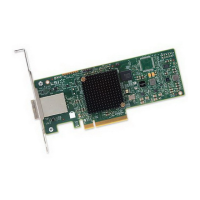
The LSI SAS 9300-16e PCI Express to 12Gb/s Serial Attached SCSI (SAS) Host Bus Adapter (HBA) is designed to provide high-performance external storage connectivity for servers and workstations. This device leverages two LSI SAS 3008 controller chips and a PCI Express switch to offer robust interconnection capabilities. It supports sixteen lanes of 12Gb/s SAS connectivity, paired with eight lanes of PCIe 3.0 8Gb/s performance. The HBA is built on the Fusion-MPT™-architected LSI SAS 3008 controller, incorporating the latest advancements in both PCIe 3.0 and 12Gb/s SAS technologies. The firmware for the HBA is stored on onboard Flash memory.
The LSI 12Gb/s SAS HBA supports major operating systems including Windows, Linux Red Hat, Linux SuSE® Enterprise Server (SLES), Solaris, and VMware. For specific software versions and device driver support, users should refer to the LSI website. For Solaris support, the HBA is compatible with Solaris 10, which includes a built-in Oracle driver, eliminating the need for a separate LSI driver installation. Users requiring further information on the Oracle Solaris 10 driver or installation should consult the Oracle support website.
All LSI 12Gb/s SAS HBAs meet or exceed UL flammability rating 94V-0. Each bare board is marked with the supplier's name or trademark, type, and UL flammability rating. As these boards are installed in a PCIe bus slot, all voltages remain below the SELV 42.4-V limit. The design minimizes electromagnetic emissions, susceptibility to radio frequency energy, and the effects of electrostatic discharge.
The HBA complies with the following integrated electromagnetic interference (EMI) standards:
It also adheres to the following environmental directives:
Installation involves unpacking the HBA in a static-free environment and inspecting it for damage. Before installation, it is crucial to back up all data to prevent loss. The computer must be turned off, and the power cord disconnected from the power supply to avoid electrical shock. After removing the chassis cover, users should check the mounting bracket and replace it with a low-profile bracket if required for their system. The HBA is then inserted into an available x8 PCIe slot, aligning it correctly and pressing gently but firmly to seat it. The bracket is secured to the chassis with a screw or system retention mechanism.
Once the HBA is installed in the slot, SAS cables are connected between the HBA's SFF-8644 external mini-SAS HD connectors and the SAS enclosure containing SATA or SAS devices. The cable should have an external mini-SAS HD connector (SFF-8644) on one end for the HBA and an appropriate connector for the enclosure on the other. After cabling, the chassis cover, power cords, and any network cables are reconnected, and the system can be powered on.
For technical assistance with installation, configuration, or operation, users can contact LSI Technical Support via email (support@lsi.com) or phone (1-800-633-4545 for North America, or 00-800-5745-6442 internationally). Additional support resources are available on the LSI website (www.lsi.com/support).


 To Next Page
 General