Appendix 1. Troubleshooting
App.1-8
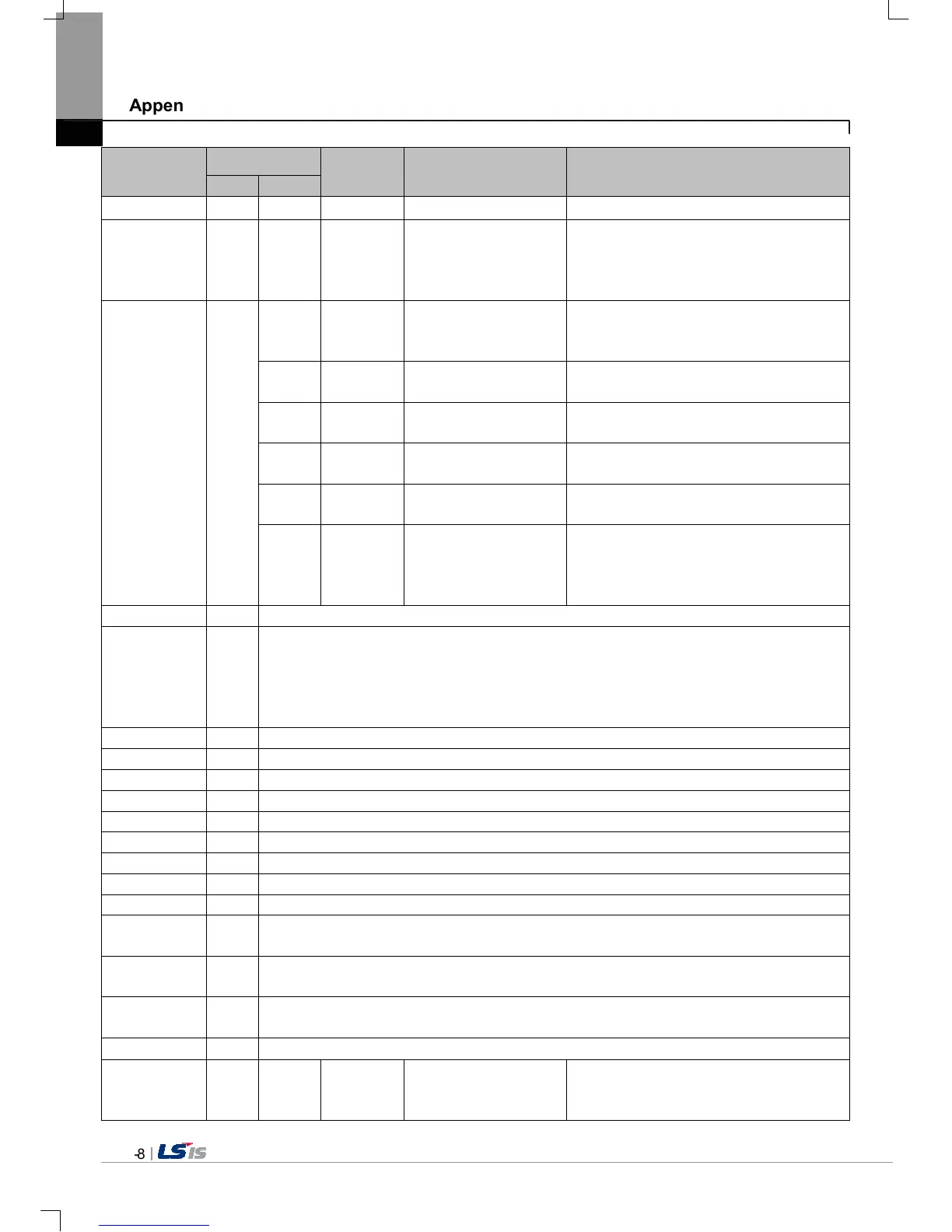
Object
Error code
Occurrence
location
Error message Reason and measure
Type Address
contact the near Customer Service Center.
Switch h05 h01 XGT Panel
Invalid password.
There is password in the each object. When
editing the project downloaded in the present
device, input the designated password at the
project property information.
Number
indication
device/
Number input
device
0x06
Can't write Data.
Because of communication error, the value
can’t be inputted. Check the communication
status and input again.
h02 XGT Panel
No input Data.
You tried to input with no value. Input the
value
0x03 XGT Panel
Exceeded the max
length.
You exceed the maximum length to input.
0x04 XGT Panel
Exceeded the minimum
Value.
You exceed the maximum value to input.
0x05 XGT Panel
Exceeded the maximum
Value.
You exceed the minimum value to input.
0x06 XGT Panel
Invalid at Input Case.
When you input the value, input can’t be done
because of wrong input. Check the input
condition of each object in the Builder and
input again.
Lamp 0x07
None
Character
indication
device/
Character input
device
0x08
None
Scheduler
related
0x22
None
Logging
related
0x24
None
Project
download
0x26
Abnormal send-payload.
Please download project
again.
Communication status is abnormal. Check
the connection of communication cable.


 To Next Page
 Loading...