EasyManua.ls Logo

Ltc Audio MEGA50USB - User Manual

Ltc Audio MEGA50USB
9 pages
Print Icon
To Next Page IconTo Next Page
Loading...
GB
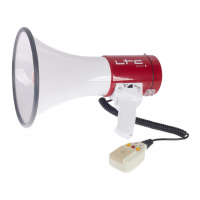
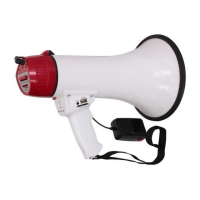
RECHARGEABLE 50W MEGAPHONE
WITH RECORD FUNCTION & USB/SD/AUX INPUT
MEGAPHONE 50W RECHARGEABLE
AVEC FONCTION D’ENREGISTREMENT & USB/SD/AUX
AUFLADBARES 50W MEGAFON
MIT AUFNAHMEFUNKTION & USB/SD/AUX EINGANG
OPLAADBARE 50W MEGAFOON MET OPNAME FUNCTIE
& USB/SD/AUX INGANG
MEGAFONO 50W RECARGABLE CON FUNCION DE
GRABACION & USB/SD/AUX
MEGAFON REINCARCABIL 50W
CU FUNCTIE DE INREGISTRARE SI INTRARE USB/SD/AUX
POLNILNI 50W MEGAFON
Z FUNKCIJO SNEMANJA IN USB / SD / AUX VHODOM
MEGAFONE COM SISTEMA DE GRAVAÇÃO E LEITOR
MULTIMÉDIA USB/SD CARD
MEGA50USB (95-2005)
INSTRUCTION MANUAL
MANUEL D’UTILISATION
BEDIENUNGSANLEITUNG
HANDLEIDING
MANUAL DE INSTRUCCIONES
MANUAL DE INSTRUCȚIUNI
NAVODILA ZA UPORABO
MANUAL DE INSTRUÇÕES
All ABS Body, sturdy yet light weight
Builtin Siren & detachable Microphone
Clear sound, long range & efficient design
16 Seconds Voice Recording Function
Built-in rechargeable Li-ion battery
BEFORE YOU START
The megaphone can be powered via the built-in Li-ion battery or 8x ‘D’ cells.
Before the first use, open the battery compartment of the megaphone. Unplug the
built-in Li-ion battery pack and connect it to your computer, smartphone or any other
USB unit supplying a voltage of 5Vdc. Let the battery charge for about 6-8 hours. Once
the battery pack is fully charged, open the battery compartment, insert the battery
pack and connect it to the 2-pin socket.
You can also insert 8x D cells with the correct polarity. Close the battery
compartment.
OPERATION
MICROPHONE: Push the ON/OFF button on the side of the microphone to ON position.
Set the USD/SD MIC switch on the left side to MIC position. Place your lips as close as
possible to the microphone and speak with a normal voice. Adjust the volume to the
desired level via the wheel on the right side of the microphone. Don’t set the volume
too loud in order to avoid howling and feedback.
If you don’t want to have the microphone switched on permanently, you can set the
ON/OFF button to OFF. Press the trigger button on the top front part of the handle
when you want to talk into the microphone. Keep the button pressed while you are
speaking.
SIREN: Press the SIREN button to activate the built-in siren. Press again to switch off
the siren.
REC: Adjust the volume control to the min. before recording. Press the REC button and
the indicator light will be on. Now your megaphone is ready for recording. The longest
record time is about 16 seconds. Press the REC button after finishing recording.
Question and Answer IconNeed help?

Do you have a question about the Ltc Audio MEGA50USB and is the answer not in the manual?

Summary

Before You Start

Powering and Charging the Megaphone

Instructions for powering the megaphone using batteries or the built-in battery and charging procedures.

Microphone Operation

How to use the microphone, including the ON/OFF switch and trigger button for voice transmission.

Siren and Recording Functions

Guides on activating the built-in siren and recording voice messages with the REC button.

USB, SD & AUX Operation

Playing Recorded Messages

How to play back recorded voice messages using the PLAY button.

Connecting and Selecting Audio Sources

Guides on connecting USB, SD cards, or AUX devices and selecting the input source.

Track Navigation and Volume Adjustment

How to navigate tracks and adjust volume for USB, SD, or AUX sources.

Specifications

Power Output and Voice Range

Details on the megaphone's power output (25W/50W) and audible range (600m).

Battery and Power Supply Details

Information on the rechargeable Li-ion battery, power supply (220-240V), and charging time (6-8 hours).

Additional Technical Specifications

Includes microphone type, dimensions (240x345mm), and weight (1.65kg w/o battery).

Betrieb

Microphone and Siren Usage

How to operate the microphone, adjust volume, and activate the siren.

Recording and Playback Instructions

Steps for recording voice messages (max 16s) and playing them back.

USB, SD und AUX Eingang

Connecting Audio Sources

How to connect USB, SD cards, or external audio devices via AUX and select the input source.

Track Selection and Volume Control

Selecting tracks and adjusting volume for USB/SD/AUX playback.

Características Técnicas

Power Output, Range, and Battery

Technical details on output power, vocal range, and integrated battery.

Power Supply and Microphone Specifications

Information on charger power supply, charging duration, and microphone characteristics.

USB, SD in Aux delovanje

Connecting and Switching Sources

How to connect USB/SD/AUX sources and switch between them.

Track Control and Volume Adjustment

Selecting tracks and adjusting volume for USB/SD/AUX inputs.

Antea de Começar

Powering and Battery Charging

Instructions for powering the megaphone with batteries or Li-ion battery and charging.

Modo de Operação

Microphone Operation and Volume

Using the microphone, adjusting volume, and the trigger button.

Siren and Recording Functions

How to activate the siren and record voice messages.

Playback Functionality

How to play back recorded messages.

Operação USB e TF

Connecting and Switching Media

Connecting USB/TF cards or audio sources via AUX and automatic source selection.

Track Selection and Volume Control

Selecting tracks and adjusting volume for USB/TF/AUX playback.

Ltc Audio MEGA50USB Specifications

General IconGeneral
Power RMS50W
USB InputYes
Microphone inputYes
TypeActive
Frequency Response40Hz - 18kHz
InputUSB
ControlsVolume, Bass, Treble

Related product manuals