Remote Control
The remote control is using Infra-Red(IR). Point it towards the front of the LED TV. The remote
control may not work correctly if it is operated out of range or out of angle.
6
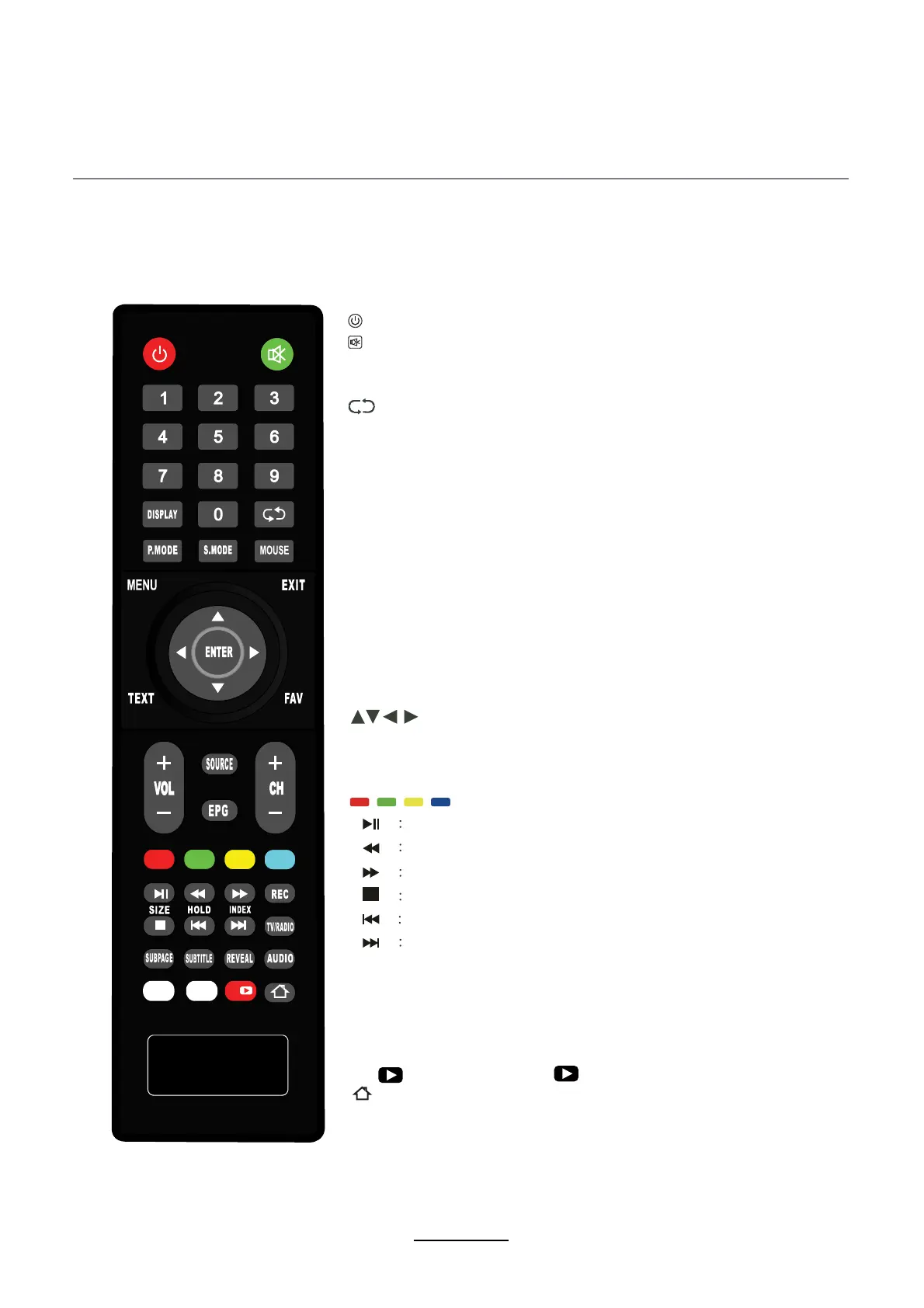
EPG : Electronic program guide.
TV/RADIO : TV/Radio Select .
REC:Press to start recording in DTV mode (In DTV mode only).
: Set your TV to power on or standby mode.
:
Press to mute the sound.Press again or press VOL+ to unmute.
0--9:Press 0-9 to select a TV channel directly while watching TV.
DISPLAY:Press to display the source and channel‘s Information.
: Return to the previously viewed program.
P.MODE : Adjust the picture mode.
S.MODE : Adjust the sound mode.
SLEEP : Select amount of time before TV turn itself off
automatically.
VOL+/- : Press to increase /dscrease the sound level.
AUDIO : Select audio mode.
CH+/- : Press to scan through or to select a channel.
SOURCE : Press the button to display the sources list.
MENU : Brings up the main menu to the screen. Press MENU
key to exit when searching.
EXIT : Press to close the OSD.
: Allows you to navigate the on-screen menus.
ENTER: Press to confirm the selection (
MEDIA as input source).
TEXT : Switch to Teletex* mode.
FAV : Favourite channel list.
SUBTITLE : DTV subtitle.
NFX: press the key "NFX" go into NETFLIX app directly .
: press the key "You " go into YouTube app directly.
SUBPAGE : Sub coded page access.
EShare : press the key "EShare" go into E-Share app directly.
REVEAL : Reveal/hidden the hidden words .
[
]
[
]
[
]
[
]
[
]
[
]
/ / /
Shortcut buttons in TV and Media mode.
Press to PLAY/PAUSE.
Press to play a program in fast rewind mode.
Press to play a program in fast forward mode.
Press to STOP playing.
Press to go to previous chapter.
Press to go to next chapter.
: Home button, back to main page.
NFX
EShare
You
You


 To Next Page