Reverse-polarity protection
This unit offers reverse-polarity protection under charging modes, the RED LED will
blink and the charging process will not start. If this happens, unplug immediately
from mains, connect the red clamp to positive (+) battery post, and black clamp to
negative (-) post, then plug into the mains power and the charging process will start.
Short-circuit protection
Should you accidentally touch the clamps together whilst the mains power is on, the
unit will not perform charging. Unplug from mains, disconnect and start the process
again being careful not to touch the clamps together.
Charge Memory
If power off on charging, DISCOVERY 250 can automatically restart charging base
on previous power down status for battery and charging current.
ATTENTION: Once the clamp of charger is disconnected from the battery, this me-
mory is erased and the charging mode will need to be reselected.
Other features
Anti Spark Protection
Battery and Charger Overheating Protection
Plastic Housing. Protection Rating IP20
OPERATION
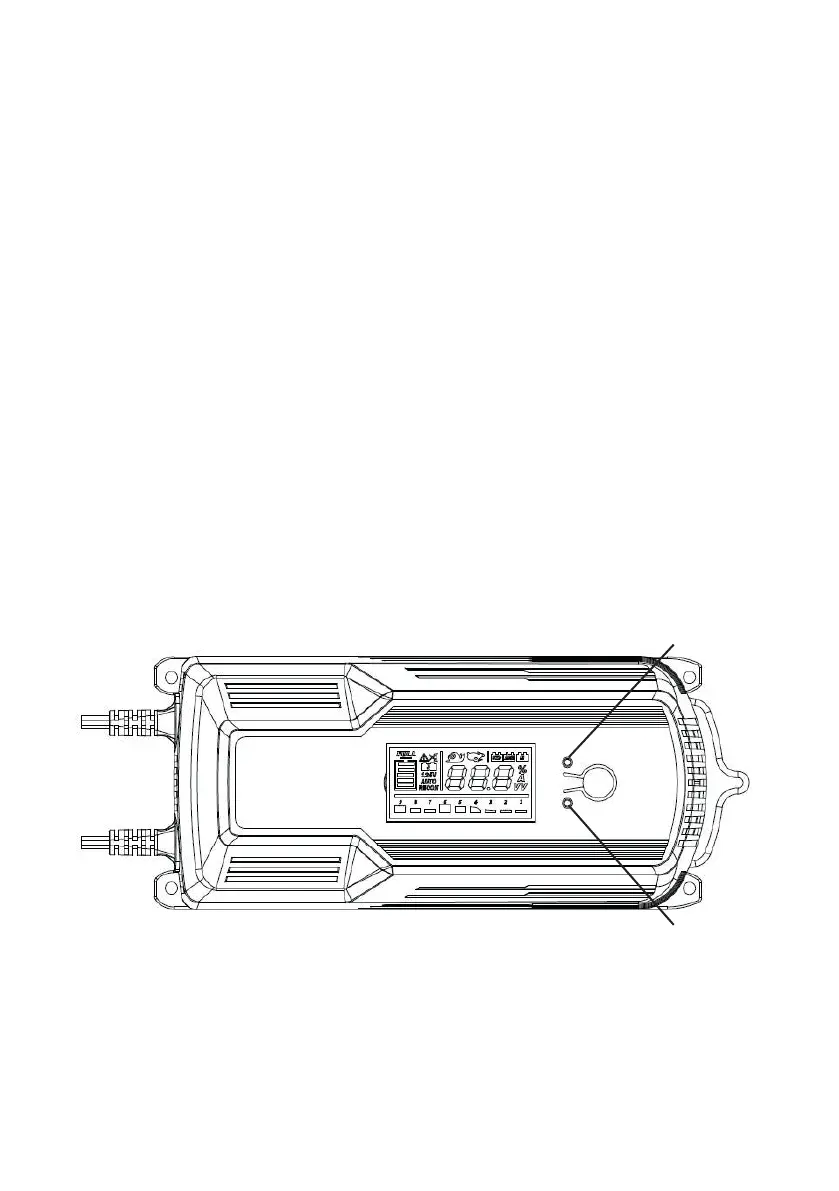
Charger LED display
Power LED -
Green color LED to indicate Power is connect to charger
STATUS LED -
Green color LED to indicate that the battery is charging. Red color LED lit or blinking
to indicate a charging failure, battery problem or reverse polarity.
Charger LCD display
The unit is built-in with LCD display for showing charger status:
Status LED
Power LED



 To Next Page