1
WiFi-102 LED Controller manual
2
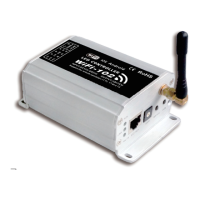
WiFi-102 LED Controller
With the improvement of people's living standard, more and more products are linked to mobile devices like
smart phones, tablet PCs, which makes life simple and intelligence. Using the emerging mobile device to
control LED lighting products becomes the aspirations of each customer. As a result, WiFi-102 controller
appeared, with the installation of controlling software on mobile devices like Android & IOS phones, tablet PCs.
they can remote control LED lighting products through WiFi, which makes LED control more intelligent and
humanization.
One WiFi - 102 controller can be used as dimmer, CT controller, even RGB controller. which means a significant
saving to middleman who need to stock up, now one product will realize your three desires.
In addition, this model has DIY function, Users can get any effect they want based on our controlling software
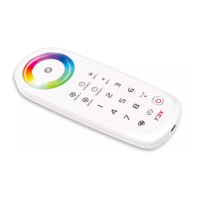
If you don't have any mobile devices with the controlling software at hand, you could also use our touch
controller-T series (T1, T2, T3) to control it , which provides more choices!
WiFi and remote wireless control operate based on the global universal 2.4 GH frequency range, By using thez
same 2.4G antenna, the space pollution caused by WiFi and remote control using wireless signal from different
frequency range will be largely reduced.
WiFi-102 Technical parameters
Max 3A*3
L127.6×W73×H44.5mm
L135×W80×H50mm
290g
-20 ~50℃℃
Output current
Operating temperature
Dimensions
Weight (G.W)
Power supply
LED CV SMPS
DC12V~DC24V
Input voltage
Control distance
Max 100m
Software Technical parameters
Android 2.1 or above, IOS4.3 or above, with the wifi function
Android(2.2MB), iOS(3.4MB)
English
Tool
Free, Plug-in-free
Platform
Size
Language
Category
Others
RGB color change mode
32 fixed modes, 8 DIY modes
flexibly control single color, cold warm color, RGB LED lighting fixture
Output control
Scene mode
9
Controller operating instructions
3.
Side A Side B
Power input/LED output
indicator
light
instructions
RUN
LINK
RX/TX
The indicator flashes quickly about 25 seconds during the electric initialization. Flashes once per second after
initialization finished.
The indicator light stays lit when the mobile device connects with WIFI controller, and turns off when not
connected.
The indicator light turns on when the controller receives or transmits the WiFi data. Turns off in the free time.
EXT Key RJ45
SSID code switch
2. Work status indicator instructions
127.6mm
73mm
44.5mm
1. Install / uninstall ANT
ANT installation instruction
Install the WiFi antenna clockwise, uninstall anticlockwise
RUN
RX/TX
LINK
EXTKEY
SSID
ON/OFF
SCENE
RUN
RX/TX
LINK
EXTKEY
SSID
MATCH
FUN
on/off scene
Indicator
LT E C H LT E C H
ZHUHAI LTECH ELECTRONIC TECHNOLOGY CO., LTD.
WWW.LTECHONLINE.COM
LT@LTECHONLINE.COM
Tel: +86 756 620 8823 Fax: +86 756 620 8833
RoHS
COMPLIANT
warranty
3 years
ISO9001:2008
1. Product arameterp
Package size
2. Configuration Diagram
WiFi-102 LED Controller manual


 To Next Page
 Need help?
 General