Need help?
Do you have a question about the Ltech WiFi-RDM01 and is the answer not in the manual?
Quickly locate and identify connected LED devices.
Ability to assign unique addresses to devices for individual control.
Facilitates firmware updates and management remotely.
Allows for easy testing of device functionality.
Simplifies the configuration and setup process.
Identifies DC input, setting button, power/communication lights, and their functions.
Illustrates connecting the device to power and lamps, and provides important connection notes.
Covers installation, environmental, electrical safety, and maintenance advice for the product.
Steps to connect and match the device, including indicator light behavior.
Instructions for connecting the device to a WiFi network via a mobile phone.
Guide on searching for and adding connected devices using the app.
Details on editing device parameters like address and dimming settings.
How to adjust dimming levels using the app's interface.
Steps to configure power supply settings within the app.
Instructions to change the WiFi SSID and password settings.
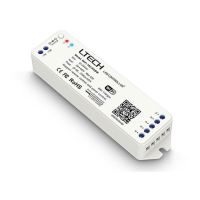
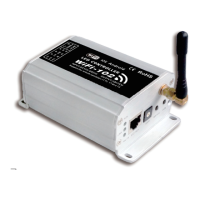
The LTECH WiFi-RDM LED Controller is a sophisticated master control device designed for managing LED lighting systems that utilize the RDM (Remote Device Management) protocol. This controller facilitates the browsing and setting of corresponding parameters for RDM-compatible equipment, adhering to the RDM standard protocol (ANSI E1.20-2010 RDM). Its primary function is to provide wireless control over DMX 512/RDM output, making it a versatile tool for various lighting applications.
One of the key features of the WiFi-RDM LED Controller is its integration of a Wi-Fi module, enabling wireless control via a dedicated smartphone application. This allows users to manage their lighting systems remotely, offering unparalleled convenience and flexibility. The controller supports firmware upgrades over the air, ensuring that users always have access to the most functional and up-to-date firmware version without the need for physical intervention. This remote upgrade capability is a significant advantage, as it simplifies maintenance and ensures long-term compatibility with evolving lighting technologies.
The controller boasts several user-friendly features that enhance its usability. It offers "Fast Searching" capabilities, allowing users to quickly discover and identify RDM devices within their network. The "Address Programmable" feature provides the flexibility to assign and modify DMX addresses for individual fixtures, streamlining the setup process for complex lighting installations. "Remote maintenance" is another core aspect, enabling users to diagnose and troubleshoot issues from a distance, which can significantly reduce downtime and operational costs. The "Convenience testing" feature aids in verifying the functionality and configuration of connected devices, ensuring optimal performance. Finally, "Easily Setting" refers to the intuitive interface provided by the smartphone app, which simplifies the process of configuring and managing the lighting system.
In terms of compatibility, the WiFi-RDM LED Controller is designed to work seamlessly with other brands' products that support the RDM protocol. This interoperability ensures that the controller can be integrated into existing lighting setups without affecting the normal operation of other devices on the bus. This broad compatibility makes it a flexible solution for diverse lighting environments, from small-scale installations to large-scale professional setups.
The product's structure includes several indicators and controls that provide immediate feedback on its status. The power light, for instance, glows red when the power supply is normal and flashes red if there is an abnormality, offering a quick visual diagnostic. The communication light, a blue LED, indicates various operational states: slow flashing signifies initialization, gradual flashing indicates configuration mode, being off means configuration is complete, and quick flashing denotes data transceiver activity. These visual cues are essential for monitoring the controller's status and troubleshooting potential issues.
A "Setting button" is also incorporated into the design, allowing users to restore the device to its factory settings by long-pressing it for six seconds. This feature is particularly useful for resetting the controller and removing any previously set passwords, providing a clean slate for new configurations or troubleshooting.
Installation of the WiFi-RDM LED Controller is straightforward. It can be powered either by a power bank or a 5-24V adapter, using a power conversion line. The device offers two options for power input: a DC+DC-socket and a DC jack, providing flexibility in power source connection. For signal transmission, it is crucial to use a standard RS485 shielded twisted pair signal cable to ensure reliable communication. The controller is capable of connecting with multiple RDM function decoders, allowing for scalable lighting control solutions.
The operational workflow involves several steps, starting with connecting and matching the device. Once the device is connected, its indicator changes from a flashing status to an off state, signifying that it is ready to be matched. A power supply reboot may be required if the blue light is not flashing. Users then connect to the controller's Wi-Fi network, which has a factory default name of "WiFi-RDM01" and no password. After connecting to Wi-Fi, the smartphone app is used to search for and add devices. The app allows for editing device parameters, such as DMX addresses, and provides access to detailed information about each device, including its UID code. The dimming interface enables users to adjust the dimming levels of individual or grouped lights by slipping a dimming rod left and right.
Further configuration options include editing the power supply setup, where parameters of dimmable drivers can be adjusted. If the driver is from the same manufacturer, the app will display editable model parameters, current values, and dimming ranges. Users can also modify the Wi-Fi SSID and password through the settings interface, enhancing network security and customization.
Regarding maintenance and safety, the manual emphasizes several critical points. Installation and servicing should only be performed by qualified personnel. The product is not waterproof and should be protected from sun and rain; for outdoor installations, it must be mounted in a waterproof enclosure. Good heat dissipation is essential for prolonging the controller's working life, necessitating good ventilation. Users must verify that the output voltage of the LED power supply matches the product's working voltage. Adequate sized cables should be used to carry the current from the controller to the LED lights, and all cable connections must be secured tightly. Correct wire connections and polarities are crucial to prevent damage to the LED lights. In case of a fault, users are advised to return the product to their supplier and refrain from attempting repairs themselves.
In summary, the LTECH WiFi-RDM LED Controller is a robust and user-friendly device designed for modern LED lighting control. Its wireless capabilities, remote maintenance features, broad compatibility, and intuitive interface make it an excellent choice for managing complex RDM-based lighting systems, ensuring efficiency, flexibility, and ease of use.
 General
| Model | WiFi-RDM01 |
|---|---|
| Category | Controller |
| Input Voltage | 12-24V DC |
| Number of Channels | 4 |
| Operating Voltage | 12-24V DC |
| Output Signal | DMX512 |
| Protocols | DMX512, RDM |
| Control Method | WiFi, DMX |
| Compatibility | DMX512 |
| Wireless Protocol | WiFi 802.11b/g/n |
| Operating Temperature | -20°C to 60°C |
| Humidity | 5% to 95% RH |

 To Next Page