Operation
Assembling the unit
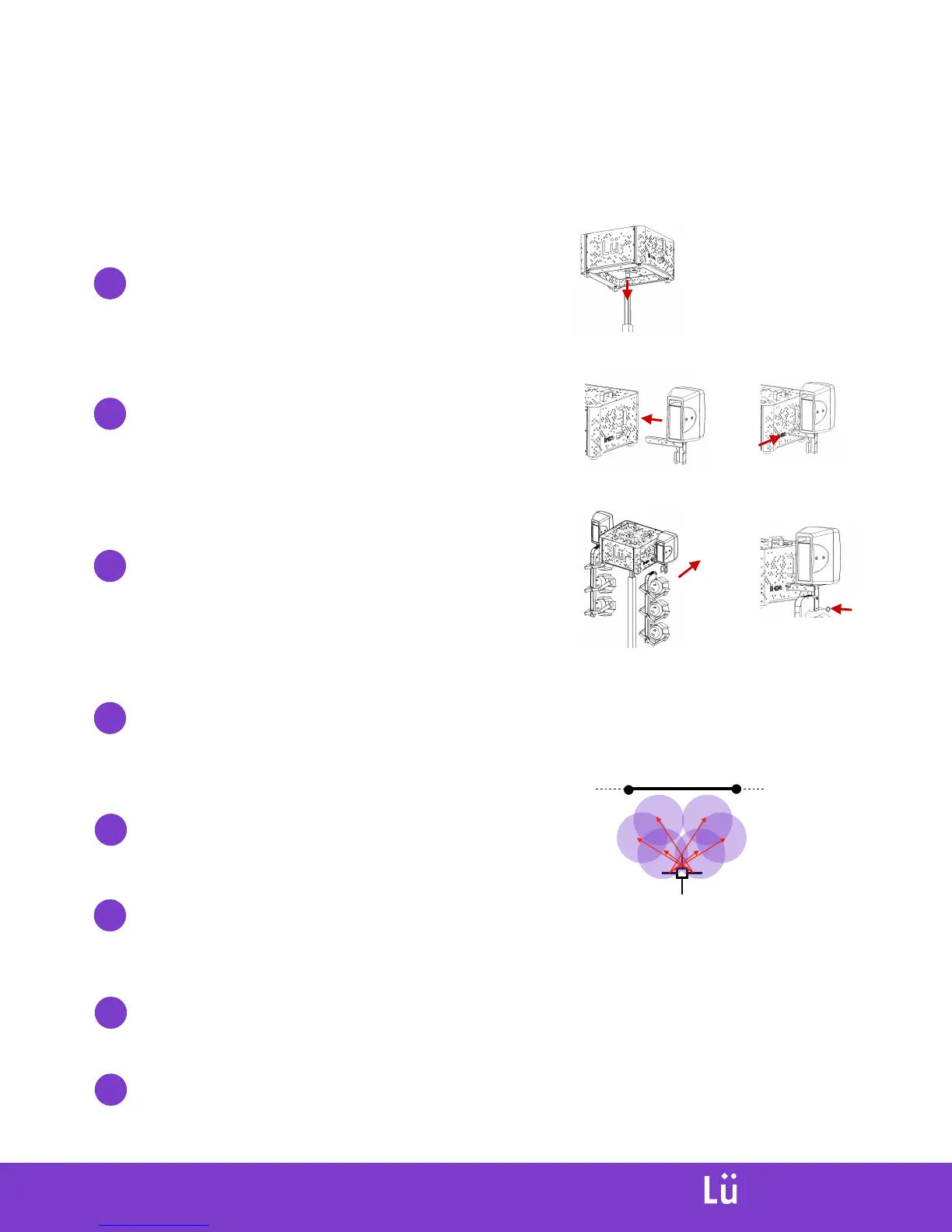
Install main module on stand
The pin beneath main module has to fit
inside the pole from the lifting tower.
***Make sure you screw the lock bolt in place.
Install speaker brackets on main module
Lock brackets in place using locking pins.
A. B.
Install light brackets on speaker brackets
Lock brackets in place using locking pin. Position
light fixture to light the floor between the screen
and the lifting tower.
A.
B.
Connect all cables from speaker and light brackets to main module.
Follow ID codes and colours to connect cables to the right socket.
Turn on the system, and make sure all components are working
Focus light fixtures positions
Focus fixtures so the light is directed evenly on
the floor, and not on the projection screen.
Connect power cable to main unit
Tie the cable to the top of the lifting tower main shaft using the
velcro attach, so when you lift, the cable will stay close to it.
Plug power cable, turn on projector, and wait for the system to boot. Make sure all
components are working properly and adjust sound level if needed on speakers.
Lift tower to final position (bottom of unit at 10’ (3m) from the floor)
INTERACTIVE
PLAYGROUND


 To Next Page